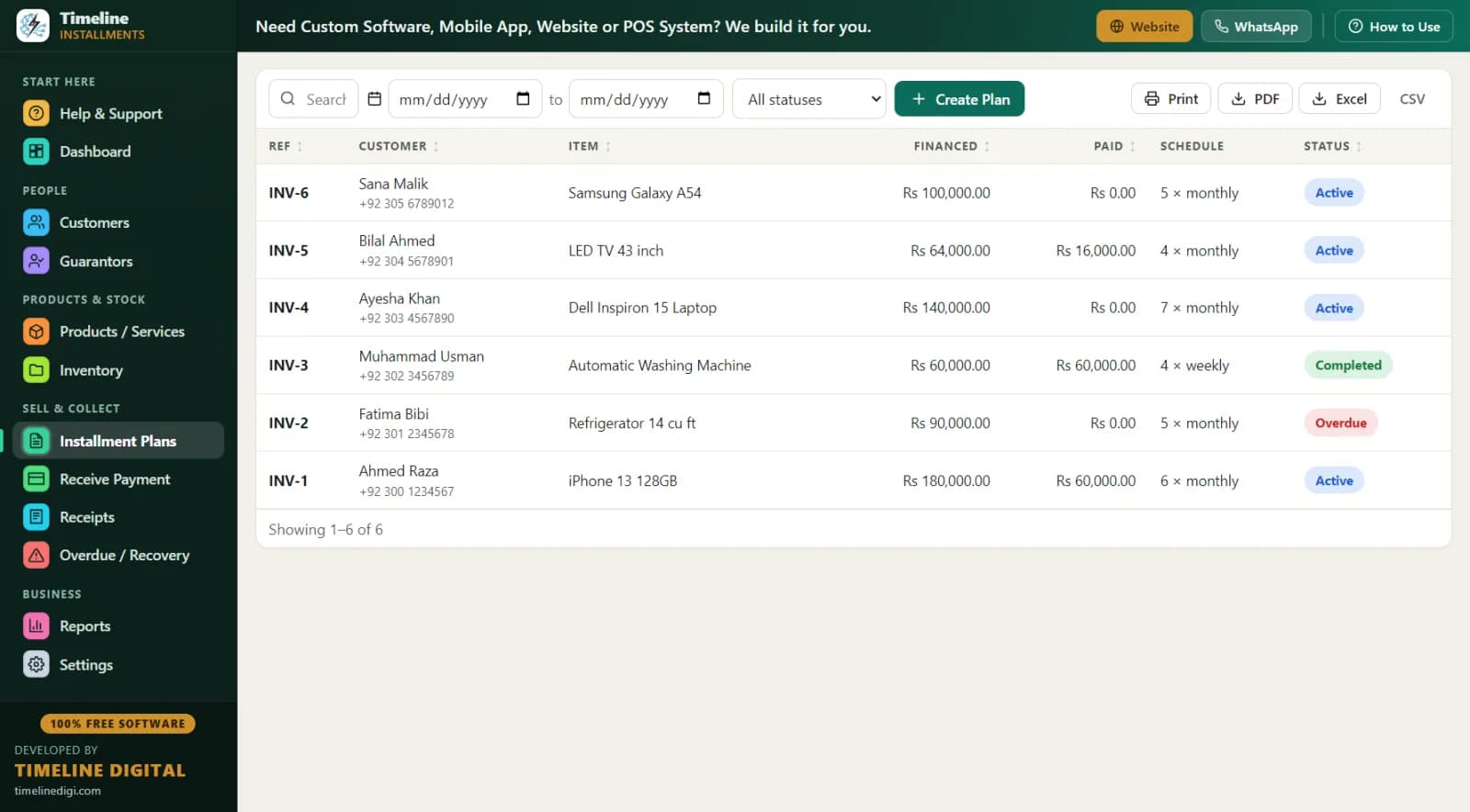
If you sell sofas, washing machines, tellies, phones or tyres on hire purchase or a pay-weekly plan, you already know the hard part isn't the selling — it's keeping track of who paid what, who's behind, and what's still owed. Most UK shops doing in-house HP still run it from a duplicate book, a diary and a spreadsheet. That works until a customer swears blind they paid last Friday and you can't prove otherwise. This page explains how a free, offline hire purchase tracker fixes that, with pound-and-pence examples from a typical high street shop.
Who is this hire purchase software for?
Timeline Free Installment Manager (v1.6.0, by Timeline Digital) is built for independent UK retailers who finance sales themselves rather than sending customers to a third-party lender:
- Furniture shops selling a £1,200 sofa with £200 deposit and 20 weekly payments of £50
- Appliance retailers doing pay-monthly on washers, dryers, fridge-freezers and cookers
- Electronics and mobile shops offering pay-weekly on TVs, laptops and handsets
- Tyre and exhaust fitters splitting a £480 set of tyres over 12 weekly payments of £40
- Catalogue-style and doorstep-collection businesses that collect weekly rounds
It is record-keeping software, not a finance company. You set the terms; it tracks the money.
How does a pay-weekly plan work in the software?
Everything runs from one screen. You pick the customer (or create one inline with the "New Customer" button — customer and plan save together in one go), pick the product with type-to-search, and set the terms. A live schedule preview shows every due date before you save, so the customer can see exactly what they'll pay and when, right at the till.
Take that £1,200 sofa:
| Item | Amount |
|---|---|
| Sofa (total agreed price) | £1,200 |
| Deposit taken at the till | £200 |
| Balance to pay weekly | £1,000 |
| Weekly payment | £50 |
| Number of weekly payments | 20 |
| First payment due | 7 days after sale |
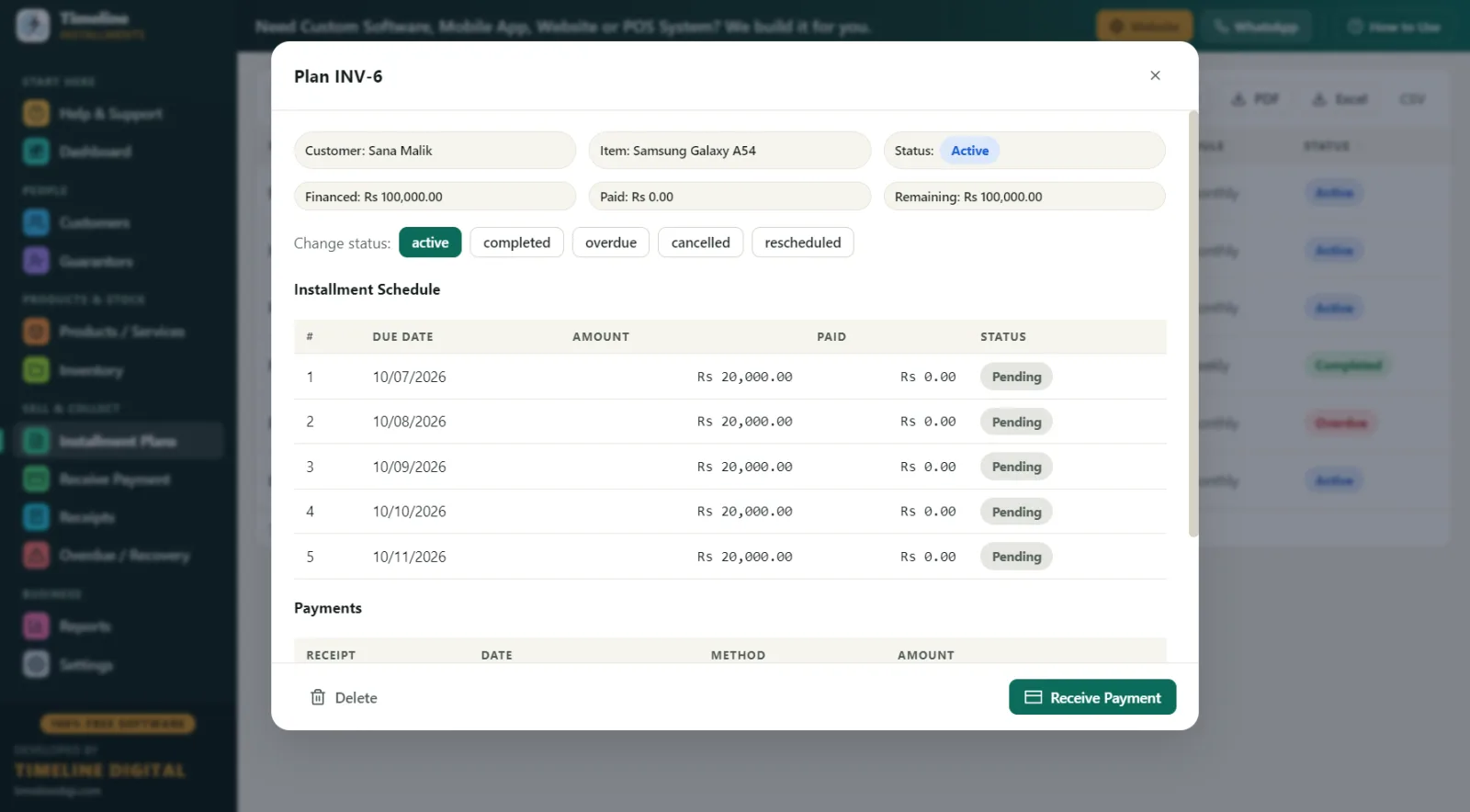
The £200 deposit is automatically recorded as the first payment, with its own printed receipt (RCP-1 style numbering). The plan gets a reference like INV-1, the schedule is generated, and if the sofa is a tracked product, stock drops by one automatically. Frequencies can be daily, weekly or monthly, so a "£25 a week or £100 a month — your choice" offer takes seconds to set up either way.
What happens when the customer comes in to pay?
Open Receive Payment, search the customer, and the next amount due auto-fills. Take the £50, choose the method — cash, bank transfer, card, online or other — and print or PDF a branded receipt on any Windows printer. The receipt shows your logo, shop contact details, the plan reference, the item, the amount in large print, "Installments Paid 7 of 20", the remaining balance, signature lines and an editable terms footer. That one slip of paper ends most "I already paid that" disputes before they start.
Partial payments are handled sensibly: if a customer hands over £30 against a £50 week, the software applies it to the oldest amount owed first and keeps the shortfall visible. If you knock £20 off to settle a plan early, the discount counts toward settlement so the plan closes cleanly.
How do I chase arrears without a spreadsheet?
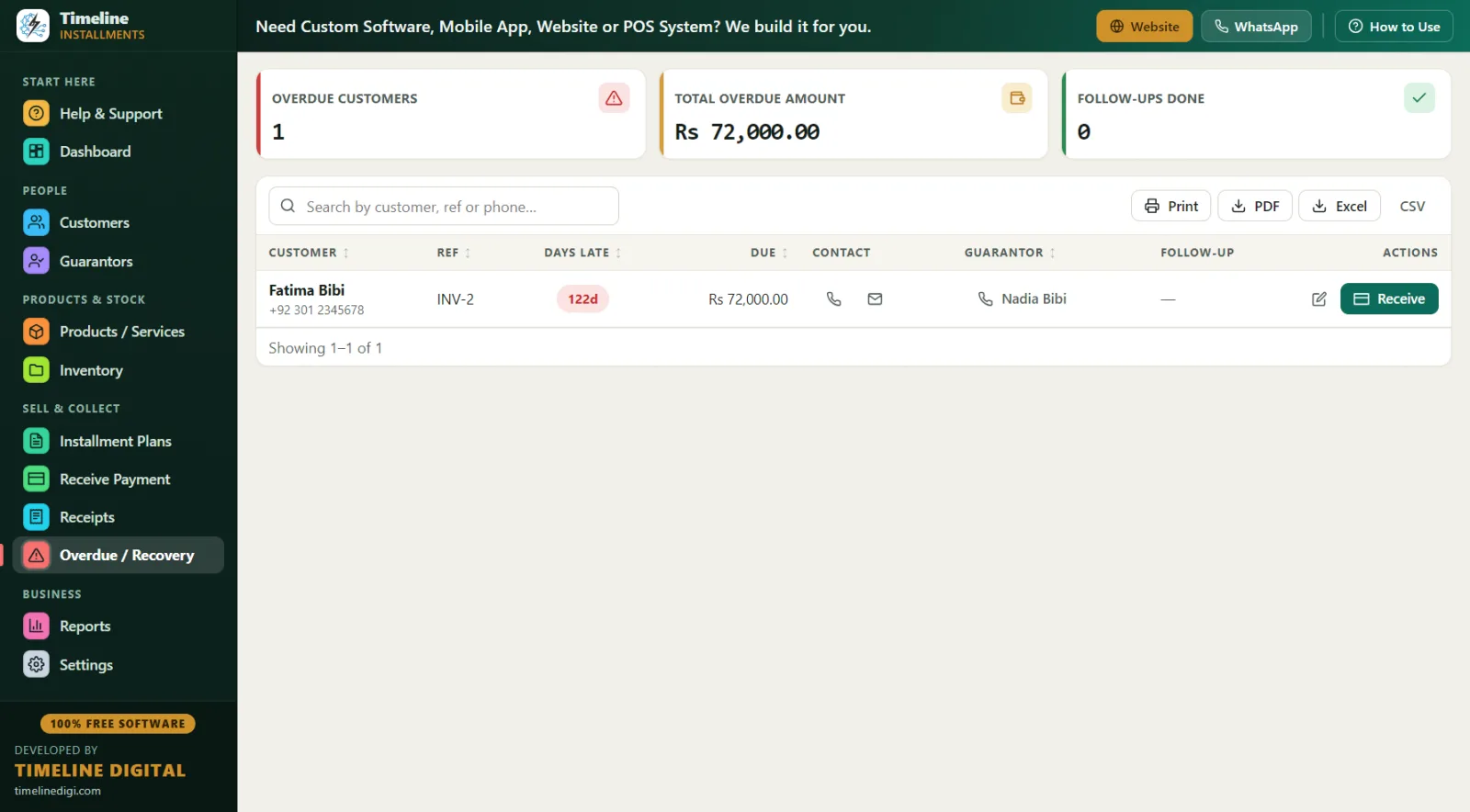
The Overdue screen is your arrears book. Plans move to overdue status automatically the moment a due date passes — no manual flagging. For each customer you see days late, the amount behind, their phone number, the guarantor's contact details, and a space for follow-up notes ("rang Tuesday, promised Friday"). A Receive button on the same row means you can take the payment the second they answer the phone and pay by bank transfer.
You can also add a late fee to any plan — either a fixed amount (say £5 per missed week) or a percentage of the remaining balance. Whether you actually charge it is your call; many shops set it up but waive it for good customers.
A day in the life of a pay-weekly shop
Here's how a typical Saturday runs at an independent appliance shop in, say, Bolton:
9:00 am — Open the dashboard. It shows today's collections due and overall business figures at a glance. Print the Daily Collection list so the counter staff know who's expected in.
10:30 am — A regular buys a £600 washer-dryer: £100 deposit at the till, then £25 a week for 20 weeks. New plan created in about a minute, deposit receipt printed, stock updated.
12:00 pm–4:00 pm — Steady stream of weekly payers. Each payment takes seconds: search name, confirm £50 or £25, print receipt. Card and cash payments recorded under their proper method so the till reconciles at close.
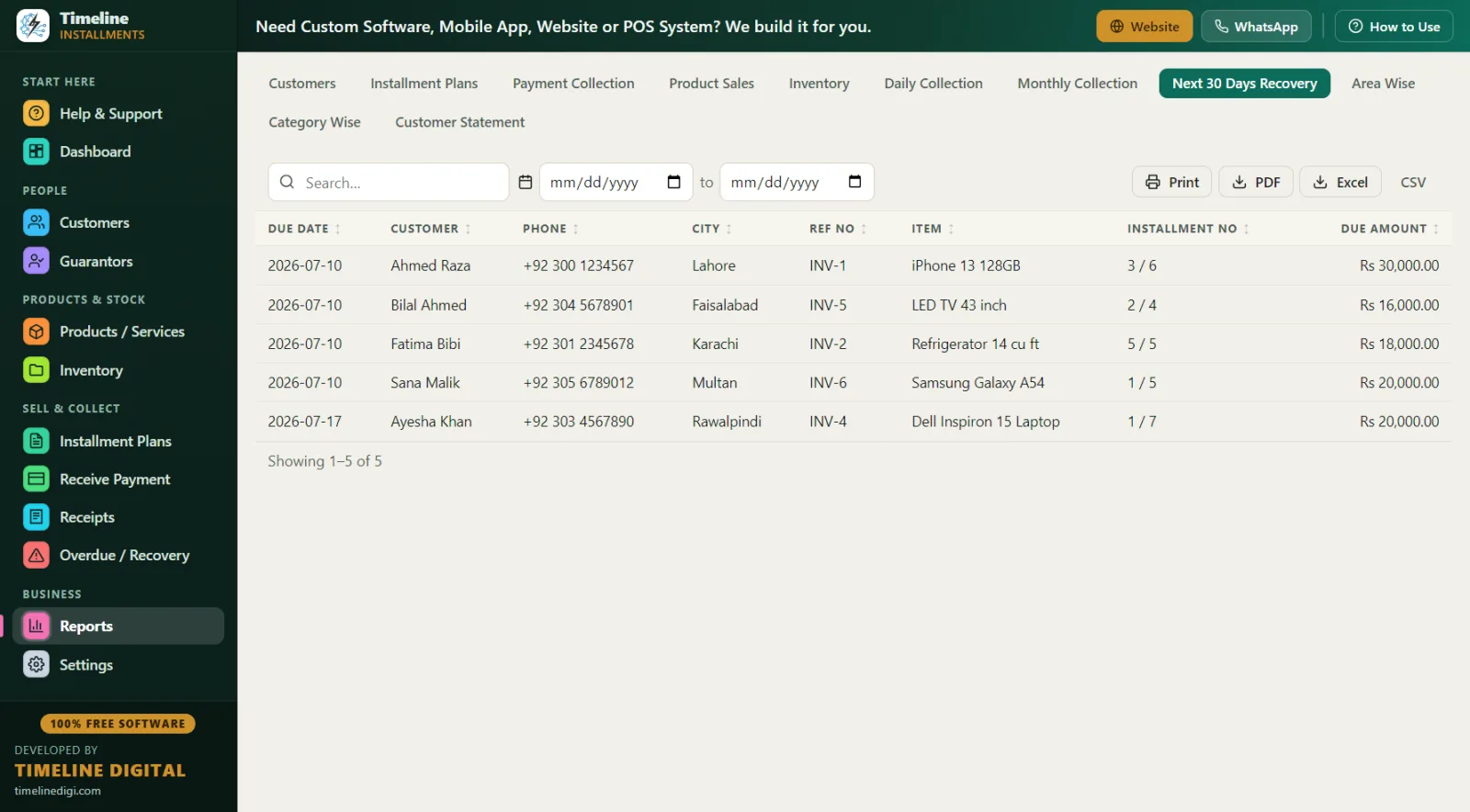
4:30 pm — Run the Next 30 Days Recovery report — due date, customer, phone, city, plan reference, item and amount — and ring the three customers who missed last week. Notes go straight onto the Overdue screen.
5:30 pm — One-click Backup before locking up. The database lives on the shop PC, so the backup goes on a USB stick in the safe.
How does free offline software compare with subscription-based cloud systems?
There are paid, subscription-based cloud systems in the UK that manage in-house credit. They suit some businesses. Here's an honest comparison for a small independent:
| Timeline Free Installment Manager | Typical subscription-based cloud system | |
|---|---|---|
| Cost | £0, free forever | Monthly or annual subscription, often per user |
| Where your data lives | Local database on your shop PC | Provider's cloud servers |
| Works with no internet | Yes, fully offline | Usually needs a connection |
| Account or login required | None | Yes, with user accounts |
| Setup time | Installs in under 1 minute, 2-step setup | Onboarding, training, sometimes contracts |
| Multi-branch / mobile apps | No (single Windows PC) | Often yes |
| Receipts, arrears, reports | Yes — 11 reports, branded receipts | Varies by plan tier |
The plain truth: if you run one shop from one till and want your books off paper, free-and-offline is hard to argue with. If you need several branches synced in real time, mobile apps for collectors, or a POS tied in, that's exactly the custom work Timeline Digital builds as its paid business (timelinedigi.com) — the free product stays free either way.
What about FCA rules and consumer credit?
A word of awareness for UK retailers: hire purchase and running-account credit offered to consumers can fall under FCA consumer-credit regulation, and depending on how your agreements are structured you may need authorisation, proper agreement documents and clear terms. Timeline Free Installment Manager is record-keeping software — it tracks customers, schedules, payments and balances. It is not a compliance suite, it does not generate regulated credit agreements, and nothing here is legal advice. If you're unsure where your pay-weekly offer sits, speak to a solicitor, accountant or compliance professional before you trade. Good records help whatever you decide — the software gives you a full per-customer history and printable Customer Statements showing total, deposit, financed amount, paid, pending and next due.
Best practices for running pay-weekly plans in the UK
- Always take a deposit. Even £50 down on a £500 telly proves commitment. The software records it as payment one, with a receipt.
- Price the credit into the total. Decide the full pay-weekly price up front — the software has no interest engine; you set the total and it splits it. Keep it clear and honest on the receipt.
- Use guarantors for bigger tickets. Link a guarantor (name, relation, phone, ID) to the plan. On anything over about £800, a guarantor changes recovery completely.
- Record ID properly. Use the ID field for a passport, national ID or driving licence number, and always capture name, phone and address.
- Print a receipt every single time. "Installments Paid X of Y" on paper is your best defence against disputes.
- Run the Next 30 Days Recovery report every Monday. Ring people two days before they're due, not two weeks after they've missed.
- Back up weekly. One click, USB stick, safe. The software reminds you.
- Practise on Sample Data first. Turn on Sample Data mode, learn the screens, then start fresh with real customers. The in-app 6-step quick start and per-page How-to-Use drawer cover the rest.
Reports UK retailers actually use
All 11 reports export to Print, PDF, Excel or CSV: Customers, Plans, Payment Collection, Product Sales, Inventory, Daily Collection, Monthly Collection, Next 30 Days Recovery, Area Wise (city → customers, plans, receivable — handy if you collect rounds across towns), Category Wise, and Customer Statement. Your accountant gets clean CSVs at year end instead of a shoebox of carbon copies.