Web Apps
Web Application Development
Web Applications That Actually Work at Scale
Next.js and ASP.NET Core frontend-to-backend, PostgreSQL and Redis for data and caching, Docker and Kubernetes for deployment, all built to a signed-off Figma prototype before the first line of backend code.
What we handle
- Custom Web Applications
- Customer Portals
- Internal Dashboards
- Progressive Web Apps (PWAs)
- B2B/B2C Web Portals
- SaaS Web Platforms
What is web application development?
The difference between a website and a web application is whether people do work in it. A website mostly publishes content. A web application has accounts and roles, business rules, a database it writes to, and usually integrations with payment providers, an ERP or a CRM. That changes the architecture, the security model and how it has to be tested.
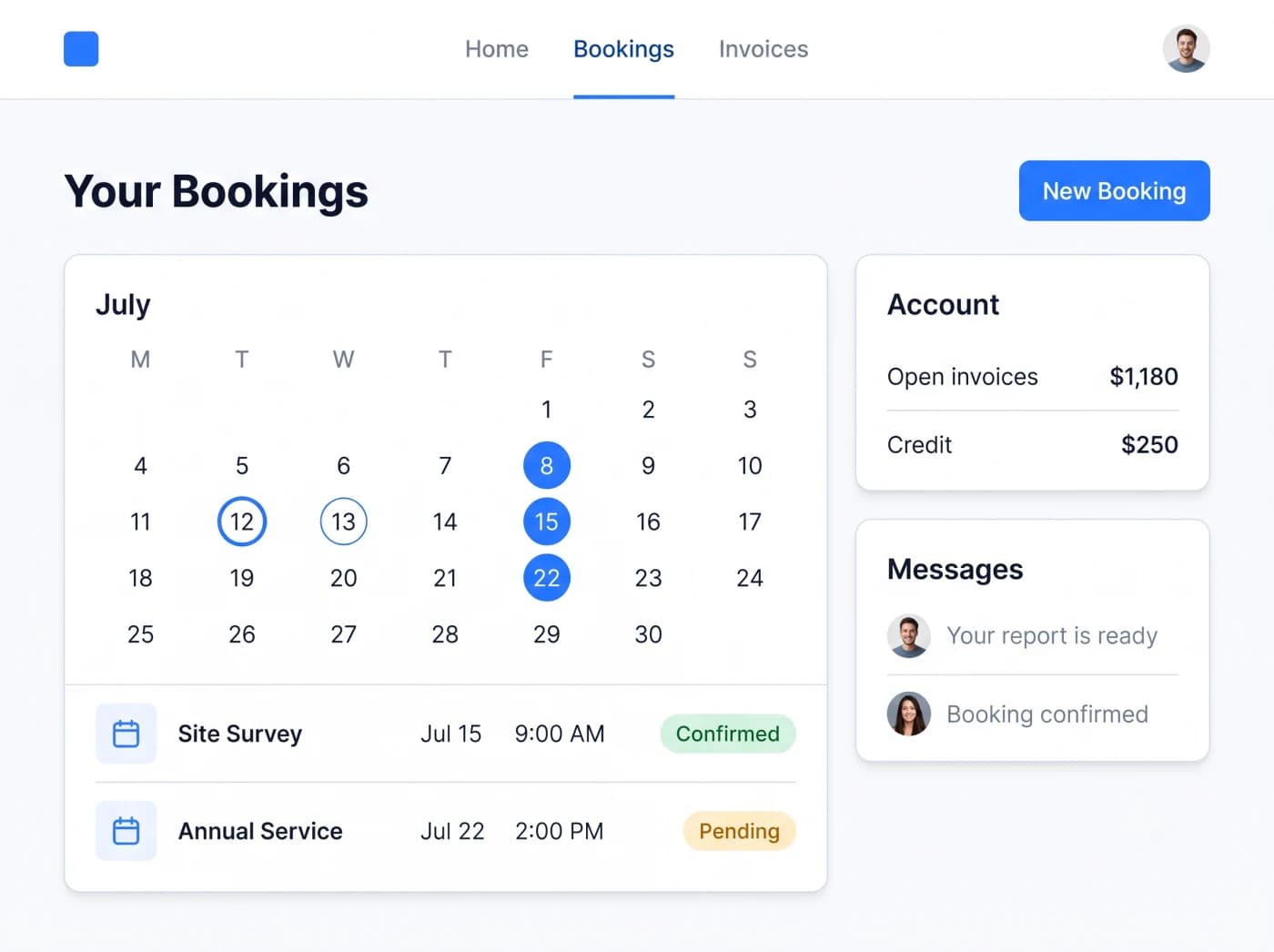
Most of the web applications we are asked for take one of a few shapes: customer portals where clients see their own records and requests, employee portals and internal tools, dashboards over data you already hold, booking systems, transactional e-commerce, and SaaS platforms used by many customer organizations. Each has its own page below.
We usually design the key screens as a clickable prototype in the Plan step, because that is where permission rules, missing data fields and awkward hand-offs show up while they are still cheap to change.
Delivered remotely from our Islamabad headquarters, with scheduled video meetings in your working hours; on-site visits only when agreed in the contract. See the countries we serve.
Web application development: problems it solves
Common problems
- A legacy portal is slow, breaks on phones and is harder to maintain than to rebuild
- Customer onboarding still runs through email, PDFs and shared spreadsheets
- Each new feature ships late because the codebase is undocumented and brittle
- You need a real SaaS product, not a website plugin stretched to behave like one
How we approach them
- A clickable prototype of the key flows, reviewed before backend work starts
- Sign-in, roles and permissions designed with the data model, not added later
- Performance checked against realistic data volumes before launch
- A staged launch with monitoring, so issues are found and fixed early
A good fit when
- Customers, partners or staff need to log in and act on their own records
- The work happens at a desk or on any device, without heavy use of phone hardware
- Several departments or customer organizations use one system with different permissions
Another option may suit you better when
- You mainly need marketing or company pages: see website design and development
- Users work offline in the field or rely on camera, GPS or Bluetooth all day: a mobile app or a mobile companion fits better
- The portal that comes with your ERP or CRM product already covers the flow
What's included in web application development
Linked cards open a dedicated page with its own scope, fit and questions.
Customer Portals
Give clients a secure login for records, requests and updates.
Employee Portals
Internal platforms for HR, workflows, attendance and operations.
Business Dashboards
See your KPIs, reports and analytics in one live view.
SaaS Platforms
Cloud, subscription software built to scale with your users.
Booking Systems
Online booking, scheduling and service management that runs itself.
E-commerce Platforms
Custom online selling and order workflows, built your way.
Not sure which of these you need? Talk to us on WhatsApp.
Usually in scope
- A prototype of the key flows, then the agreed screens, roles and business rules
- Database design, APIs and the admin screens your team needs
- Integrations named in the approved plan, such as payments, email, ERP or CRM
- Testing on the browsers and screen sizes agreed in the plan, deployment and launch support
Not included unless agreed
- Integrations not named in the plan, or with systems that offer no API or export
- Native mobile apps, which are scoped separately
- Content writing and marketing campaigns
- Running costs such as hosting and third-party services, and support beyond the agreed period
Benefits of web application development
Platform Independence
Web apps run in any browser. They work on Windows, Mac, phones, and tablets, with no separate versions to build.
Always Up-to-Date
Everyone always uses the latest version. There are no downloads or updates for your users to manage.
Highly Scalable
Your app grows with your business. It handles busy times smoothly and scales back when things are quiet.
One App for Every Device
One app serves every device. That means less to build, test, and look after over time.
How we deliver web application development
Custom software built around the way your business works. Five steps, with a free pilot of 2 to 3 key modules before the full build.
Step 1: Understand
We learn how your business works.
Your requirements, workflow, challenges and goals, understood before anything is recommended.
Step 2: Plan
We design the right solution around your workflow.
Modules, workflows, roles, approvals, reports and integrations, agreed before development.
Step 3: Select Technology
Choose the right technical foundation.
Technology options matched to your users, security, budget and growth, not one fixed stack.
- Free pilot
Step 4: Pilot
Test our work before full project development.
Free. You choose 2 to 3 key modules and we build them first, so you can judge our work.
The full project starts only after you approve the pilot.
- Full project
Step 5: Build & Scale
From approved pilot to complete digital system.
Full development, testing, deployment, training and support, built to grow with you.
Technologies We Use for Web Apps
Next.js and React for the interface; ASP.NET Core or NestJS for APIs; PostgreSQL or SQL Server for data. The final choice is made in Select Technology from your hosting rules and who will maintain the system.
Client work we can show
Anonymized case studies from delivered client projects. Client names stay confidential; verifiable references are shared privately during procurement.
Public sector and charitable services · Qatar
Qatar Government Digital Platform
Timeline Digital designed and built a bilingual Arabic and English digital platform for a public-sector program in Qatar, replacing manual, paper-based handling of beneficiary and donor services with one secure online system.
Read the case studyReferences
More client work is under NDA
Much of our enterprise and government work is covered by confidentiality agreements. Ask for references on your first call.
Discuss Your ProjectTimelines and what we need from you
We do not quote a timeline before we understand the work. After the Understand and Plan steps you get a written plan with phases and target dates for the scope you approve. The free pilot of 2 to 3 key modules comes first, and the delivery plan for the full build is confirmed after you approve the pilot. Any requirement outside the approved scope is reviewed and agreed before extra work begins.
What you provide
- Examples of the records, forms and reports users work with today
- Decisions on roles, permissions and approval rules
- Access to the systems the application must connect to, or their documentation
- Test users from each role to review the prototype, the pilot and each release
Want a plan built around your project? Share your requirements through our contact form.
Guides for this decision
In-depth, practical reading for teams planning this kind of project.
- Guide · 9 min readCustomer Portal Development: Features, Security and Integration ChecklistA customer portal lets customers serve themselves using data from your ERP, CRM or case system. This checklist covers features by portal type, identity and access, security, integration, accessibility and rollout.Read the guide
- Guide · 9 min readBusiness Dashboards People Actually Use: KPI Definitions, Data Sources and RefreshA dashboard gets used when every tile supports a decision, every KPI has a written definition and the data refreshes as fast as the decision needs. This guide gives a KPI template, refresh trade-offs and a worked distributor example.Read the guide
- Guide · 11 min readTurning Internal Software into a SaaS Product: What Has to ChangeInternal software becomes a SaaS product when it can safely serve many organisations it does not know. This guide covers what has to change, from tenant isolation and billing to support, security reviews and a phased plan.Read the guide
Web application development FAQ
People also ask about web application development. Here are direct answers.
A website primarily serves content to anonymous visitors: pages, blog posts, product descriptions. A web application processes authenticated user actions. It reads and writes to a database, enforces business rules, manages user sessions, and integrates with external services. Examples include a customer portal where clients track their orders and raise support tickets, a dashboard where your operations team monitors KPIs in real time, or an internal workflow tool that routes approval requests between departments. The architecture, security model, and infrastructure required for a web application are substantially different from a marketing site.
Frontend: Next.js and React. Next.js is chosen for applications where server-side rendering matters, since it measurably reduces time-to-interactive on data-heavy dashboards and improves crawlability for public-facing portals. Backend: ASP.NET Core for high-throughput transactional systems requiring strict type safety and .NET ecosystem integrations; NestJS/Node.js for event-driven architectures and real-time features. Databases: PostgreSQL for relational, transactional data; SQL Server where clients have existing Microsoft infrastructure; MongoDB for document-oriented data structures. Redis handles caching and session state to keep API responses fast under load. Deployment uses Docker containers orchestrated by Kubernetes, ensuring that what runs in staging is identical to what runs in production.
Yes, and the definition of responsive matters. Every application we build is developed mobile-first, meaning the layout, touch target sizes, and interaction patterns are designed for small screens before they are adapted for desktop. QA includes testing across real device viewports, not just browser emulation, for iOS Safari, Android Chrome, and tablet breakpoints. For applications where mobile usage is primary, we also evaluate whether a Progressive Web App build makes more sense than a standard responsive web approach, since PWAs can support offline functionality and home-screen installation without a native app build.
Yes, and legacy migration is a defined service with its own methodology. The first step is a Legacy Audit: we document the existing application's data model, business rules, and integration points before writing any replacement code. This audit often surfaces undocumented logic baked into the old system that would otherwise be lost. Migration typically runs in parallel. The old system stays operational while the new web application is built and validated. Data migration scripts are tested against production-scale data volumes before cutover. Clients in this process receive a Migration Runbook covering rollback procedures, validation checks, and go-live sequencing.
Security is addressed at the architecture level, not as a post-launch checklist. Authentication uses industry-standard flows: OAuth 2.0 and OpenID Connect for third-party identity providers, JWT with short expiry windows and refresh token rotation for session management. All database queries use parameterized statements to prevent SQL injection. API endpoints enforce rate limiting and input validation at the schema level. File uploads are scanned and stored outside the web root. Before go-live, every application goes through an OWASP Top 10 review, and findings are documented and resolved before production access is granted. HTTPS is enforced with HSTS headers; security headers including CSP, X-Frame-Options, and X-Content-Type-Options are configured on every deployment.
We design for your regulatory requirements from the architecture stage rather than retrofitting them. Where GDPR applies, that can mean EU-region hosting, consent management in the user flow and a process for data subject requests. Where HIPAA applies, it can mean encrypting health data at rest and in transit, logging access, and choosing cloud services that sign a business associate agreement. Role-based access control and audit logging are standard in builds that handle regulated data. We design to support your obligations; compliance remains your organization's responsibility and is confirmed by your own assessment.
Yes. We can take over a web application another team built, including codebases in React, Next.js, Vue, Laravel or .NET. We start with a code audit covering security issues, test coverage, database design and outdated dependencies, and you receive a written assessment before any remediation begins. We then fix critical issues first to reach a stable baseline before moving on to new features.
Other Services You May Need
Custom Software Development
Off-the-shelf software forces your team to adapt to it. We reverse that by building business...
Read this nextWebsite Design and Development
We design modern websites that look great and win customers. Every site is fast, works on phones...
Read this nextMobile App Development
Timeline Digital designs and builds iOS and Android apps using Flutter for cross-platform...
Read this nextWant to talk about your web application development project?
Leave your name and number. No long form. We'll reply on WhatsApp within 4 business hours to understand what you need.
No spam. We only use your number to reply about your project.
Made in Islamabad, Pakistan
Web Application Development for Pakistani Businesses
Timeline Digital builds web applications for companies across Pakistan, from customer portals to internal dashboards and order systems. We build fast, secure web apps with React and Next.js, host them with reliable backups, and build the key modules first as a pilot, with support in Urdu and English from Islamabad.
Chat on WhatsApp in Urdu or EnglishReal business logic, not just a website
We build web apps with user logins, roles, workflows, and reports that run your operations, not simple brochure sites.
Fast and reliable hosting
Hosted on cloud or VPS with automated backups, so a power cut at your office never wipes out your data.
A pilot, then code ownership
We build two or three key modules first as a pilot for you to test, and the source code is yours on full payment.
Local support
Our Islamabad headquarters team supports your web app in Urdu and English on WhatsApp.
Common questions from Pakistan
What is the difference between a website and a web application?
A website mostly shows information. A web application does work: it has user logins, roles, forms, workflows, and reports. For example, an order portal, a dashboard, or a booking system is a web application. Timeline Digital builds web applications that run real business operations for Pakistani companies.
Do you provide hosting and support in Pakistan?
Yes.
Do we own the web application after it is built?
Yes. The source code becomes yours on full payment, so the web app is your asset. You can host it where you like, change it, and extend it with any team.
See working software before you commit
Before you commit to the full project, we build 2 to 3 of your key modules as working software, free of charge. Your team tests the pilot, and the full build starts only after you approve it.
See how the free pilot worksUnderstand
We learn your requirements and how your organisation works today.
Select pilot modules
Together we choose 2 to 3 key modules that prove the solution.
Build the working pilot
We build those modules as real, working software, free of charge.
You test it
Your team uses the pilot. The full project starts only after you approve it.
Start a conversation
Tell us how your business works.
Describe what is slowing your team down. We will help you work out what to build, and how a free pilot lets you judge our work before the full project.
Prefer WhatsApp? Start a chatWhat happens next
You send a short brief
The problem, the people involved and any target date. A senior engineer replies within 4 business hours.
We understand your workflow
A first call about how your business works today. An NDA can be signed before you share details.
You test a free pilot
You choose 2 to 3 key modules and we build them first, so you judge real software before the full project.