100% free · Lifetime license · No subscription

Free School Management System for Every School

Timeline School Manager is an offline school management system built by Timeline Digital. It runs students, staff, attendance, fees, exams, payroll, certificates, and finances from one Windows program, at zero cost, for good.

No internet needed. No monthly bill. No per-student charge. Install it on a Windows PC and start running the school the same day.

Free forever
Works offline
No student limit
Windows desktop
SQLite storage
Print-ready reports
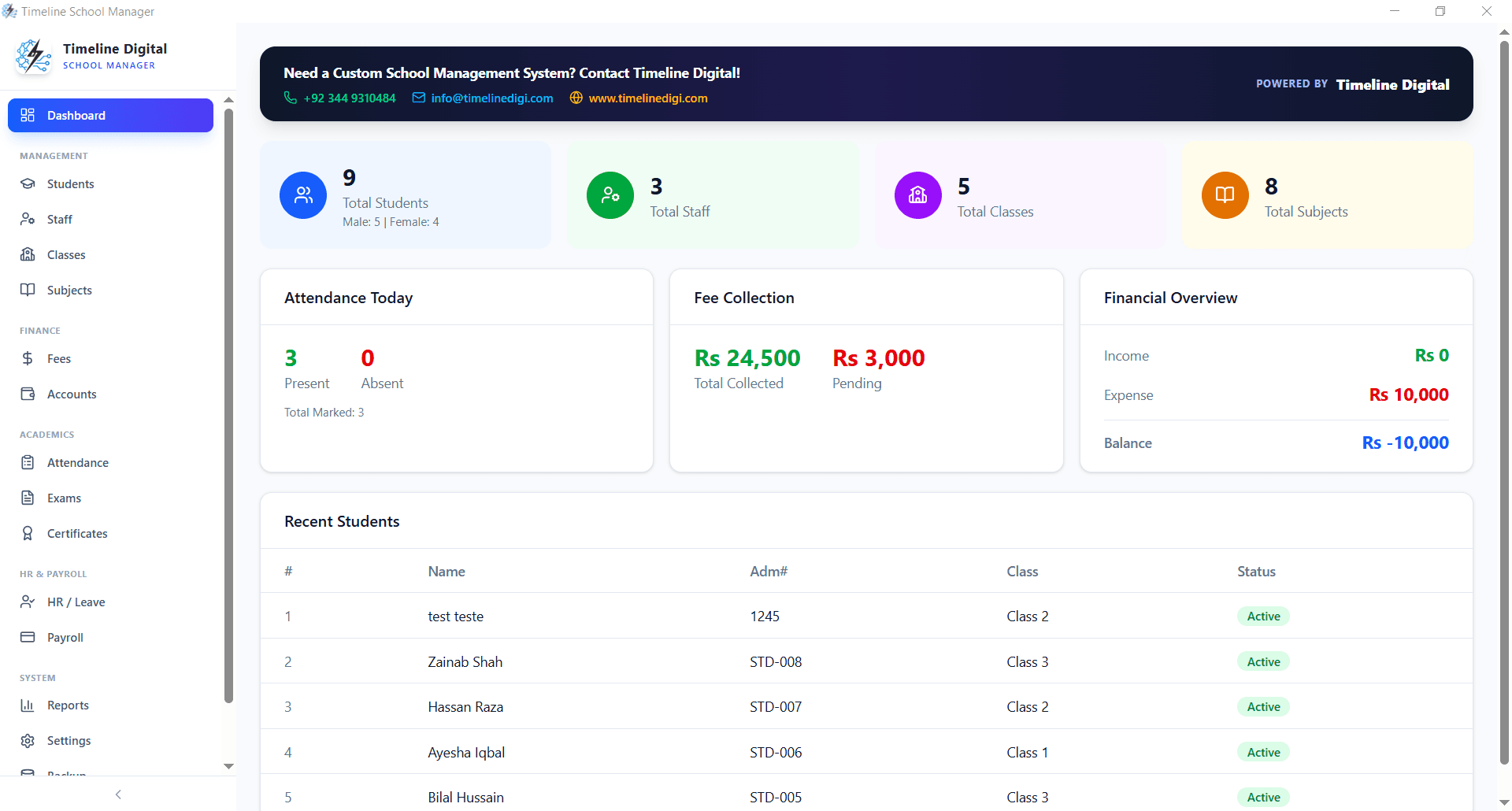
Timeline School Manager dashboard | free school management system
v2.5.0 · Free offline edition

What is a school management system?

A school management system is an application that digitizes and centralizes the daily administrative operations of a school. Instead of maintaining paper registers, separate spreadsheets, and manual fee books, a school management system puts everything in one place: student records, staff information, attendance logs, fee collection, exam results, payroll, and financial accounts.

The same category of software goes by several names: school administration software, student management software, school ERP, or, in the US, a student information system. Whatever the label, the job is identical: student records, staff information, attendance logs, fee collection, exam results, payroll, and financial accounts in one place.

For principals, administrators, and accountants, that means less paperwork, fewer errors, faster reporting, and more time on education instead of admin.

Direct answer

One-sentence definition

A school management system is an application that helps schools manage students, staff, attendance, fees, exams, and reports from one centralized platform.

Why schools switch from paper to digital systems

Manual processes take hours to complete, create data errors, and make it impossible to get a quick overview of school operations. The right school management system solves all of that instantly.

Timeline School Manager, built for real schools

Timeline School Manager is an offline-first school management desktop application developed by Timeline Digital. Currently at version 2.5.0, it is built specifically for small to medium-sized schools that need a reliable, professional system without depending on the internet or paying monthly subscriptions.

Whether you run a primary school, secondary school, private academy, coaching center, or madrasa, this free school management system covers every department of your institution in a single application.

  • One-time install, use it for lifetime. Absolutely free
  • All data stays on your own computer, completely private
  • No per-student, per-teacher, or per-module charges ever
  • Works on any Windows 10 / Windows 11 PC
  • No IT team or server setup required
  • Developed and supported by Timeline Digital
Student management module in Timeline School Manager

What features does a complete school management system include?

A complete school management system includes student and staff management, fee and accounts tracking, attendance, exam and results management, payroll, certificates, timetable and section support, and print-ready reports. Anything less pushes part of the school's daily workflow back into spreadsheets and paper registers.

Timeline School Manager includes every module your school needs, all in the free version. No paid upgrades. No premium tiers.

Student and Staff Management
Fees and Accounts Tracking
Attendance System
Exam and Results Management
Staff Attendance and Payroll
Certificates and Reports
Multi-Class and Section Support
Offline / Local SQLite Storage
Print-Ready Reports and Receipts
Secure Password Protection

Inside the free school management system

Each module is built for real school workflows. Here is what each section of the system does.

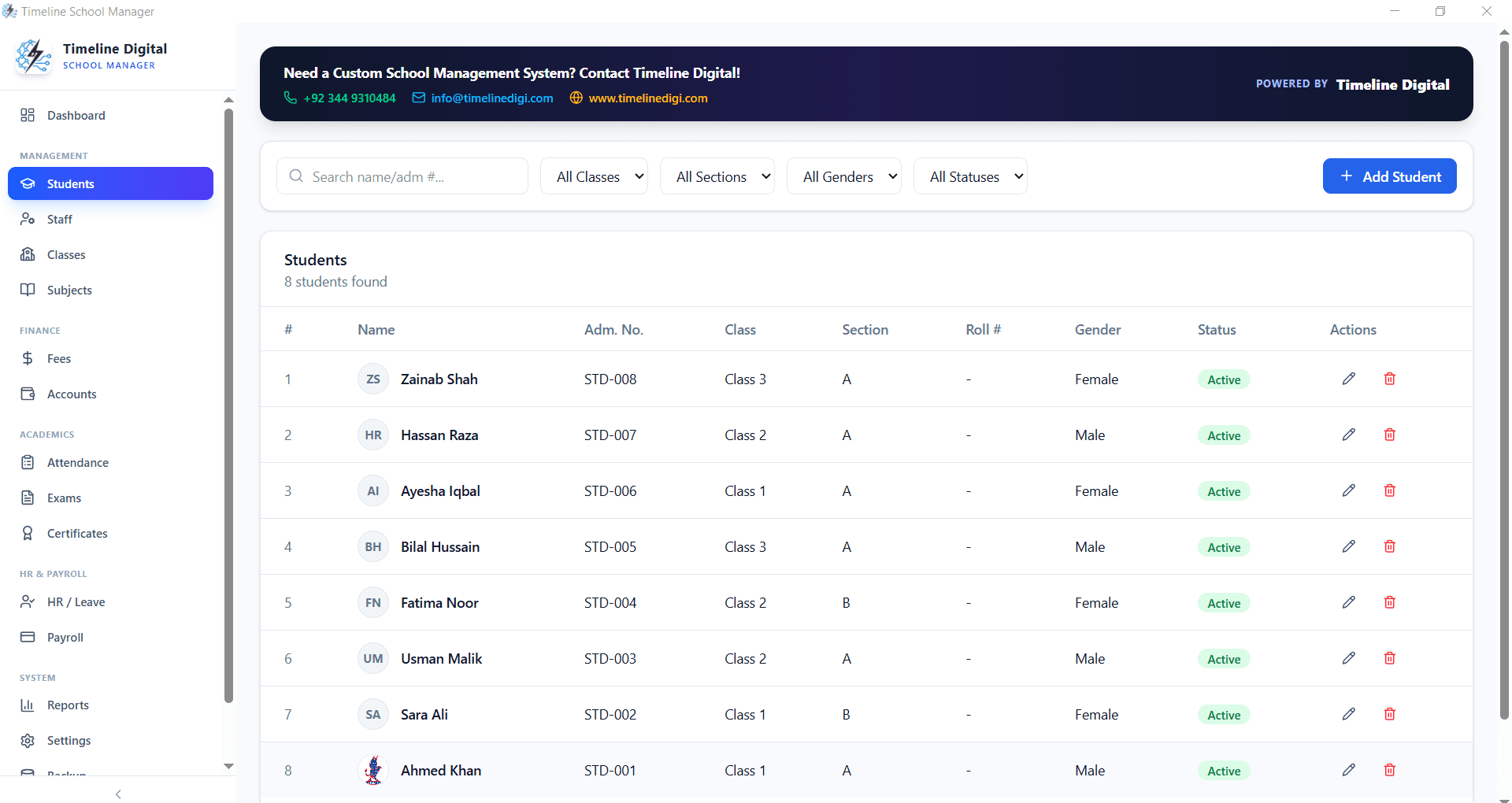
Student Management

Maintain complete student profiles including admission details, parent contact information, class assignment, fee status, and academic history in a single organized database.

Student management module | Timeline School Manager

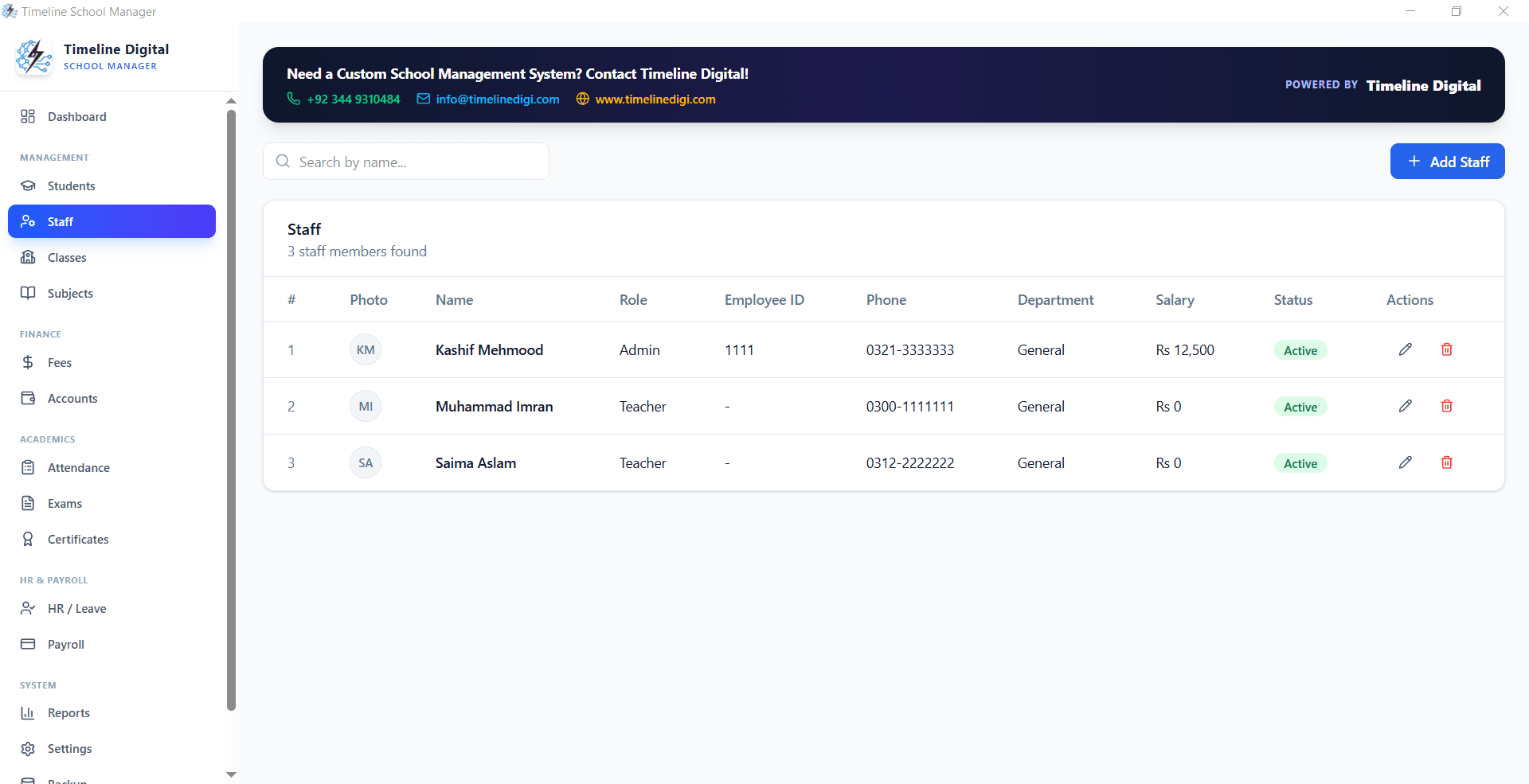
Staff Management

Manage every teaching and non-teaching staff record: designations, salary details, joining dates, qualifications, and contact information, with quick search and filters.

Staff management module | Timeline School Manager

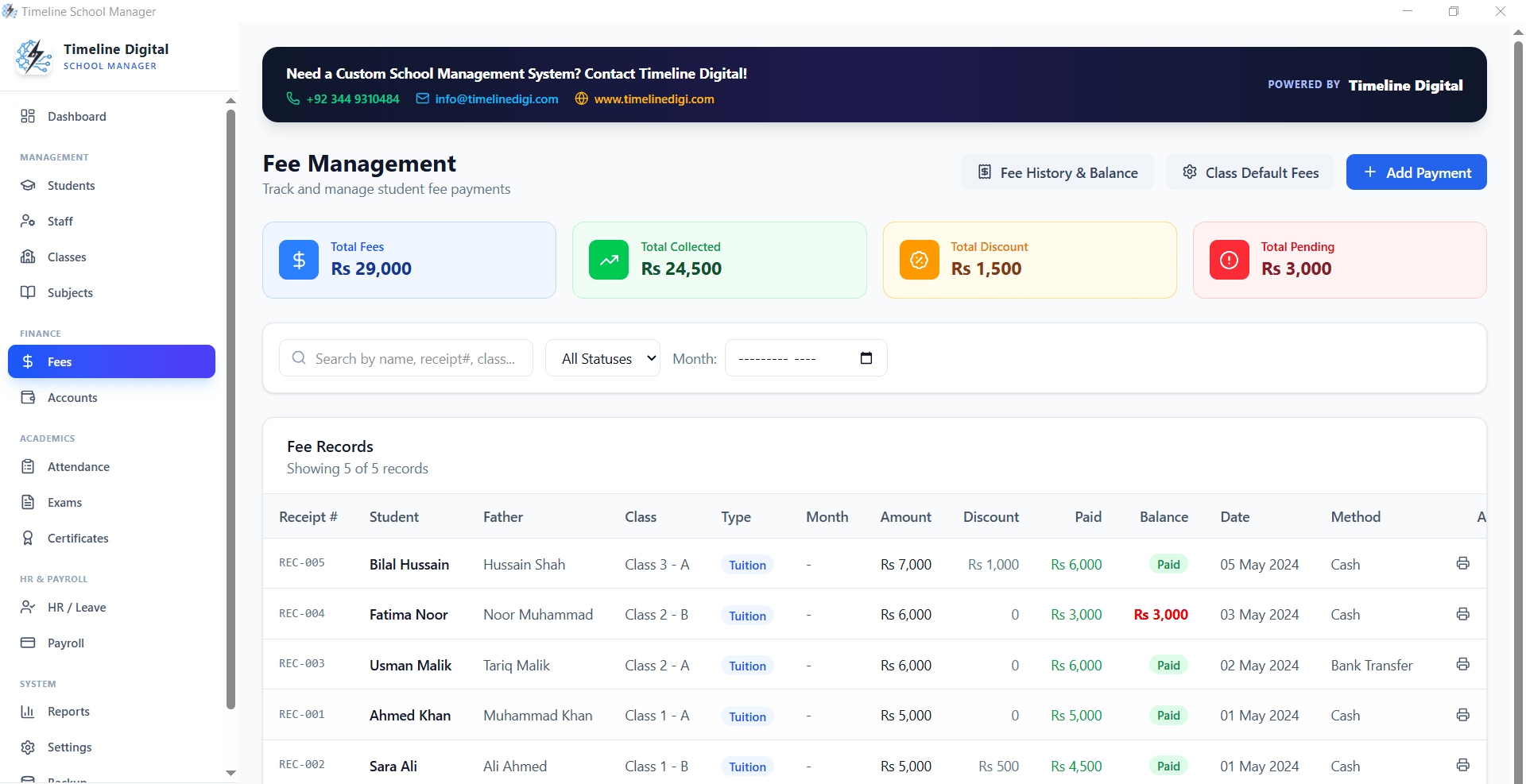
Fees and Accounts Tracking

Collect and record student fee payments, generate fee receipts, track dues, apply discounts, and monitor monthly fee collection, backed by a full accounts ledger.

Fee management and accounts module | Timeline School Manager

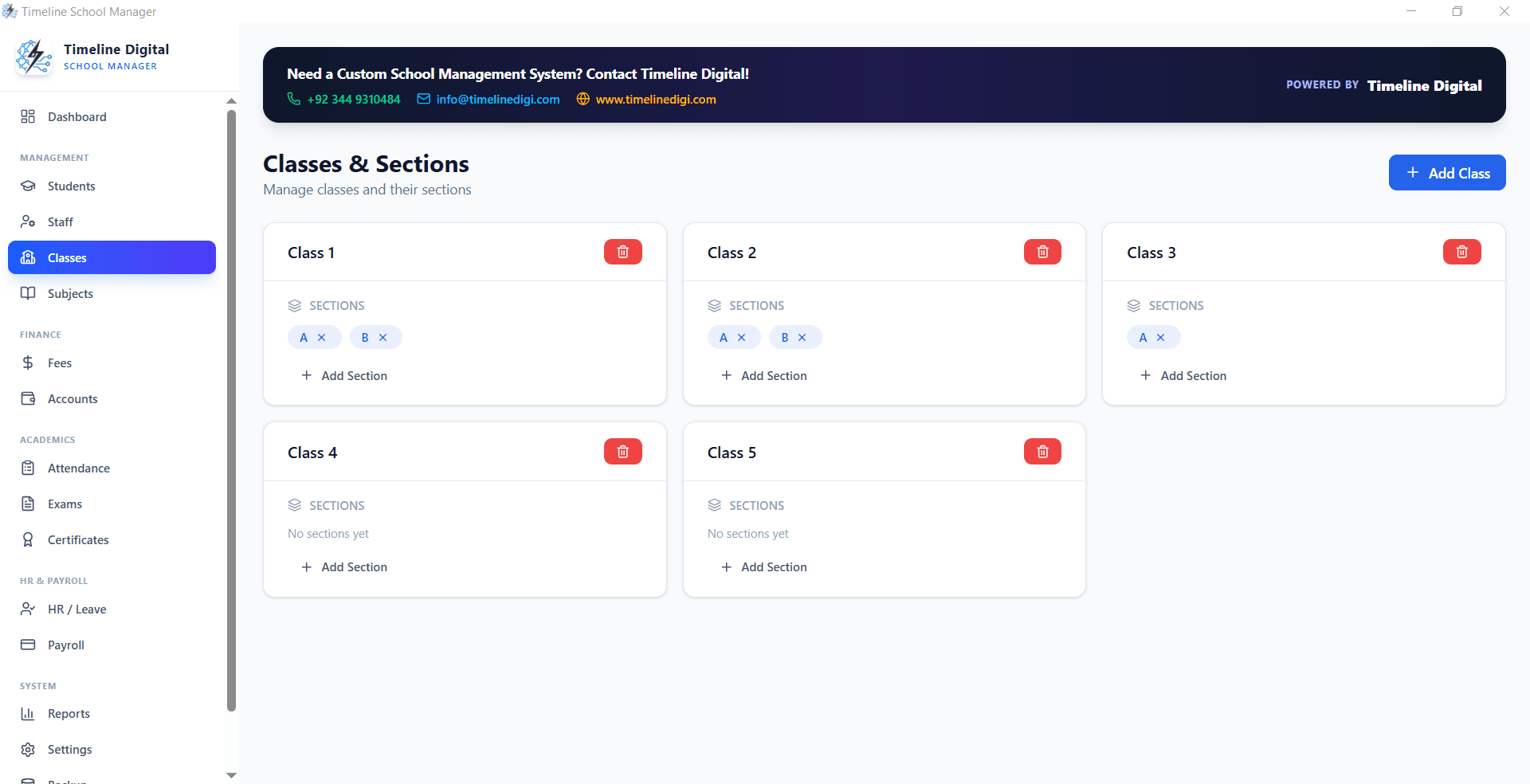
Class and Section Management

Define unlimited classes and sections, assign subject teachers, manage timetables, and keep class-wise enrollment counts for accurate planning and reporting.

Class and section management | Timeline School Manager

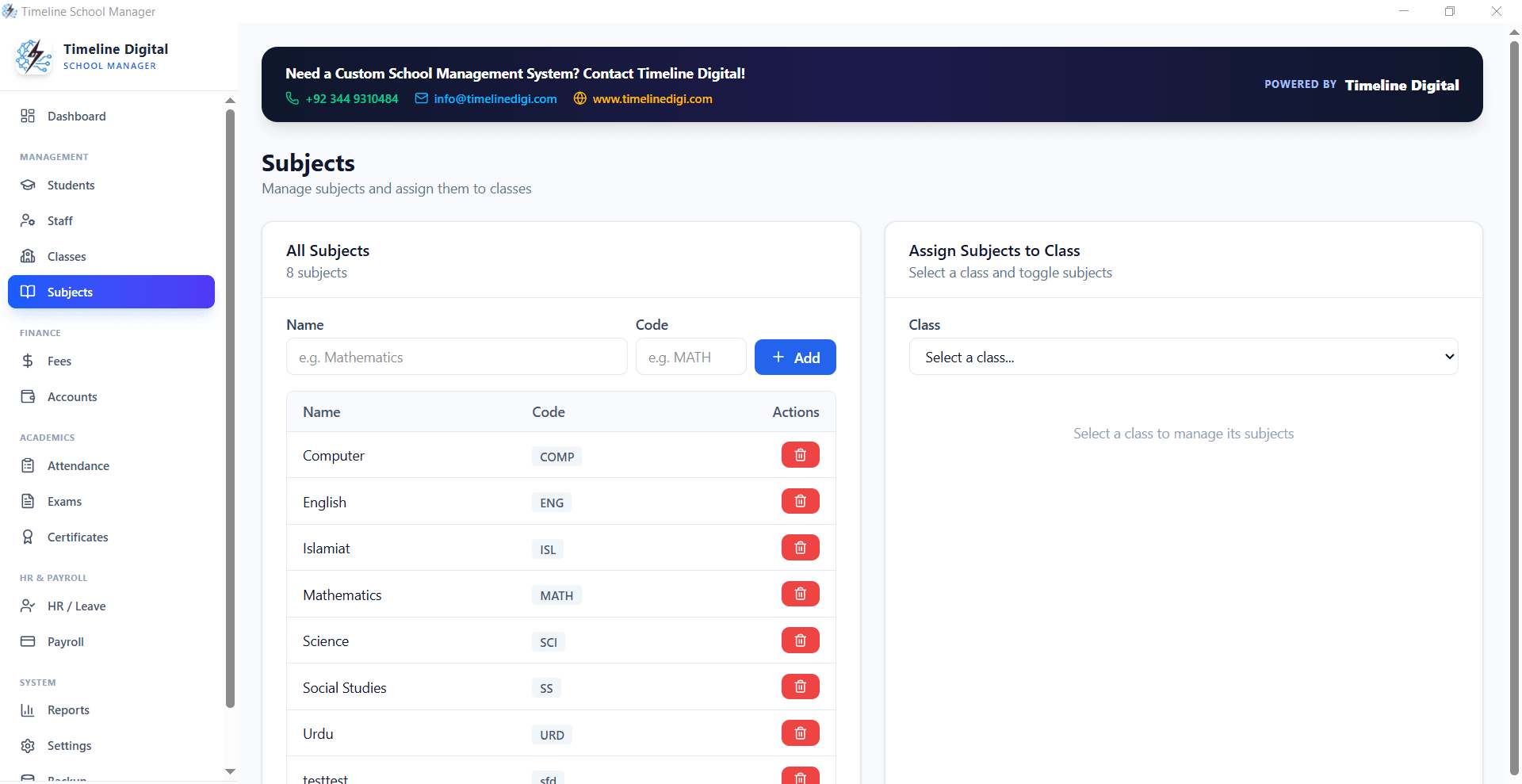
Subject Management

Create and manage subjects per class, assign subject teachers, set exam schemes, and configure grading rules. Supports both elective and compulsory subjects.

Subject management module | Timeline School Manager

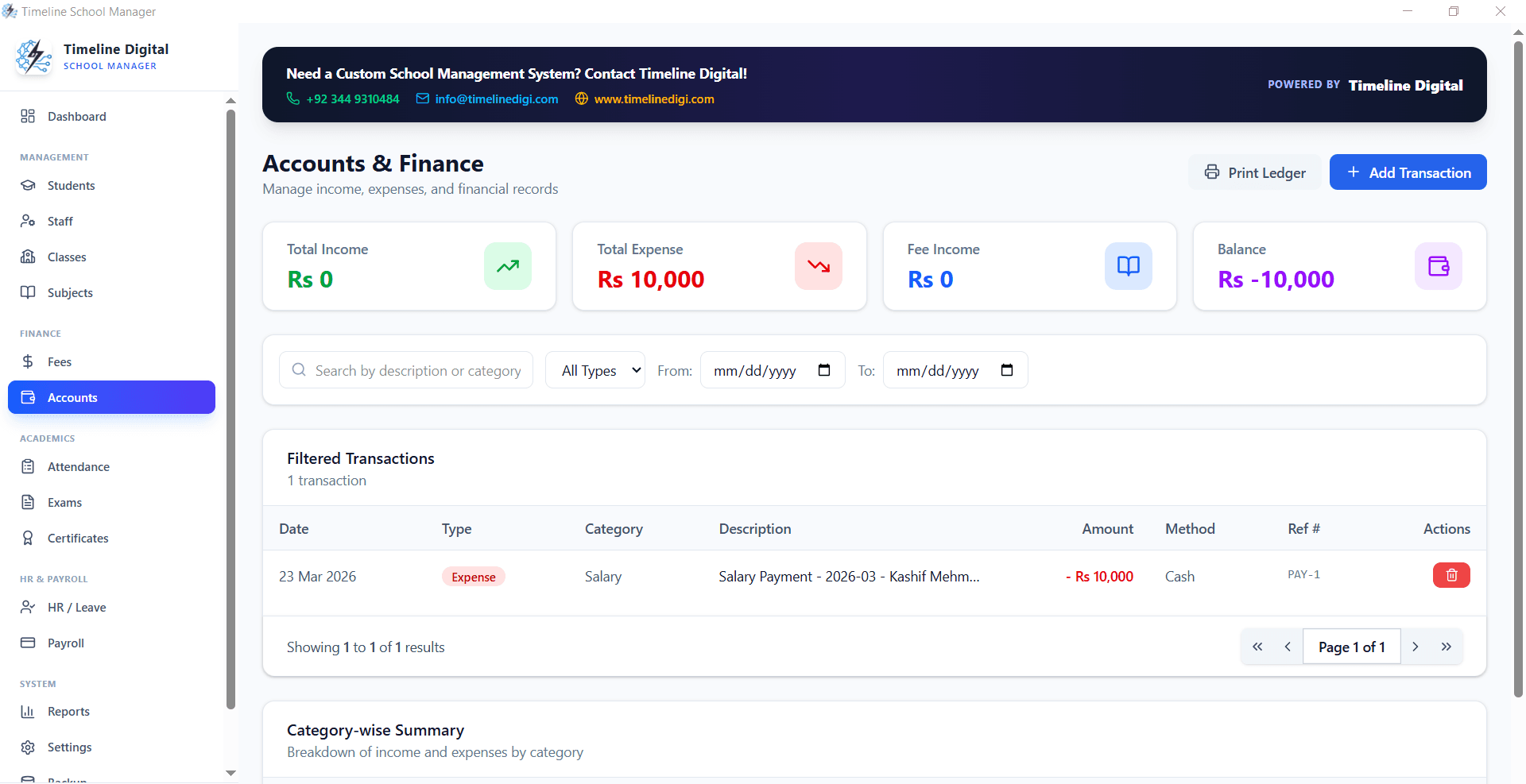
Financial Accounts

Track school income, expenses, vendor payments, and overall financial health with an accounts module that gives principals a real-time budget picture.

Financial accounts module | Timeline School Manager

Attendance, exams, and payroll. All in one school system

Beyond student records and fees, Timeline School Manager covers the operational backbone every school depends on.

Attendance system

Take daily student attendance class by class and mark individual students as present, absent, or on leave. The system computes monthly attendance summaries and flags low-attendance students. Teacher attendance is tracked separately with its own daily log.

Exam and results management

Configure term exams and annual exams per class, enter marks per subject, and let the system calculate totals, percentages, grades, and positions automatically. Print individual result cards and class-level result sheets with a single click. No spreadsheets needed.

Staff payroll

Calculate monthly salaries for all staff members based on configured pay scales, allowances, and deductions. Generate payroll slips for each employee and keep a full salary payment history. Staff attendance data feeds directly into payroll, so late marks and absences get deducted automatically.

Certificates and testimonials

Print school-branded leaving certificates, character certificates, bonafide certificates, and testimonials directly from student records. Certificate fields auto-populate from the student profile, cutting data entry time to seconds.

Print-ready reports

Every report in Timeline School Manager, from fee defaulter lists to monthly attendance sheets to exam result summaries, is formatted for direct printing. No extra formatting in Word or Excel. Click print and you are done.

Security and access control

Protect your school data with admin-level password protection. Only authorized staff can access the system. Because all data is stored locally and never sent to any cloud server, your student and financial records stay fully private at all times.

School accounts and financial management | Timeline School Manager

Can a school management system work without the internet?

Yes. An offline school management system like Timeline School Manager stores all data locally in an SQLite database on your Windows PC, so attendance, fee collection, and exam entry keep working with no internet connection at all. That is exactly why an offline school management system matters for schools with unreliable connectivity.

Most schools, especially in rural and low-connectivity areas worldwide, face unreliable internet connections. Cloud-based school management systems become unusable the moment the connection drops, interrupting fee collection, exam entry, or attendance marking.

Timeline School Manager removes that risk entirely. Because it runs fully offline on a local Windows PC with SQLite database storage, your school operations are never interrupted by power cuts, slow internet, or provider outages.

  • Works in areas with no or slow internet
  • No dependency on external servers or cloud providers
  • Data never leaves your school premises
  • Daily operations continue even during internet outages
  • No monthly cost even if your internet plan expires
  • Faster performance than web-based school systems

Which schools should use this free school management system?

Timeline School Manager is built to work for any educational institution that needs a simple, capable, cost-free school management system.

Primary and Secondary Schools

Manage classes from Grade 1 to Grade 12 with full fee tracking, attendance, and result cards for every student.

Private Academies

Run a complete academy operation: enroll students, collect fees, manage teachers, and print certificates without paying monthly SaaS bills.

Madrasas and Religious Institutes

Works equally well for religious schools, with custom class names, subject structures, and Arabic-friendly reporting.

Coaching Centers

Track batch enrollments, collect fees per subject or batch, manage tutors, and run exams for coaching center students.

Low-Resource Environments

Because it runs fully offline on a single Windows PC, it works well for schools in rural areas with limited internet connectivity.

Schools Migrating from Paper

Enter your existing student and staff data once, then run every daily operation digitally from day one, with no IT team required.

Free lifetime license · No credit card required

Timeline School Manager is 100% free

Most school management systems charge per student, per teacher, or per month. Timeline Digital works differently: every school deserves professional digital tools regardless of budget. That is why Timeline School Manager Free Offline Edition is offered at zero cost, for individual schools of any size, forever.

License cost
$0 / £0
Free forever
Monthly fee
$0 / £0
No subscription
Per-student cost
$0 / £0
Unlimited students

Download starts instantly. If you need installation help, message us on WhatsApp and we will guide you.

Timeline School Manager vs. paid school management systems

See how our free offline system compares to typical cloud-based paid school system options.

FeatureTypical paid systemTimeline School Manager (free)
CostMonthly/yearly subscription100% free, for lifetime
Internet requiredYes, cloud-basedNo, fully offline
Data privacyStored on vendor serversStored on your own PC only
Student recordsIncludedIncluded
Fee managementIncluded (paid tier)Included, free
Attendance trackingIncludedIncluded
Exam and resultsSometimes an add-onIncluded, free
PayrollOften paid add-onIncluded, free
CertificatesOften missing or extraIncluded, free
Print reportsIncludedIncluded
OS supportWeb browser / any OSWindows 10 / 11
Setup requiredAccount registrationSimple local install

System requirements and installation

Timeline School Manager runs on an ordinary Windows PC. There is no server to configure, no database to install, and no account to register.

Operating systemWindows 10 or Windows 11
Installer sizeAbout 105 MB (single .exe setup file)
Current versionv2.5.0 (Timeline School Manager Setup 2.5.0.exe)
Data storageLocal SQLite database on your own PC
Internet connectionNot required, works fully offline
Server or cloud accountNot required
License costFree, no subscription, no student limit
DeveloperTimeline Digital, Islamabad, Pakistan

How to install it in four steps

  1. 1
    Download the setup file

    Click the download button on this page. The installer saves to your PC as a single .exe file.

  2. 2
    Run the installer

    Double-click the file. If Windows SmartScreen shows a warning, choose "More info" then "Run anyway".

  3. 3
    Complete the setup wizard

    Click Next through the setup screens. Installation finishes in under a minute on most computers.

  4. 4
    Add your school and start

    Open the app, enter your school name and logo in Settings, then add classes, students, and fee plans.

Download free, v2.5.0

Where is your school data stored, and how do backups work?

Every record, students, fees, attendance, exam marks, payroll, is stored in a local SQLite database on the computer where you install the software. Nothing is uploaded to Timeline Digital or any cloud provider, and the application never needs to send data over the internet. For schools handling sensitive pupil and financial records, this local-only model means your data protection posture stays entirely under your own control.

Backups are equally simple: copy the application's data folder to a USB stick or external drive. Restoring a backup is copying the folder back. We recommend a weekly backup as part of the school's office routine.

Verify your download

Timeline School Manager Setup 2.5.0.exe · 105,854,191 bytes · SHA-256 checksum:

c2810c00308edf9a481dedafb1ec994bd2d6e35069ba49786bbfb7ad5aba2486

Does it fit schools in your country?

Timeline School Manager works the same in every country: one Windows PC, local data, no internet dependency. What differs is the kind of school it suits best in each market.

United Kingdom

A practical fit for independent schools, tuition centres, and supplementary schools that want pupil records, fees, and registers without MIS subscription costs. It is not a census-accredited MIS replacement for state schools.

School management software for UK schools

United States

Suits small private schools, micro-schools, and homeschool co-ops that want student records, tuition tracking, and report cards on one office PC, with data that never leaves the building. It is not a cloud SIS with parent portals or state reporting.

Student records for small private schools

Pakistan, India, Africa and the Gulf

Built for exactly these conditions: unreliable internet, load-shedding, and tight budgets. Fee receipts, attendance, and results keep printing when the connection does not.

Offline school software for Windows
We reply within 4 business hours

Want us to set up Timeline School Manager for your school?

Leave your name and number. We will set it up, add the modules you need (fees, attendance, exams, transport, and more), move your existing student and staff data across, support multiple campuses, and train your staff. Tell us what your school needs and we will help.

No spam. We only use your number to reply about your project.

Free school management system FAQs

Common questions about Timeline School Manager and how it works.

What is a school management system?

A school management system is an application that helps schools manage students, staff, attendance, fees, exams, payroll, timetables, and reports from one central platform, replacing manual paperwork and spreadsheets.

Is Timeline School Manager really free forever?

Yes. Timeline School Manager Free Offline Edition is completely free with no subscription, no license cost, and no hidden fees, for lifetime use. Download it once and use it forever at zero cost.

Does Timeline School Manager work without the internet?

Yes. Timeline School Manager is an offline-first desktop application. All data is stored locally on your computer using SQLite. You do not need an active internet connection to run it.

What operating systems does Timeline School Manager support?

Timeline School Manager is a Windows desktop application. It runs on Windows 10 and Windows 11 and can be installed on any school computer without requiring a server or cloud setup.

Can I manage multiple classes and sections with this system?

Yes. Timeline School Manager supports multi-class and multi-section management. You can define classes, assign sections, enroll students, manage subject timetables, and run exams per class and section.

Can I print fee receipts and reports directly from the system?

Yes. The system includes print-ready reports for fee receipts, attendance sheets, exam result cards, certificates, payroll slips, and financial summaries. Everything prints directly without needing external tools.

Is my school data secure in this offline system?

Yes. All data is stored locally on your own machine, nothing is sent online. The system also includes password protection to prevent unauthorized access.

Who is Timeline School Manager designed for?

Timeline School Manager is designed for small to medium-sized schools, academies, madrasas, coaching centers, and educational institutes that need a reliable, easy-to-use system without depending on the internet or paying ongoing fees.

What version is currently available?

The current release is Timeline School Manager Setup 2.5.0 (Free Offline Edition), developed by Timeline Digital.

How do I get support for Timeline School Manager?

You can contact Timeline Digital through the contact page on this website. Our team provides support via email and WhatsApp for setup, configuration, and any technical questions.

Does Timeline School Manager have a student limit?

No. The free version has no student limit, no staff limit, and no class limit. You can manage 50 students or 5,000 students without ever being asked to upgrade or pay per student.

How do I back up my school data?

All records live in a local SQLite database on your PC. Copy the data folder to a USB stick or external drive to create a backup; restoring is copying it back. We recommend a weekly backup.

How is the software free? What is the catch?

There is no catch. Timeline Digital earns from custom software projects, such as cloud school systems with parent portals and multi-campus sync. The free offline desktop app is complete on its own; schools that later need cloud features hire us for a custom build.

Can schools outside Pakistan use Timeline School Manager?

Yes. The application has an English interface, runs on any Windows 10 or 11 PC in any country, and stores every record locally, so it works the same everywhere. There is no region lock, no local server requirement, and no internet dependency.
Free school management system · v2.5.0

Start running your school, for free

Join schools worldwide that use Timeline School Manager to run their daily operations without internet dependency and without paying a single dollar or pound in system fees. Download your free copy today and take full control of your school administration.

Available for Windows 10 and Windows 11 · Developed by Timeline Digital · Version 2.5.0

About Timeline Digital

Timeline Digital is a custom application development company based in Islamabad, Pakistan. We build web applications, mobile apps, enterprise systems, and desktop applications for businesses and schools worldwide. Timeline School Manager is our contribution to the education sector, a full-featured, free school management system that any school can use regardless of its budget.

Beyond free digital products, Timeline Digital also builds custom school management systems tailored to the workflow of individual institutions, with cloud sync, multi-branch support, parent portals, and SMS notifications. If your school has grown beyond what a standard offline application can offer, contact us to discuss a custom build.

Need more than off-the-shelf?

We build custom software for businesses in the USA, UK and beyond. See what custom software costs in 2026.

Explore custom development

Made in Islamabad, Pakistan

Free School Management Software for Pakistan

Timeline School Manager is used by schools, academies and madrasas across Pakistan, including Islamabad, Lahore, Karachi, Rawalpindi and Peshawar. It handles admissions, fees, attendance, exams and payroll offline, prints fee receipts in PKR, and costs Rs 0 forever.

Fees and receipts in PKR

Print fee receipts and reports in Pakistani Rupees, with school name, student name, class and fee head, for monthly and term billing.

Works during load-shedding

Offline-first by design, because power and internet are not always reliable. The office keeps working when the connection drops.

Madrasa and academy ready

Supports Hifz and Dars-e-Nizama style classes and coaching academies, not just standard school grades.

Rs 0, no per-student fee

Free forever with no per-student monthly charge, unlike cloud school systems that bill PKR 1,000 to 3,500 per student per month.

Support in Urdu

Setup help for administrators on WhatsApp at +92 344 9310484, in Urdu or English.

Common questions from Pakistan

Is Timeline School Manager available in Pakistan and does it support Urdu?

Yes. It is used by schools across Pakistan and is built by Timeline Digital in Islamabad. The interface is in English, but setup help and support are available in Urdu on WhatsApp at +92 344 9310484. Fees and receipts can be printed in PKR.

How does it compare to paid school software in Pakistan that charges monthly in PKR?

Many cloud school systems in Pakistan charge a monthly fee per student, often PKR 1,000 to 3,500. Timeline School Manager is free forever with no per-student fee and runs offline on your own PC. The tradeoff is that it is a desktop app rather than a multi-campus cloud portal.

Does it work during load-shedding or when the internet is down in Pakistan?

Yes. It is a fully offline Windows app, so admissions, fee collection, attendance and reports keep working when the power or internet is unstable. All data stays on the school computer.

Can Pakistani madrasas and Islamic institutes use it for Hifz and Dars-e-Nizama classes?

Yes. You can name classes and sections to match Hifz, Nazira and Dars-e-Nizama groups, and track admissions, fees, attendance and results for them like any other class. Coaching academies can use it the same way.

Chat on WhatsApp in Urdu or English