Installments, EMI, qist, layaway · Free Windows download
Free installment management software for your shop. Works 100% offline.
If you sell phones, furniture, appliances, or motorcycles on installments, you know the problem: registers get lost, Excel formulas break, and nobody knows exactly who owes what today. Timeline Free Installment Manager tracks every customer, every plan, and every payment — automatically. No monthly fees. No account. No internet needed.
v1.6.0 · ~90 MB · Windows 10/11 (64-bit) · No signup needed · Installs in under a minute
- 100% free, forever: no trial, no license fee, no premium tier
- Works fully offline, no account, email or login
- Automatic schedules with live preview, partial payments handled
- Branded printed receipts and 11 exportable reports
- By Timeline Digital, building business software since 2013
In 60 seconds
What is Timeline Free Installment Manager?
Timeline Free Installment Manager is free installment management software for Windows 10 and 11. It tracks customers, installment plans (EMI, kisti, qist, hire purchase, pay-weekly, or layaway), payments, branded receipts, overdue recovery and reports — fully offline, with no subscription or account. Your records live in a private database on your own computer, and nothing is ever uploaded.
Built for mobile shops, electronics stores, furniture showrooms, motorcycle and vehicle dealers, and any business that sells on easy installments. It is one of the free Windows apps from Timeline Digital’s free business software collection, with paid custom versions when a business needs more.
What does this installment tracking software actually do?
A real example of the whole workflow, start to finish.
A customer walks into your mobile shop wanting a phone priced at Rs 219,000. He pays Rs 39,000 down and agrees to 6 monthly installments of Rs 30,000. In Timeline:
- Open Installment Plans, click Create Plan, and type his name. He’s new, so you press the New Customer button inside the same form and enter just his name and phone.
- Type the phone model — the product select finds it as you type.
- Enter 219,000 total, 39,000 down, 6 installments, monthly, starting today.
- A live schedule preview appears instantly: six due dates, Rs 30,000 each. If the math didn’t divide evenly, the last installment would absorb the rounding.
- Click save. The customer, the plan (ref INV-1), and the down payment receipt (ref RCP-1) are all created in one step. Stock for that phone drops by 1 automatically.
Total time: under a minute. From that moment the software knows his next due date, shows him on the Dashboard under Today’s Due when the date arrives, moves him to Overdue if he’s late, and prints a branded receipt every time he pays. That is what installment software for shops should do — and this one costs nothing.
Why do shop owners choose Timeline over registers and Excel?
100% Free, forever
No trial, no license fee, no "premium tier." Every feature is included from day one.
Works offline
No internet needed — ever. Power comes back, shop opens, software works.
Automatic schedules
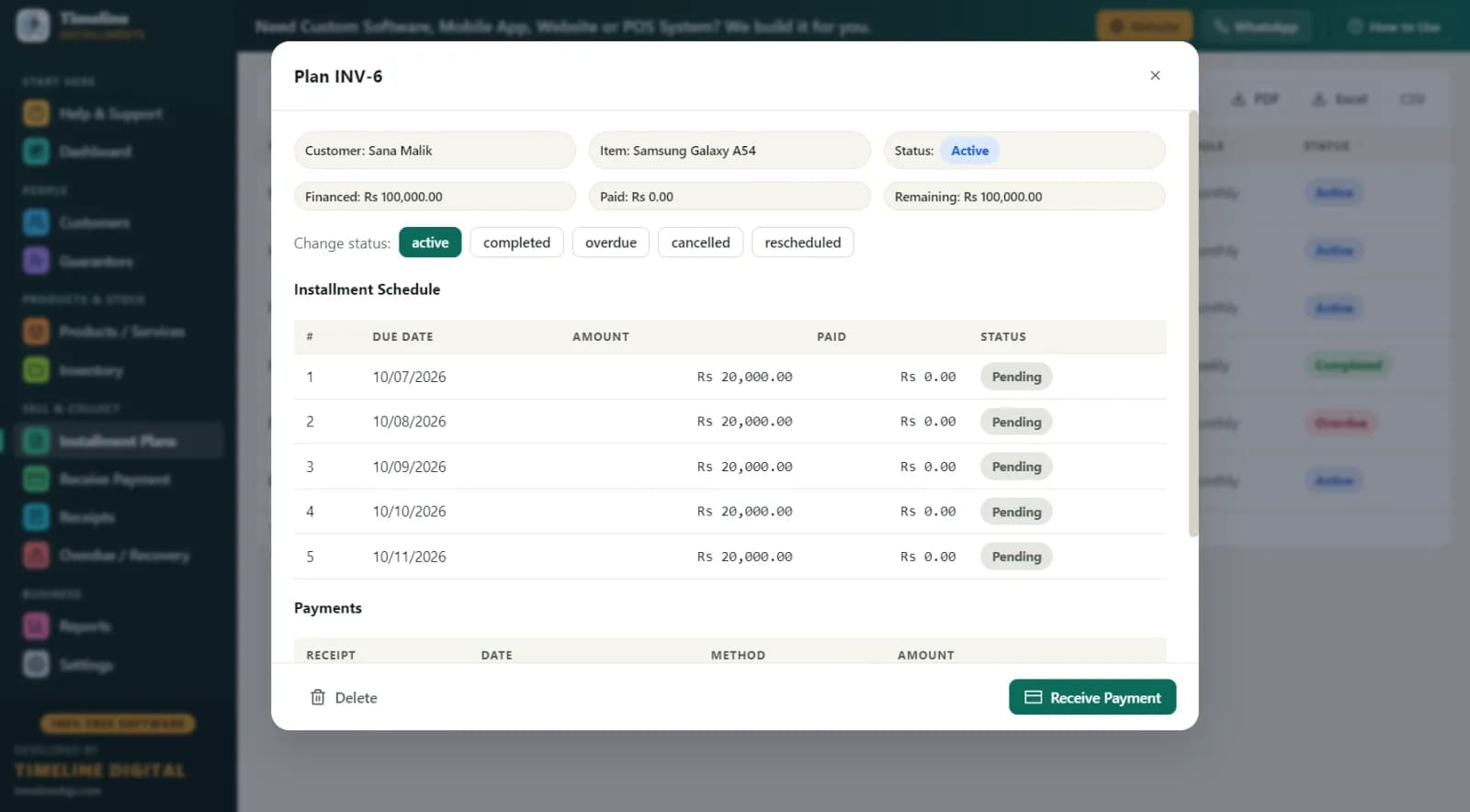
Enter total, down payment, and number of installments — the full schedule builds itself with a live preview.
Branded printed receipts
Your logo, shop name, amount, "Installments Paid 3 of 6," remaining balance, signature lines. Print or PDF in one click.
Recovery in one screen
Every late customer with days late, amount due, phone number, and guarantor contact — plus a Receive button right there.
Your data stays yours
Everything sits in a local database on your PC. No cloud, no uploads, no one else can see it.
11 exportable reports
Print, PDF, Excel, or CSV — daily collection, area-wise receivables, customer statements, and more.
One-click backup
Save a backup file to a USB drive; restore on any computer with a built-in safety copy.
Everything an installment business runs on, with screenshots
Setup, plans, payments, receipts, recovery, reports, and backups — the complete daily workflow.
How fast is setup? (About one minute.)
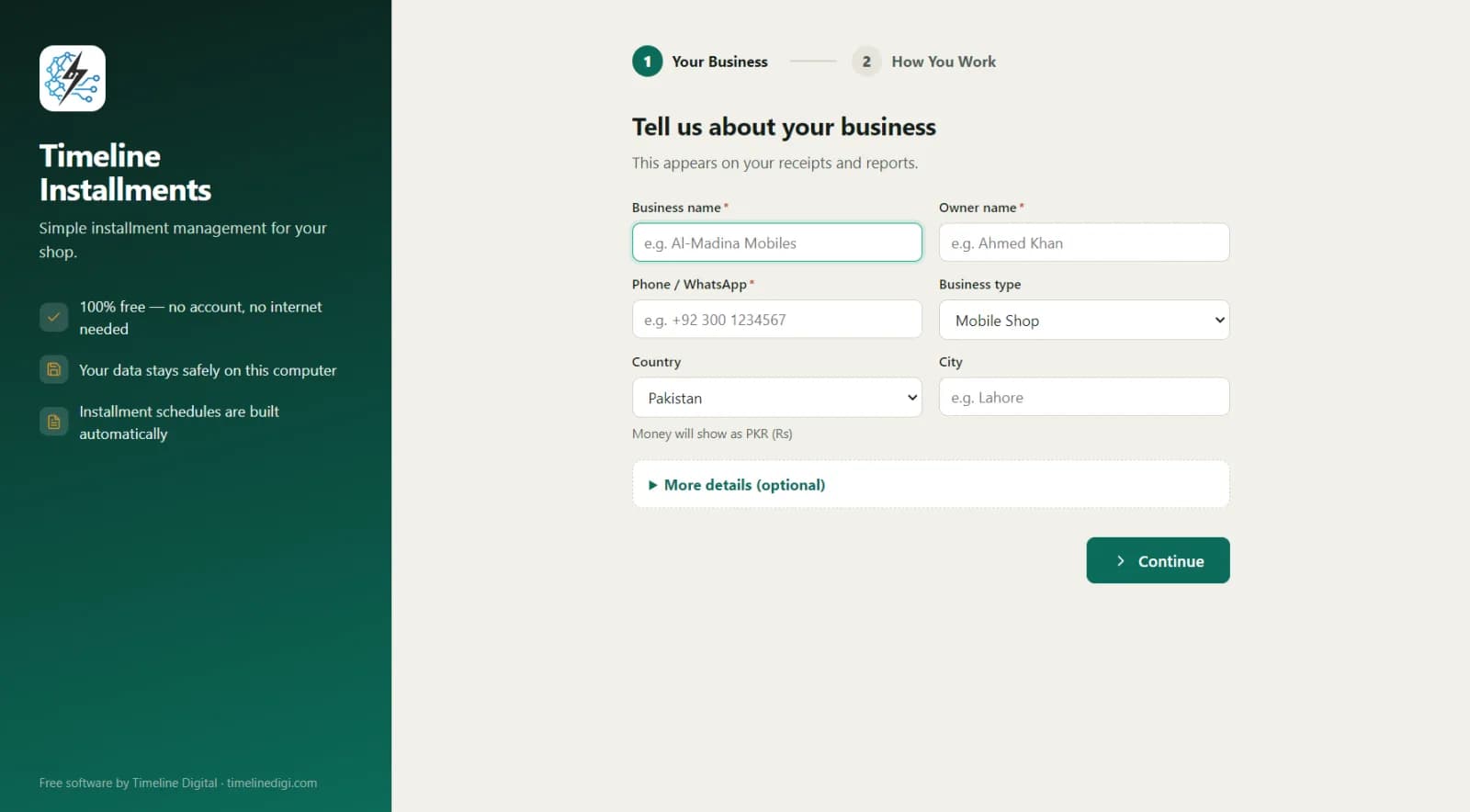
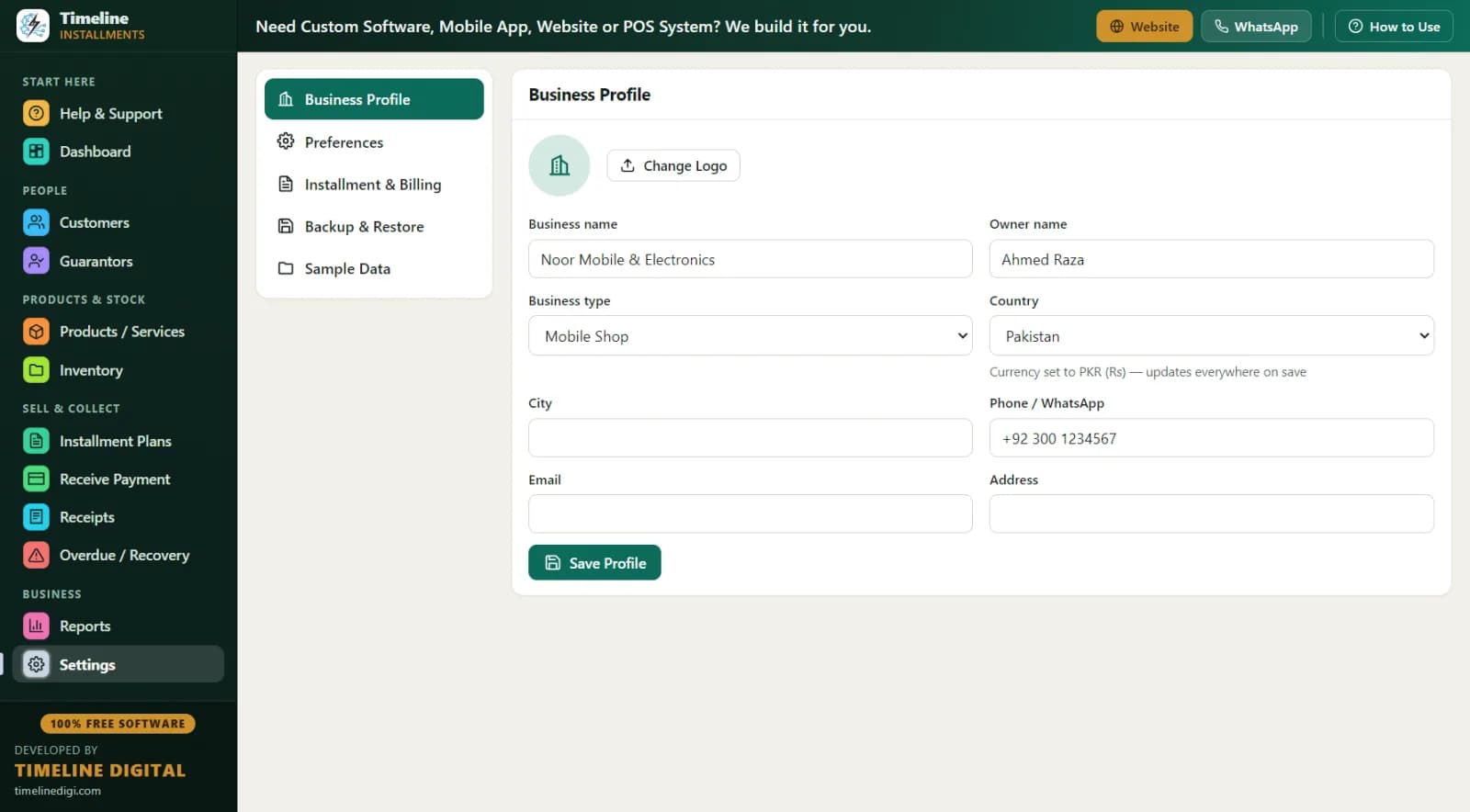
Setup is a 2-step wizard: your business details, then your working preferences. Pick your country and the currency is selected automatically — Rs, ₹, $, £, ৳, د.إ and symbols for 150+ countries. A shop in Karachi sees Rs; a dealer in Dubai sees د.إ; a store in Houston sees $.
Change the country later in Settings and the currency and date formatting update across the entire app instantly — every plan, receipt, and report. No account is created, no email is asked for, and the app opens ready to work.
How do I see my whole business in one glance?
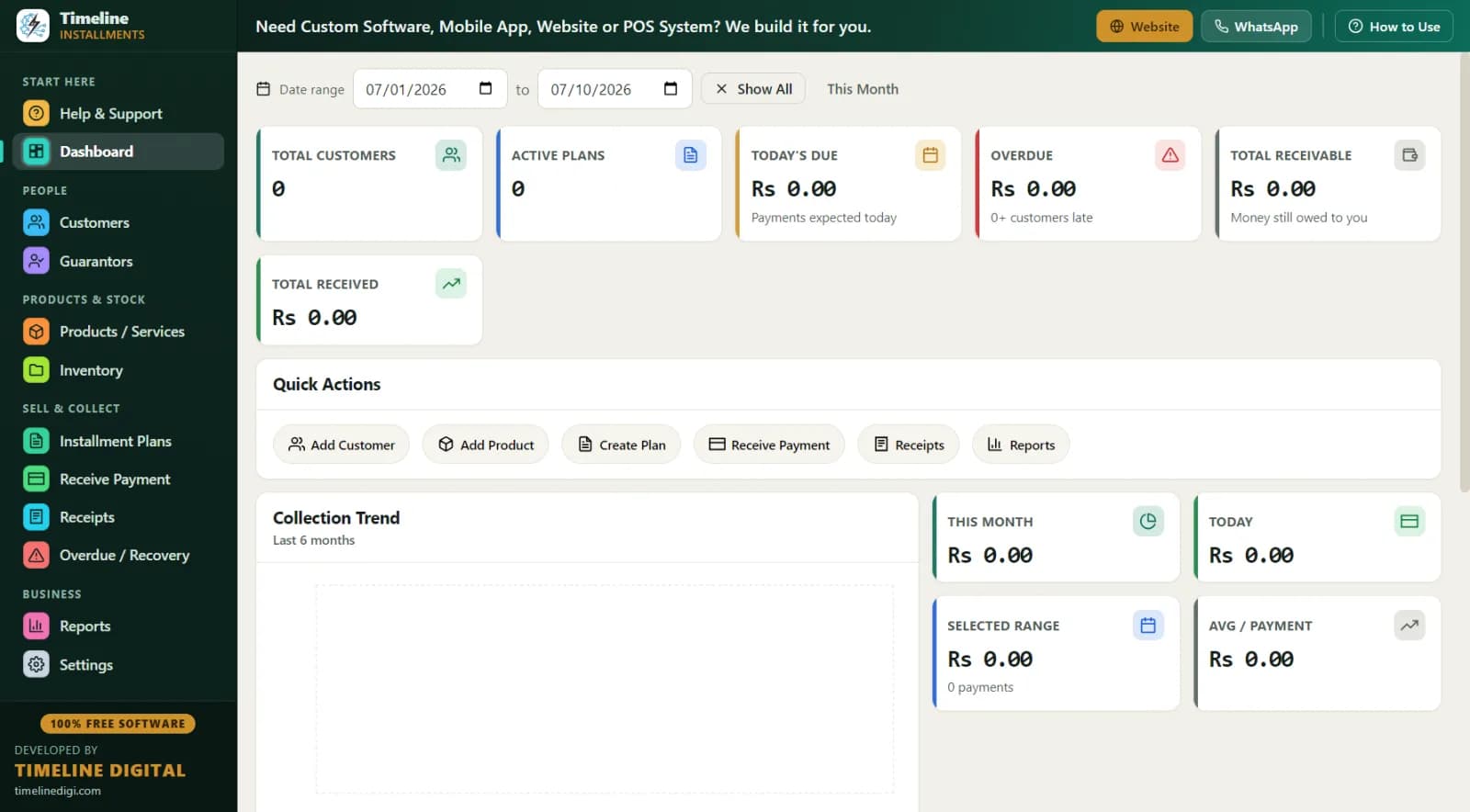
The Dashboard answers the questions you ask every morning: how many customers do I have? How many plans are active? Who is due today? How much is overdue? How much money is still out there, and how much have I collected? Six cards show Total Customers, Active Plans, Today’s Due, Overdue, Total Receivable, and Total Received.
A date-range filter lets you look at any period, and a 6-month collection trend chart shows whether your collections are climbing or slipping. Example morning: Today’s Due shows Rs 90,000 across 3 customers, Overdue shows Rs 45,000. You now know exactly who to call before lunch.
How do I create an installment plan in seconds?
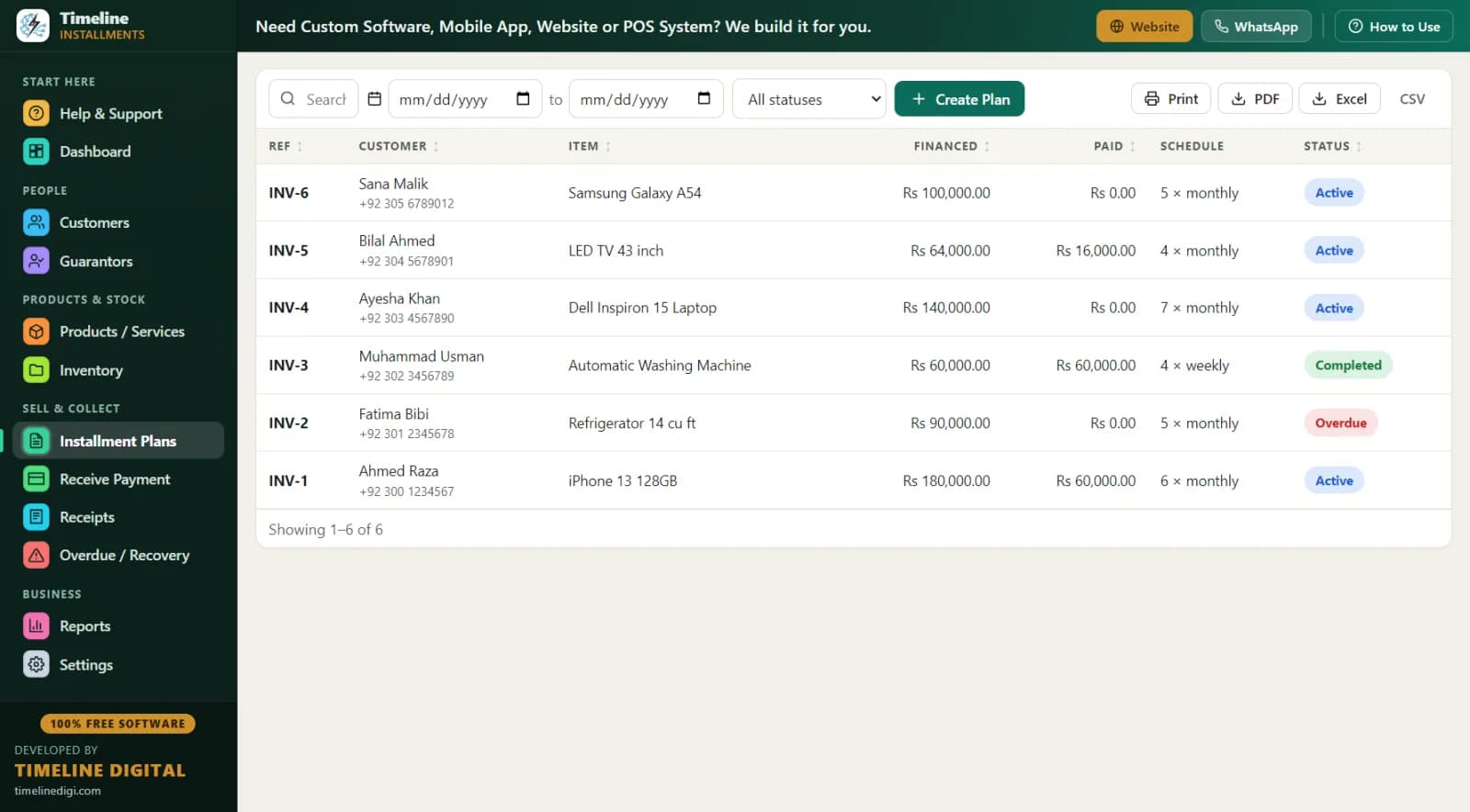
Everything happens in one form: type-to-search selects for customer, guarantor, and product, plus a New Customer button inside the form — name and phone, and the customer and plan are saved together while the buyer waits at the counter.
Enter total amount, down payment, number of installments, frequency (daily, weekly, or monthly), start date, and an optional late fee. The live schedule preview shows every due date and amount before you save; the last installment absorbs any rounding difference, so a total of $1,000 over 3 installments becomes $333.33 + $333.33 + $333.34 — never a cent lost. The down payment is recorded automatically as the first payment with its own printable receipt, and status (active, overdue, completed) is computed for you.
How do I receive payments and print receipts?
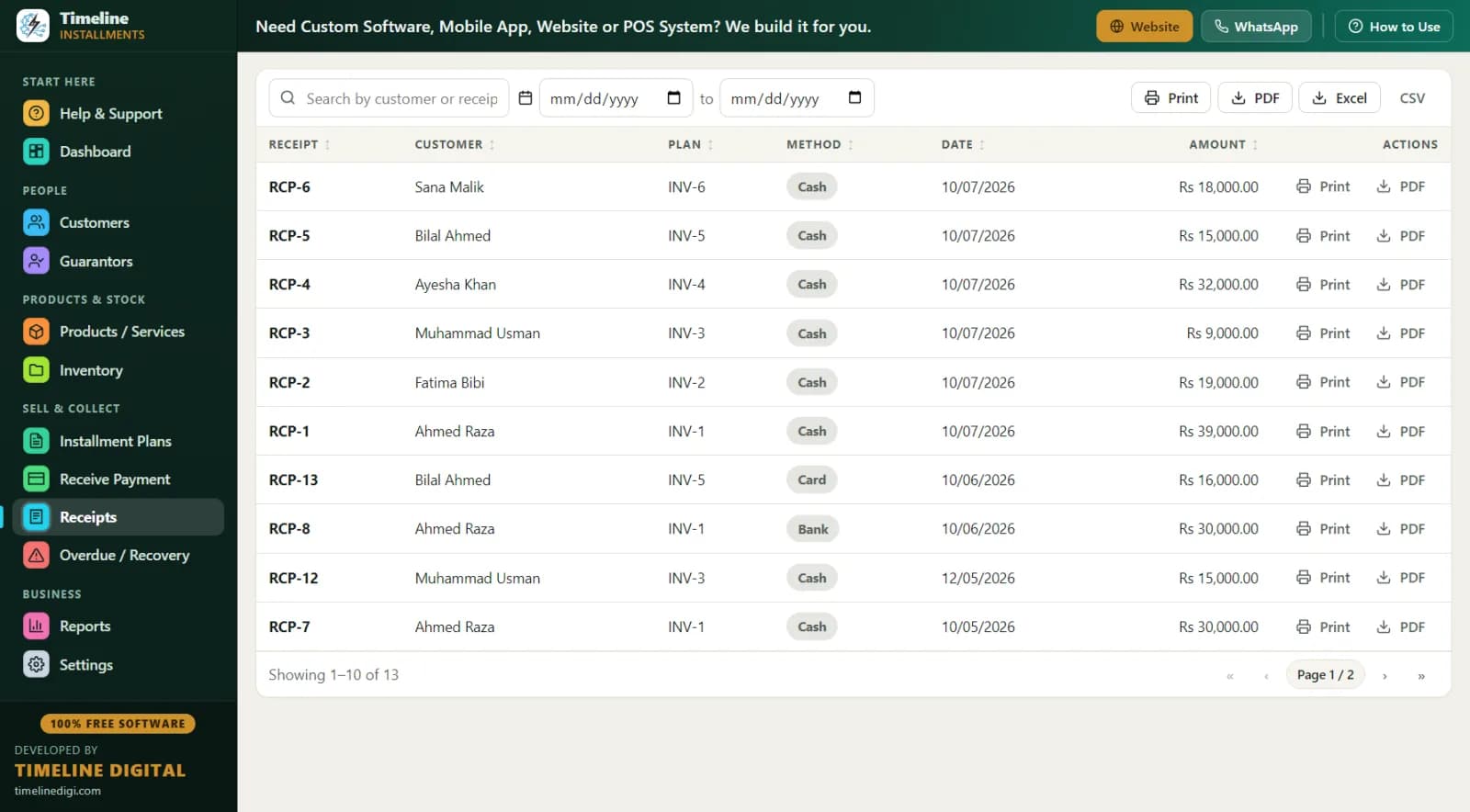
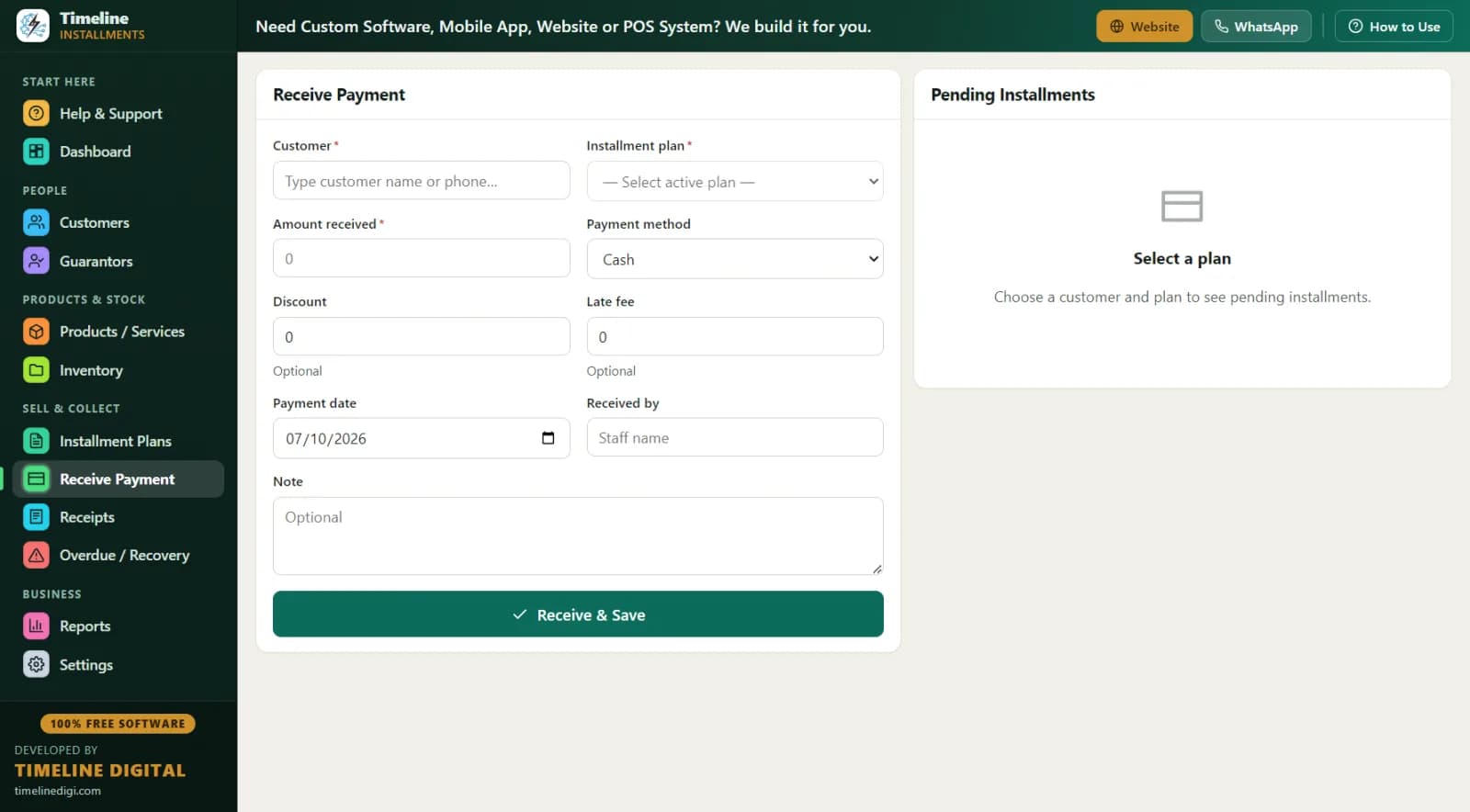
Search the customer, pick the plan, and the next due amount auto-fills. Partial payments are allowed — money is applied to the oldest unpaid installments first. A discount field counts toward settling the balance, a late fee field adds charges when your policy calls for them, and payment methods cover cash, bank, card, online, or other.
Every payment gets a receipt number like RCP-1 and appears on the Receipts page forever. Receipts print through Windows’ native print engine, so any printer works, and Microsoft Print to PDF turns any receipt into a PDF for WhatsApp. When a customer sees "Installments Paid 3 of 6 — Remaining Rs 90,000" printed under your logo, arguments about balances end.
How do I recover late payments?
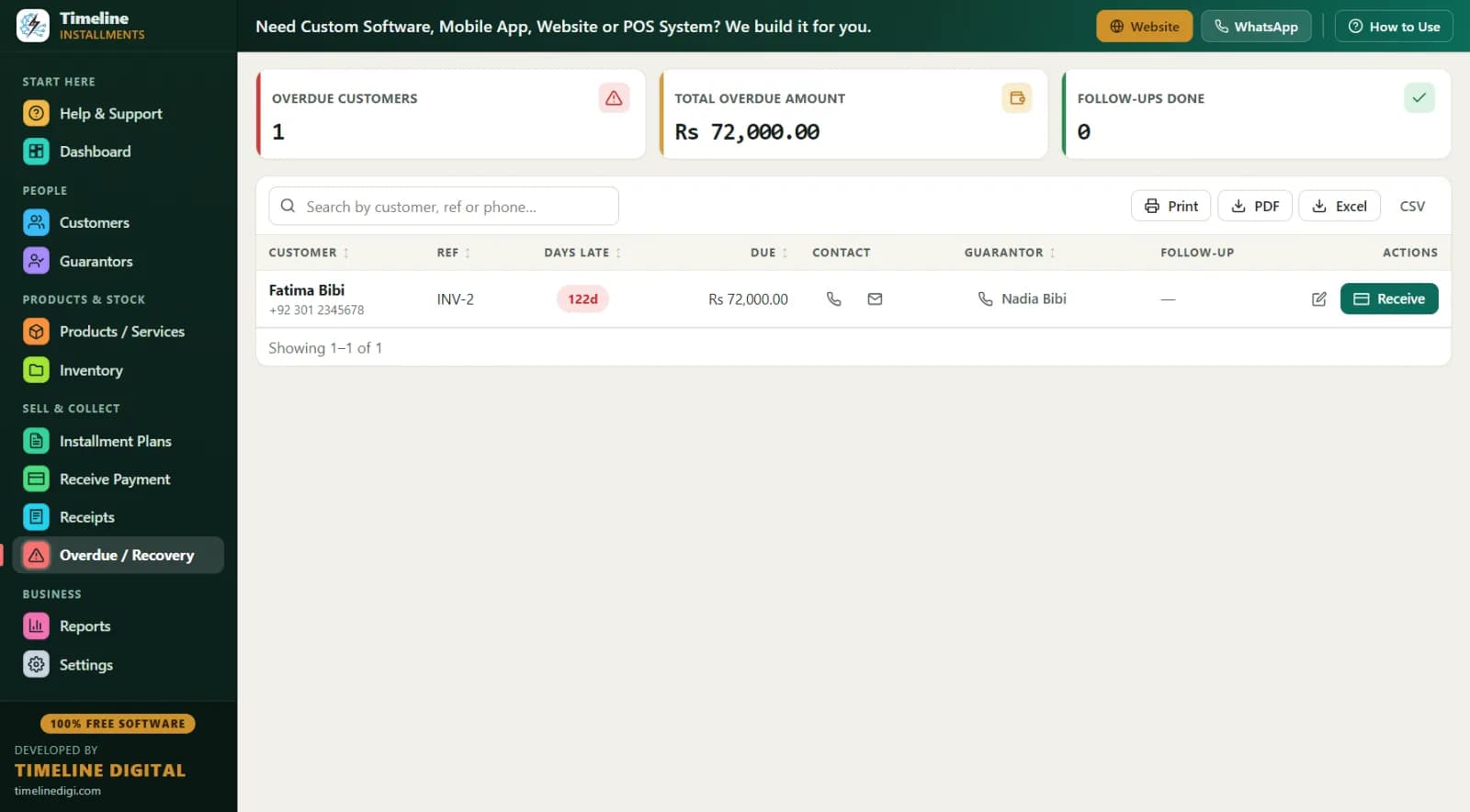
Recovery is where installment businesses live or die, so Timeline gives it two dedicated tools. The Overdue / Recovery screen lists every late plan with days late, amount due, customer phone, guarantor name and phone, and a follow-up note field. When a customer pays after your call, press the Receive button right on that row.
The Next 30 Days Recovery report looks forward instead of back: every installment due in the next month, with due date, customer, phone, city, plan ref, item, and amount. Print it, hand it to your recovery staff, and they have a ready visit list sorted by date — customers get a call two days before the due date, before they’re late, not after.
What reports does it include?
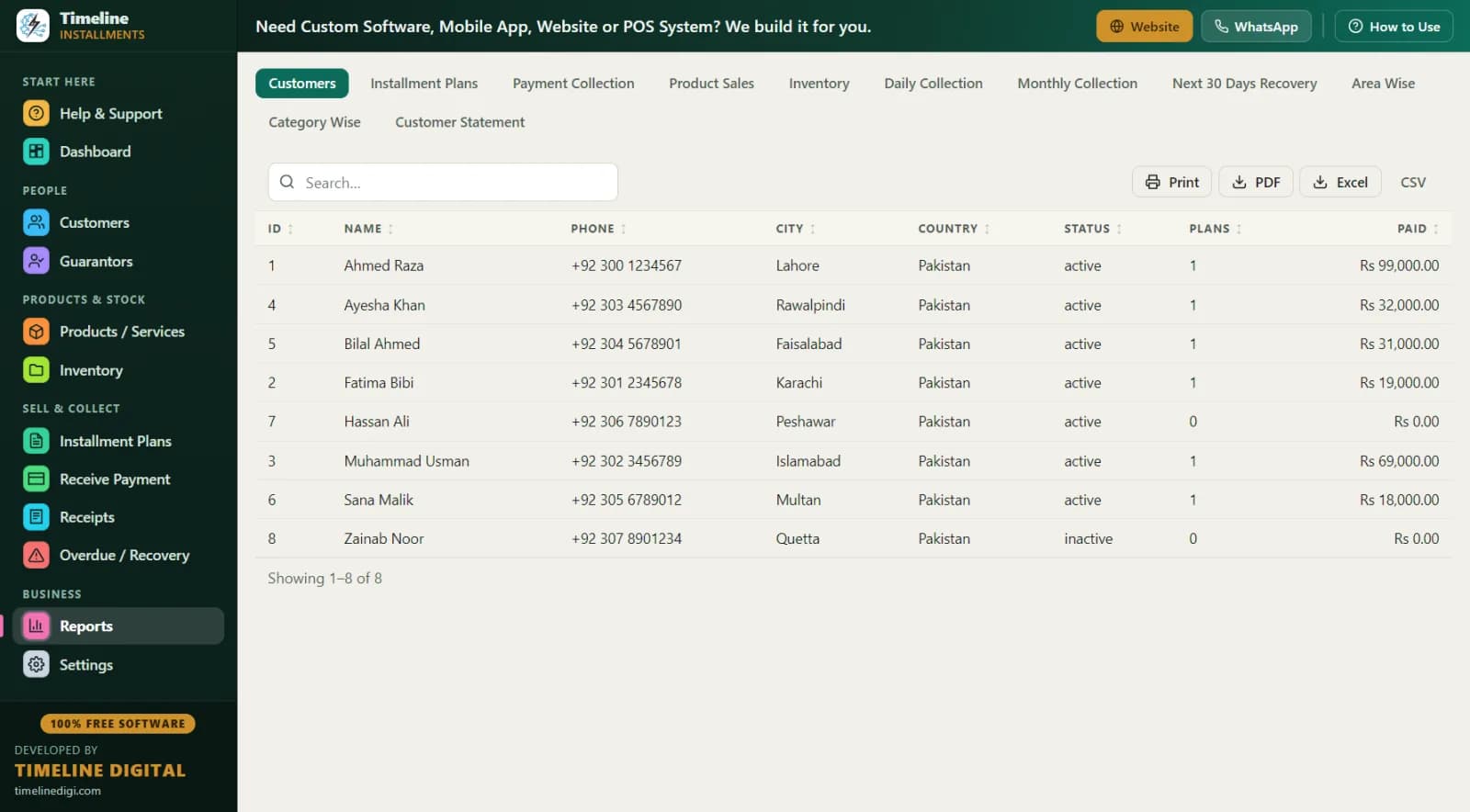
11 reports, all searchable, sortable, and date-filterable, and every one exports to Print, PDF, Excel, and CSV: Customers, Installment Plans, Payment Collection, Product Sales, Inventory, Daily Collection, Monthly Collection, Next 30 Days Recovery, Area Wise, Category Wise, and Customer Statement.
The Customer Statement deserves a special mention: when a customer disputes his balance, print his statement and every payment is right there in black and white. The Area Wise report tells a Lahore mobile shop that Gulberg customers owe Rs 480,000 across 12 active plans while Johar Town owes Rs 150,000 across 4 — so the recovery bike goes to Gulberg first.
How does it handle customers, guarantors, products, and stock?
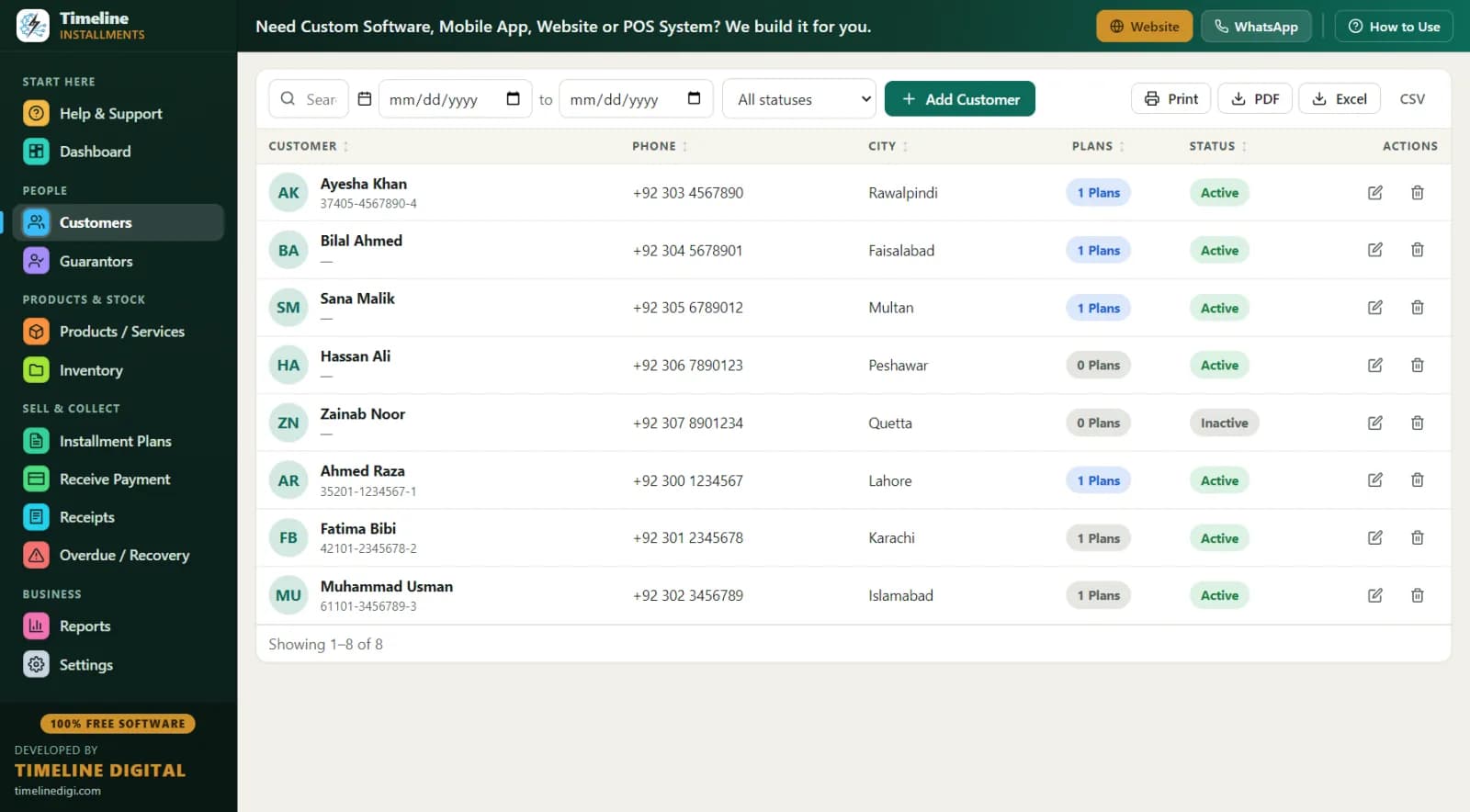
Customers need only a name and phone — add one in ten seconds during a sale. Optional fields cover WhatsApp, email, city, country, ID type (CNIC, Passport, or National ID), ID number, address, and notes. Click any customer to see their full history: every plan, every payment, linked guarantors, and totals.
Guarantors are linked to a specific customer and plan, so when someone stops answering your calls, the guarantor’s number is one click away. Products carry category, SKU, purchase and sale price, stock with a low-stock alert, and warranty text — and when a tracked product sells on a plan, stock drops by 1 automatically with the note "Sold on plan INV-x," so your stock count and your installment book can never disagree.
How do I keep my data safe?
Settings → Backup & Restore gives you a one-click backup file you can copy to a USB drive, another PC, or a private cloud folder. Restore is protected too: the app makes a safety copy and asks for confirmation before overwriting anything, and you can set a backup reminder every N days.
Settings also covers your Business Profile (logo upload; changing country cascades the currency), Preferences (currency code and symbol, date format), and Installment & Billing defaults (frequency, late fee, receipt prefix RCP, invoice prefix INV, optional tax, and the receipt terms footer). There’s also Sample Data: load realistic demo records, practice for an hour, then remove it — removal deletes only what it added.
“But I’ve always used a register / Excel — why change?”
"My register works fine."
Until it doesn’t. A register can’t tell you who is 12 days late, can’t total your receivables, and can’t be backed up. One spill, one lost book, one fire — and years of records are gone. Timeline gives you the same simple entry (name, phone, amount) plus automatic math and a backup file on a USB drive.
"Excel is free too."
Excel doesn’t know today’s date matters. It won’t move a customer to an overdue list, won’t apply a partial payment to the oldest installment, won’t print a branded receipt, and won’t stop a staff member from quietly editing last month’s numbers. In Timeline, plan amounts lock after real payments and changes are logged.
"Free software always has a catch."
The business model here is open: Timeline Digital sells custom software (apps, cloud systems, POS, websites) and uses the free app to meet shop owners. There’s no trial timer, no locked features, and no ads inside the app.
"I don’t trust putting customer data online."
Neither does this app — because it never goes online. Data lives in a local database on your PC. No account, no login, no upload. If your internet dies for a week, nothing changes.
"My staff isn’t technical."
Name + phone adds a customer. Total + down + months creates a plan. Search + click receives a payment. Every page has its own How-to drawer. If your staff can use WhatsApp, they can run this.
Which countries and business types is it built for?
Pick your country once; every screen, receipt, and report follows — with automatic currency for 150+ countries.
Pakistan — qist / kisti (قسط) software
Mobile shops in Hall Road Lahore, Saddar Karachi, and electronics markets across Pakistan sell daily on qist. Timeline records the customer’s CNIC, links a guarantor with his own CNIC and phone, and prints receipts in simple English with amounts in Rs (PKR) — auto-selected when you pick Pakistan.
Installment software PakistanIndia — EMI software for shops
Independent dealers selling mobiles, appliances, and furniture on EMI — without going through a finance company — need their own EMI book. Timeline auto-builds EMI schedules in ₹ (INR), tracks partial payments, and the Area Wise report groups receivables by city for collection rounds.
EMI software IndiaUnited States — layaway, in-house financing & BHPH
Furniture stores, tire shops, appliance dealers, and buy-here-pay-here style retailers offering layaway or in-house financing usually face pricey monthly SaaS. Timeline is a free, offline alternative in $ (USD): weekly or monthly schedules, partial payments applied oldest-first, and clean printed statements.
Layaway & in-house financing softwareUnited Kingdom — hire purchase & pay-weekly
Independent furniture, appliance, and vehicle retailers running hire purchase or pay-weekly plans get automatic weekly schedules in £ (GBP), DD/MM/YYYY dates, printable customer statements, and a rolling 30-day collection list.
Hire purchase software UKBangladesh — kisti (কিস্তি) software
Electronics and furniture shops selling on kisti get automatic schedules in ৳ (BDT), customer records with National ID, guarantor tracking, and daily/weekly/monthly frequencies to match how kisti is actually collected.
Kisti software BangladeshAlso used across…
Nigeria (₦, pay-small-small), Kenya (KSh, lipa mdogo mdogo), Ghana (₵, work-and-pay) and 150+ countries with automatic currency.
Download Timeline Free Installment Manager v1.6.0
Windows 10/11 (64-bit) · ~90 MB · Free forever · No email or account required
Download the installer
Download Timeline-Free-Installment-Manager-Setup-1.6.0.exe (about 90 MB) from this page. No email or account is required.
Run the setup
Double-click the file and click I Agree → Install. Installation finishes in under a minute and creates Desktop and Start Menu shortcuts.
Answer the 2-step setup wizard
Enter your business details and working preferences. Picking your country sets the currency automatically for 150+ countries.
Create your first installment plan
Open Installment Plans → Create Plan, add the customer inline, enter total, down payment and number of installments, and save. The schedule builds itself.
Installs in under a minute. You can create your first installment plan within two minutes of clicking Download.
Frequently asked questions
Is Timeline Installment Manager really free?
Yes. It is 100% free with every feature included — no trial period, no license fee, no monthly subscription. Timeline Digital earns from custom software projects (apps, cloud systems, POS, websites), and gives this app away free as its introduction to shop owners. Nothing inside is locked or time-limited.
Does it need internet to work?
No. The software works fully offline. All your records are stored in a local database on your own computer, and nothing is ever uploaded. There is no account, no email, and no login — you can run your installment business with no internet connection at all.
What is installment management software?
Installment management software tracks customers, payment schedules, received payments, and overdue balances for businesses that sell on installments — EMI, kisti, qist, hire purchase, pay-weekly, or layaway. It replaces paper registers and Excel sheets with automatic schedules, branded printed receipts, and ready-made recovery lists.
Which businesses can use it?
Any business that collects money over time: mobile phone shops, electronics stores, furniture showrooms, motorcycle and car dealers, appliance sellers, jewellery shops, computer shops, and installment or finance offices. It also supports services — repairs, tuition, or subscriptions billed in installments — alongside physical products.
Can I print receipts with my shop name and logo?
Yes. Every payment produces a branded receipt showing your logo, shop name and contact, receipt number, date, customer, plan reference, item, payment method, amount, "Installments Paid X of Y," remaining balance, received-by, and signature lines. Print on any printer or save as PDF via Microsoft Print to PDF.
Can customers pay partially or late?
Yes. Partial payments are applied to the oldest unpaid installments first, so balances stay accurate automatically. You can add an optional late fee — a fixed amount or a percentage of the remaining balance — and record a discount that counts toward settling the plan.
How do I keep my data safe?
Use the built-in one-click backup in Settings → Backup & Restore and keep a copy on a USB drive. Restore is protected with a safety copy and confirmation step, and you can set a reminder every N days so backups never get forgotten.
Does it work on Windows 11?
Yes. It runs on Windows 10 and Windows 11 (64-bit). The installer is about 90 MB, installs in under a minute, creates Desktop and Start Menu shortcuts, and opens automatically after installation — ready to use with the two-step setup wizard.
Does it support my country's currency?
Yes. Pick your country during setup and the currency is set automatically — Rs, ₹, $, £, ৳, د.إ and 150+ countries in total. Changing the country later in Settings instantly updates the currency and date formatting across every screen, receipt, and report.
Can I get a mobile app, cloud, or multi-branch version?
The free version is offline desktop software for one PC. If you need cloud sync, a mobile app, multi-branch access, or a POS, Timeline Digital builds custom versions as paid projects — contact them on WhatsApp or through the contact form at timelinedigi.com/contact.
Need more than the free version?
Timeline Digital builds custom software: mobile apps, cloud versions with sync, multi-branch systems, POS, CRM, and websites. The free installment app is our introduction — the custom work is our business.
Questions? Message us on WhatsApp or send a brief through our contact form.
Free download
Fix your installment records this afternoon, free.
Every customer, every plan, every payment — tracked automatically on your own PC, with branded receipts and a recovery list that runs itself.
Last updated July 2026 · v1.6.0 · ~90 MB · Windows 10/11 · Free forever
Powered by Timeline Digital, custom software that runs your business. Building software since 2013.