Invoices + quotations · Free Windows download
Free invoice software for Windows. Offline, free forever.
Free invoicing software for small businesses and freelancers. Create professional invoices and quotations in minutes, 100% free, 100% offline. No subscription, no sign-up, no internet required. Your data stays on your computer.
v1.0.0 · 56 MB · Windows 10/11 · Runs offline · Last updated 2026-07-05
SHA-256: d86ae6c6d3c222e11ac270a0ed5b5cebb19c7fdf997c3d0aa67abff82254b2d8
If Windows SmartScreen warns about the installer, choose “More info” then “Run anyway”, and verify your download against the SHA-256 above.
- Free forever: no trial, no invoice limit, no watermark
- Works fully offline, no account needed
- Invoices + quotations in one app
- 199 countries & currencies supported
- By Timeline Digital, building business software since 2013
In 60 seconds
What is Timeline Invoice?
Timeline Invoice is free invoice software for Windows 10 and 11 that lets freelancers and small businesses create invoices and quotations, track payments, and export branded PDFs, fully offline, with no subscription or account. It supports 199 countries with automatic currency selection and flexible tax/VAT. It is built and maintained by Timeline Digital.
It is one of the free Windows apps from Timeline Digital’s free business software collection, free to use daily, with paid custom versions when a business needs more.
Everything you need to invoice, nothing you have to pay for
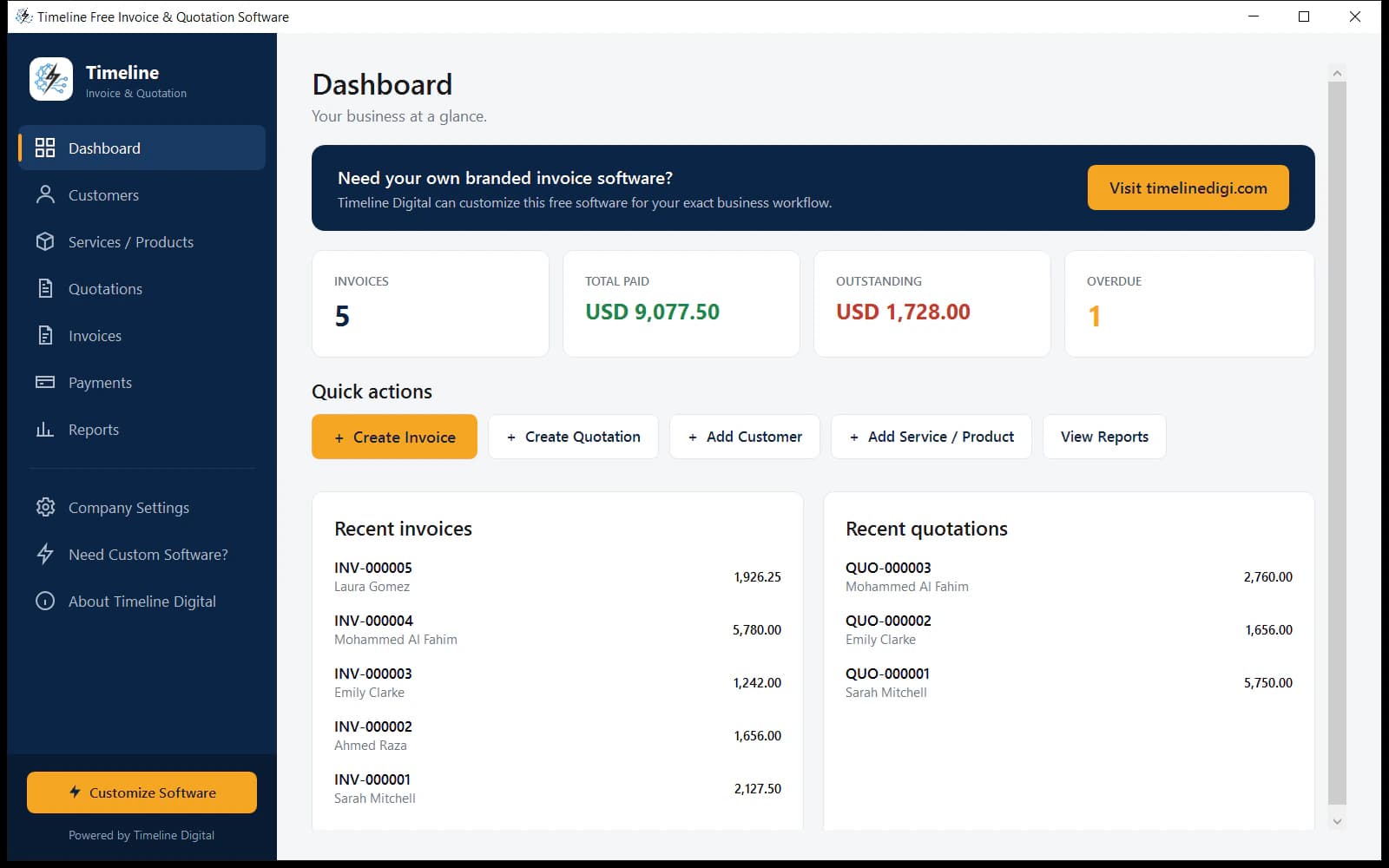
Invoicing, quotations, payments, PDFs, sharing and reports, the complete daily workflow, free.
Professional invoices
Auto-numbered invoices (INV-000001) with line items, discounts, per-line tax, due dates and payment status: Draft, Sent, Partially Paid, Paid, Overdue.
Quotations that become invoices
Send quotes and convert accepted ones to invoices in one click. Numbering, totals and terms carry over automatically.
Payment tracking
Record full or partial payments in cash, bank transfer, card, cheque and more. Balances and invoice status update automatically.
Branded PDF export
One click creates a clean PDF with your logo, company details, tax summary and totals, ready to send or print.
WhatsApp & email sharing
Share any invoice or quotation on WhatsApp or email in one click, with a pre-filled message: number, amount, due date.
Reports & data export
Dashboard totals, customer, invoice and payment reports, CSV export, and one-click backup of all your data as a ZIP.
Free quotation and invoice software, in one app
Most free tools do invoices or quotes. Timeline Invoice does both, connected.
Timeline Invoice is free quotation and invoice software in a single app: send a professional quote, and when the client says yes, convert it to an invoice in one click. Line items, prices, taxes and terms carry over, and the quote is marked as converted so nothing gets billed twice.
Estimates, quotes, invoices and payments live in one place, numbered automatically. No retyping, no copy-paste mistakes, no second tool to pay for.
Download free: quotes & invoices in one app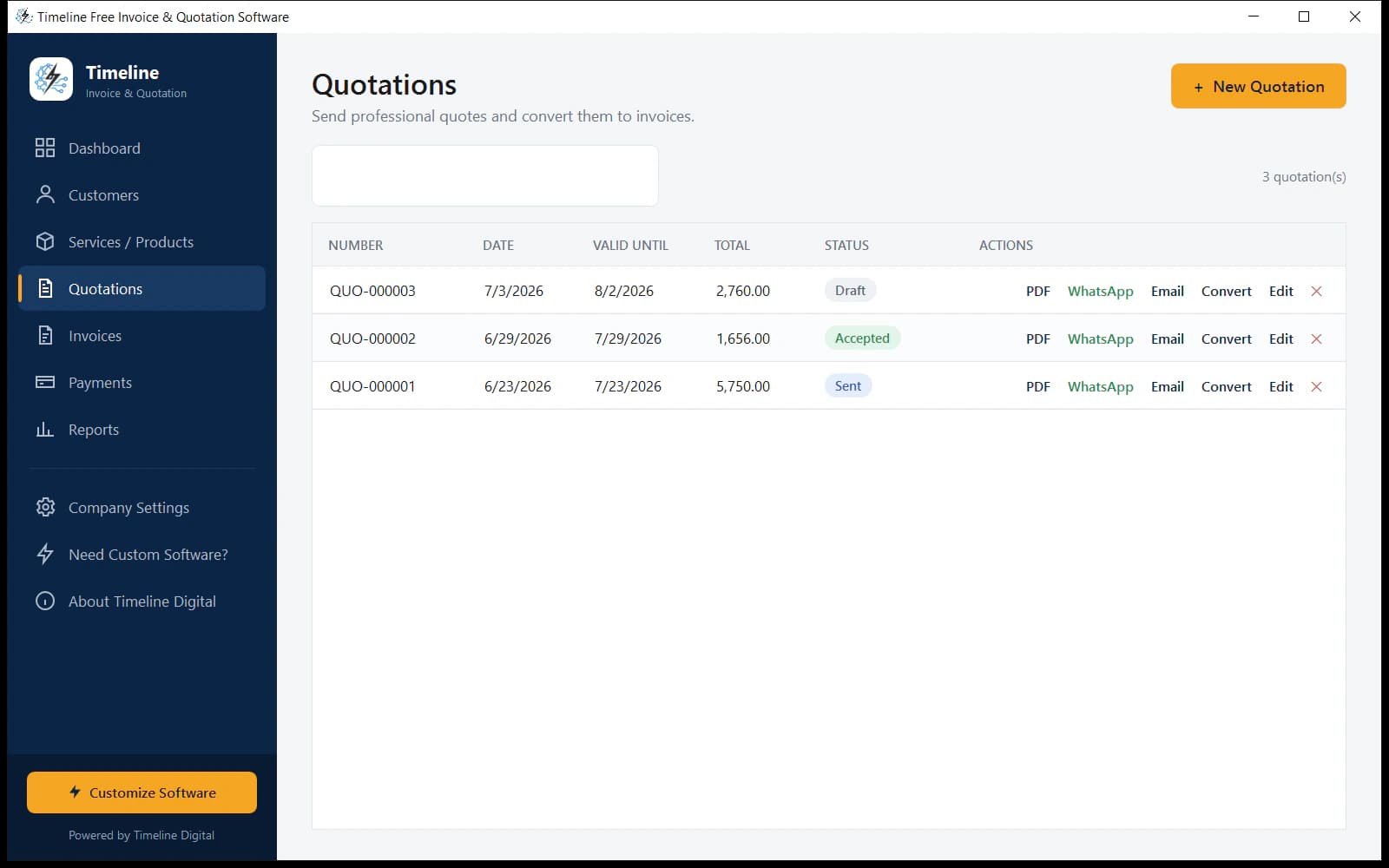
Works offline. Your data never leaves your PC.
Unlike online invoicing tools, this free invoice software runs entirely on your computer. Everything is stored in a local database on your machine, so nothing is uploaded, tracked, or shared.
Invoice on a plane, in a shop with no Wi-Fi, or anywhere else. You can export every record: customers, items, invoices, quotations, payments, as CSV files anytime.
- No monthly fees. Online invoice tools cost $10–$35/month; Timeline Invoice is $0.
- No internet dependency. Create and print invoices anywhere.
- No data risk. Your client list and pricing never sit on someone else’s server.
- No account, no password, no vendor lock-in. Export everything anytime.
Built for businesses worldwide
Timeline Invoice supports 199 countries. Pick your country once and the app sets your currency automatically: PKR, USD, GBP, EUR, AED, SAR, INR, CAD, AUD and 150+ more.
Tax is fully flexible: set a default VAT/GST/sales-tax rate, override it per item or per line, or use no tax at all. Nothing is hard-coded to one country.
From Karachi to London to Dubai to New York, freelancers, agencies and small businesses use it the same way, in their own currency and tax system.
199 countries · automatic currency · flexible VAT/GST/sales tax
Who is this free invoicing software best for?
If you send invoices or quotations and want them professional, tracked and free, this is for you.
Small businesses with under 10 clients and first-time invoicers especially: there is nothing to configure beyond your company profile.
How it works: invoicing in 3 steps
From download to your first invoice in minutes, not days.
Download & install
One 56 MB setup file for Windows 10/11, no admin rights needed, nothing else to install.
Add your company details
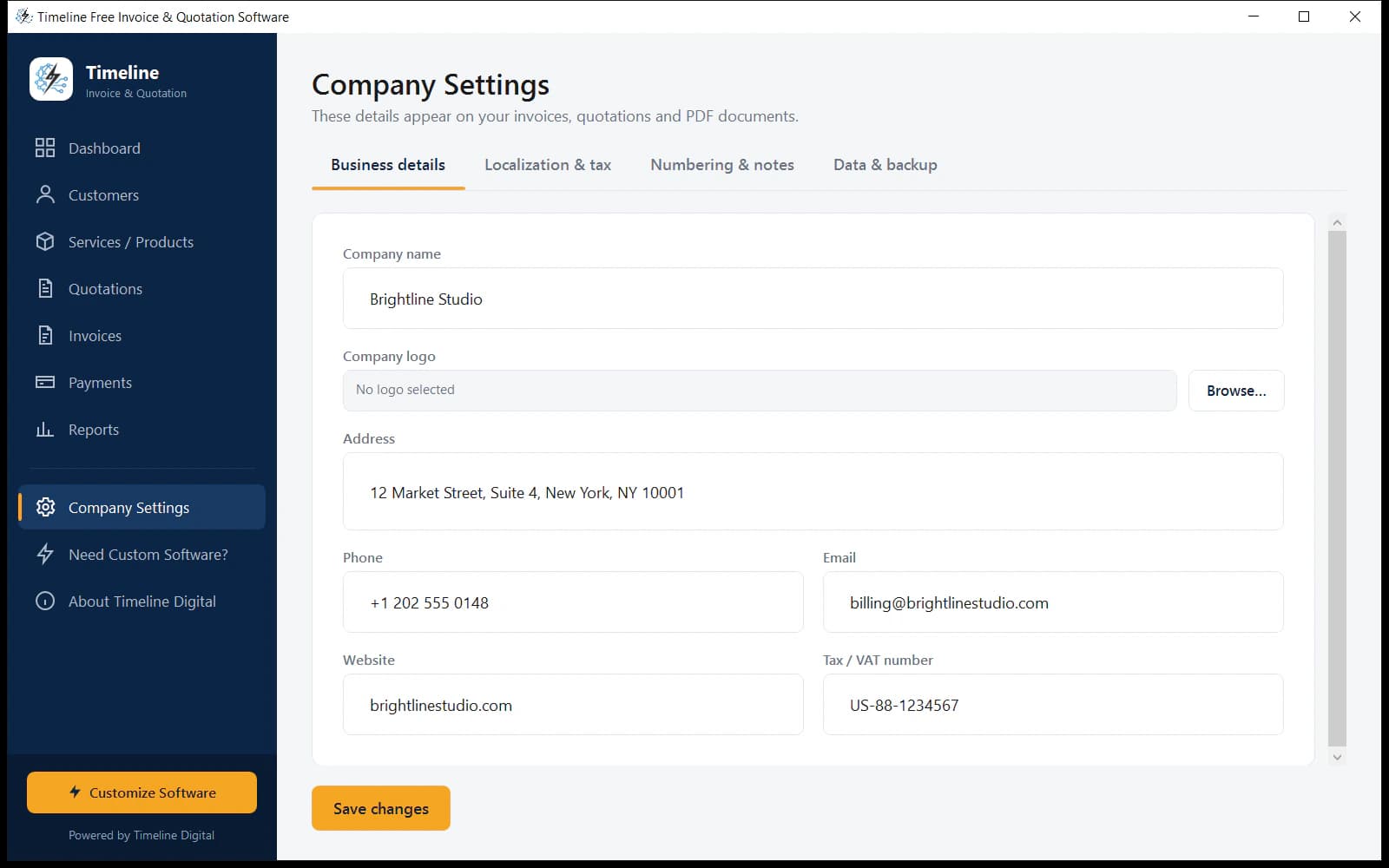
Name, logo, country (currency sets itself), tax rate. They appear on every document automatically.
Create & send
Build an invoice or quote, export the PDF, share by WhatsApp or email. Done.
How to use Timeline Invoice: step-by-step guide
The whole workflow, from download to your first paid invoice in under ten minutes, without spending anything.
Step 1: Install the software
Download TimelineInvoiceSetup.exe (56 MB) and double-click it. The installer needs no admin rights and bundles everything. When it finishes, Timeline Invoice opens from your Start Menu or desktop shortcut.
Step 2: Set up your company profile
Open Company Settings and fill in your business details once: name, logo, address, and tax number. Start typing your country and the currency sets itself automatically. Everything you enter here appears on every invoice and quotation you create.
Step 3: Add your customers
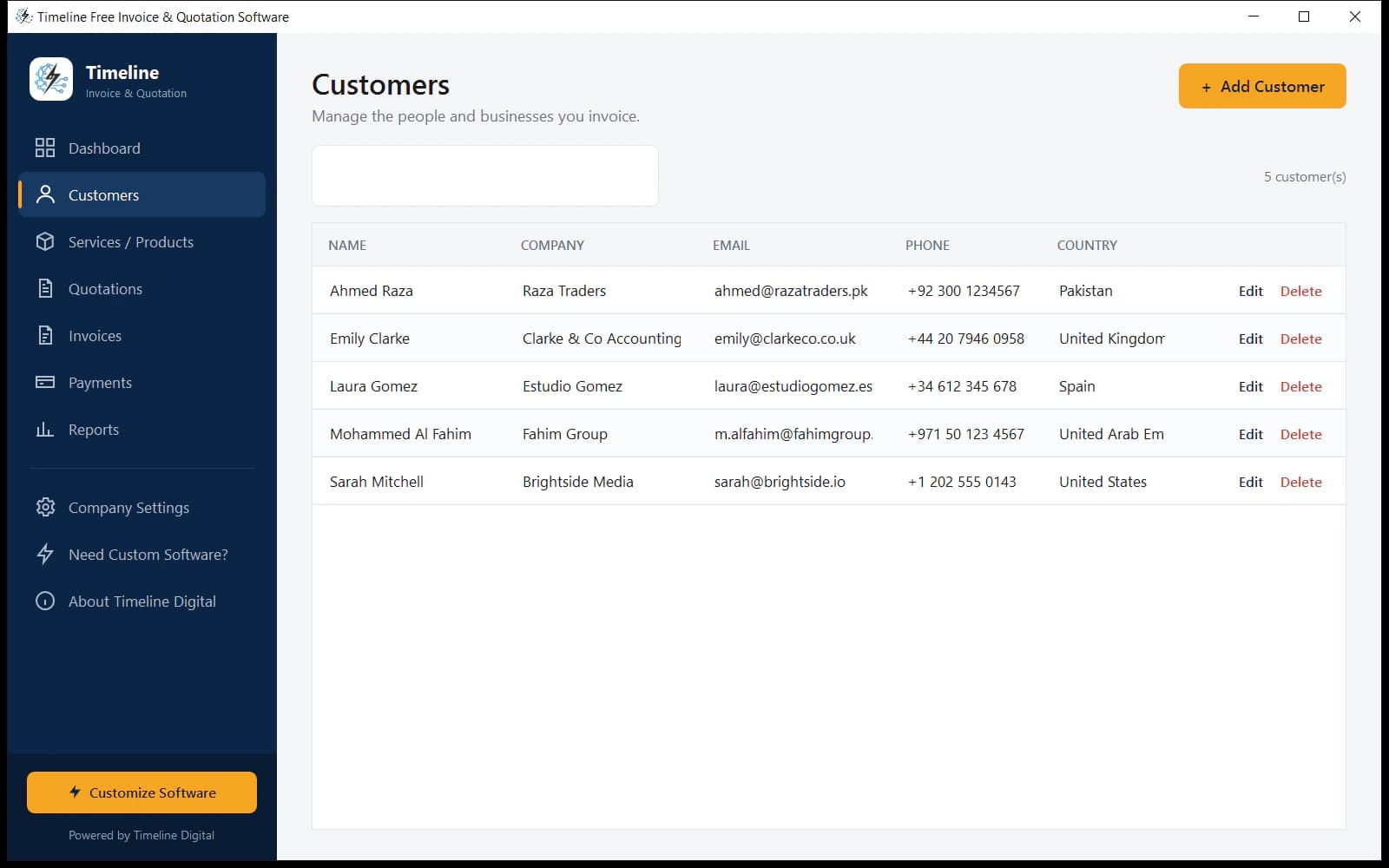
Go to Customers → Add Customer. Only the name is required. Email, phone, country and opening balance are optional. Use the search box to find anyone instantly as your list grows.
Step 4: Add your services or products
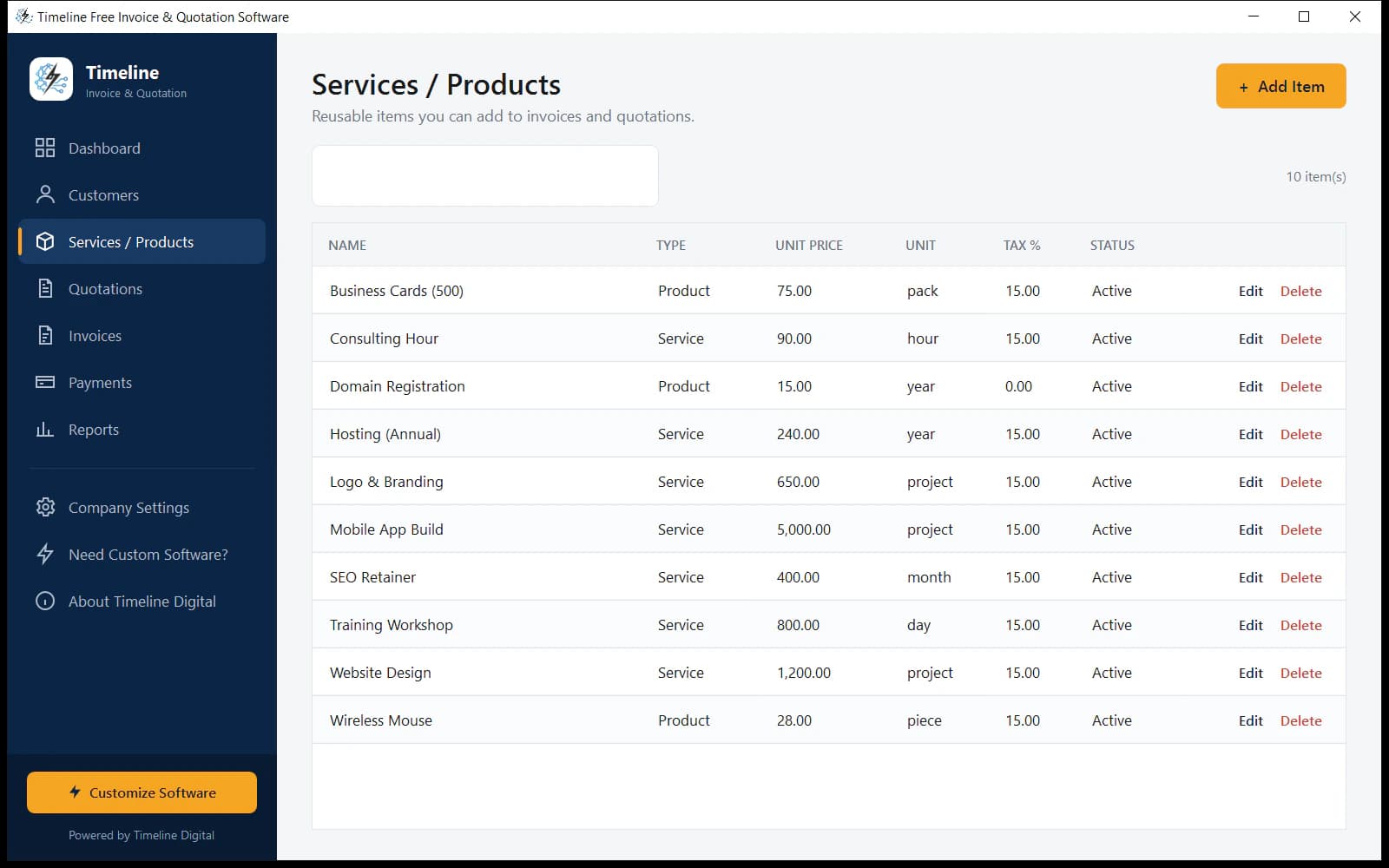
Go to Services / Products → Add Item and save the things you sell: name, price, unit (hour, project, piece…) and tax rate. Saved items auto-fill invoices and quotations later, so you never retype prices.
Step 5: Create a quotation (optional but powerful)
Go to Quotations → New Quotation, pick the customer, and add line items, then choose a saved item and the price and tax fill in automatically. Totals update live as you type. Save it, download the PDF, or send it by WhatsApp or email in one click.
Step 6: Convert the quote to an invoice (or create one directly)
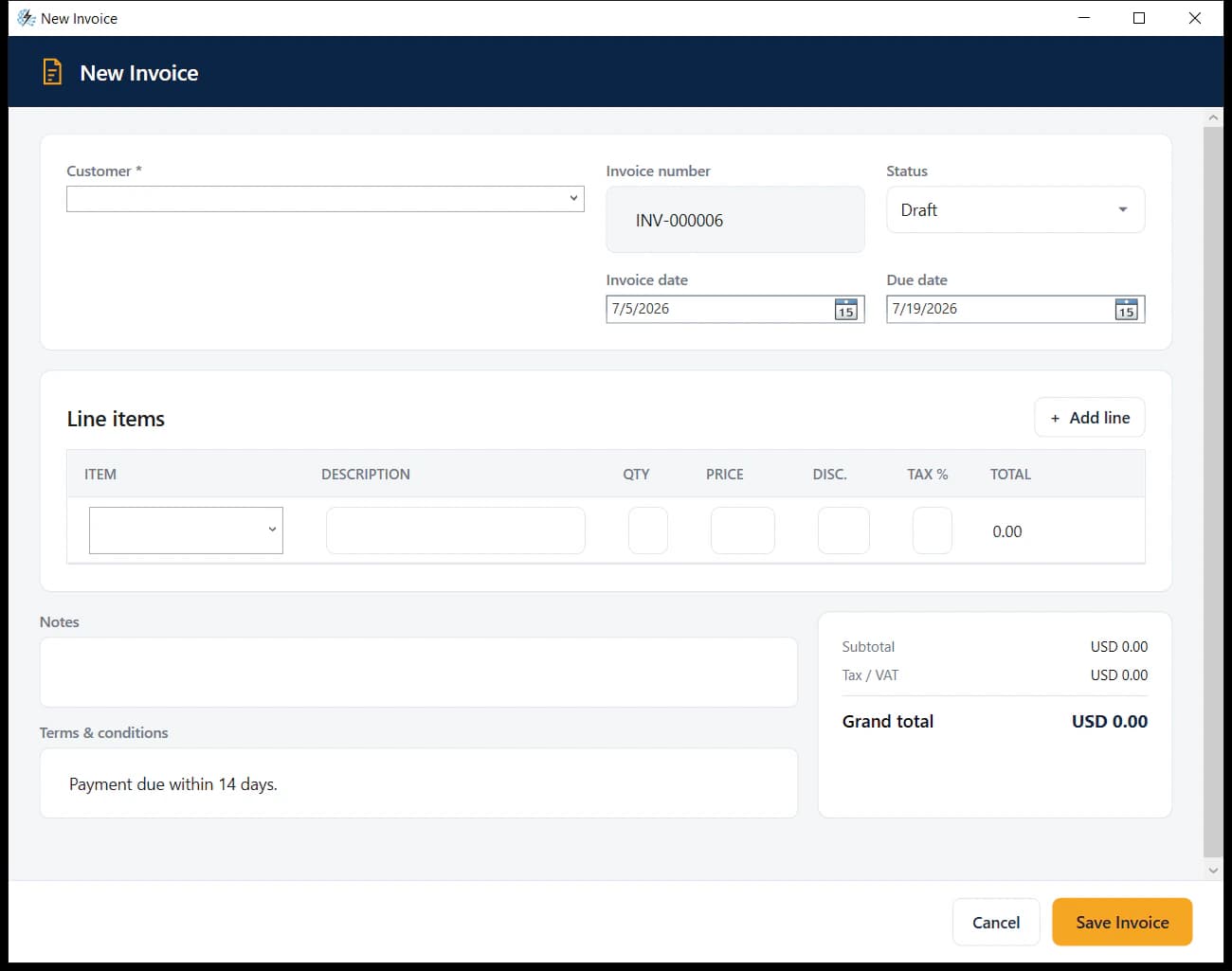
When the client accepts, press Convert on the quotation and an invoice is created instantly with everything carried over. Or skip quotes and go to Invoices → New Invoice directly. Numbers auto-increment (INV-000001, INV-000002…) using your prefix.
Step 7: Send the invoice as a branded PDF
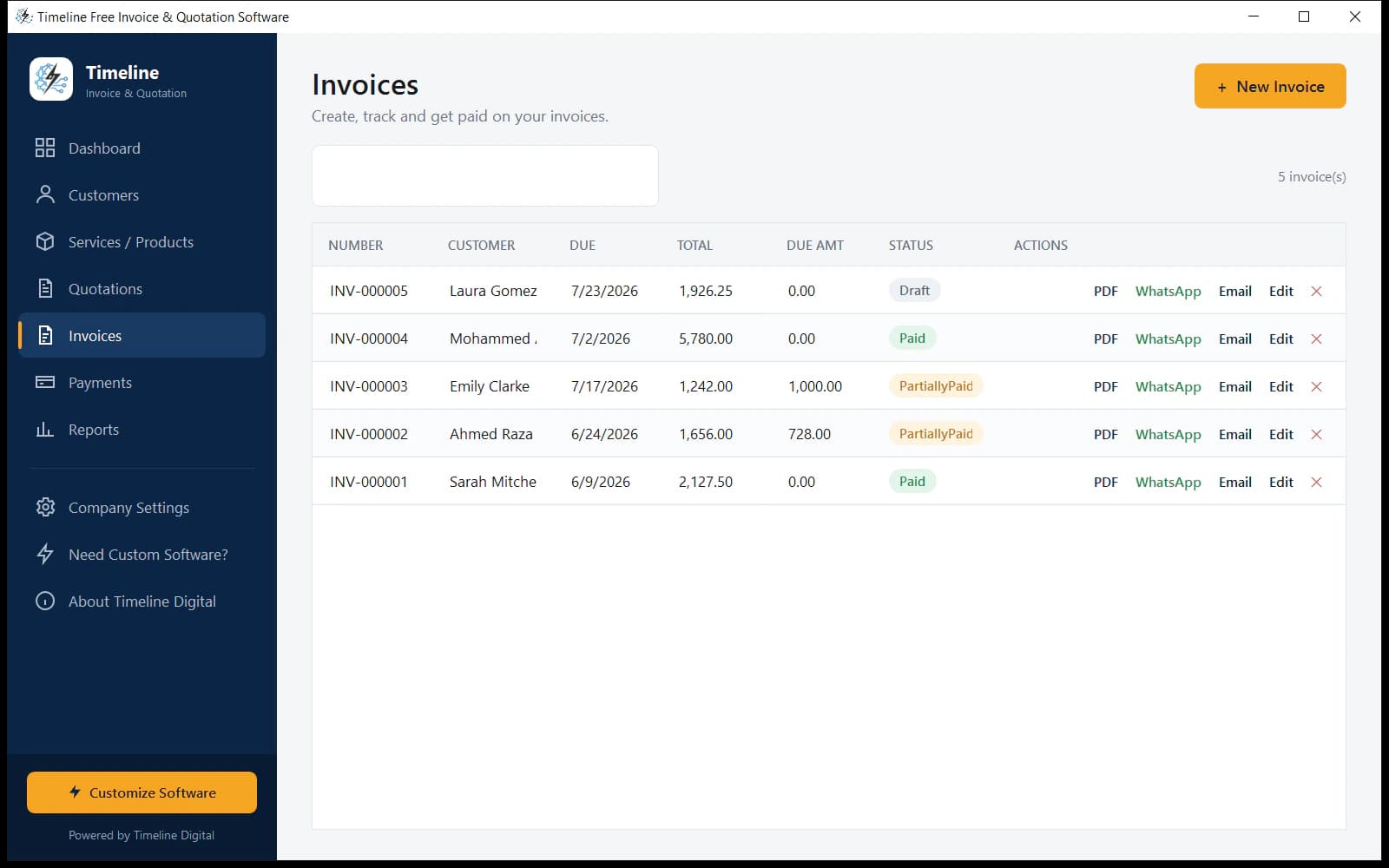
Every invoice row has PDF, WhatsApp and Email buttons. One click creates a professional PDF with your logo, tax summary and totals, then opens WhatsApp or your email app with a pre-filled message (invoice number, amount, due date) ready to send.
Step 8: Record payments and track balances
When money arrives, go to Payments and press Pay next to the outstanding invoice (or Record Payment). Enter the amount, full or partial, and the invoice’s paid, due and status update automatically.
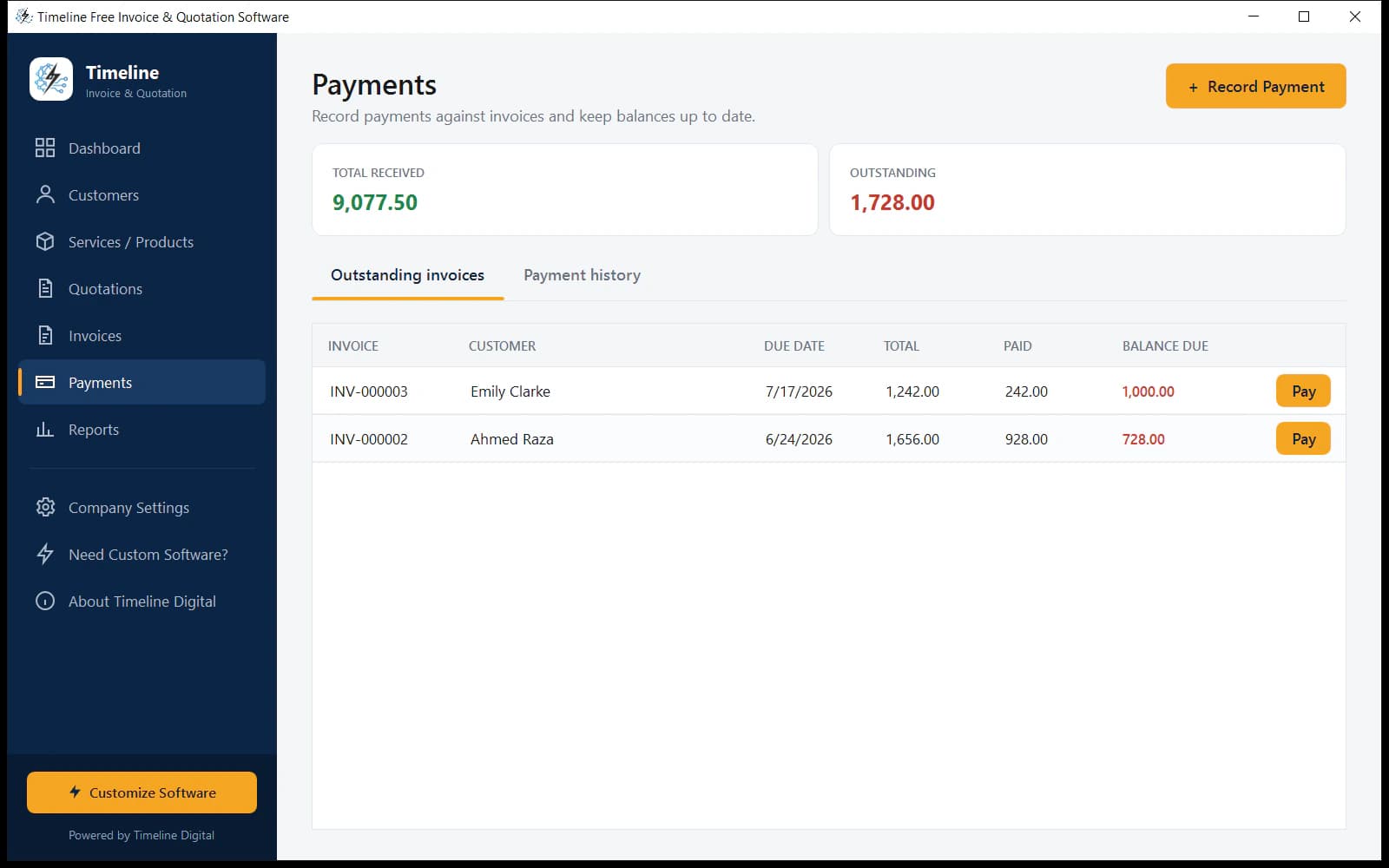
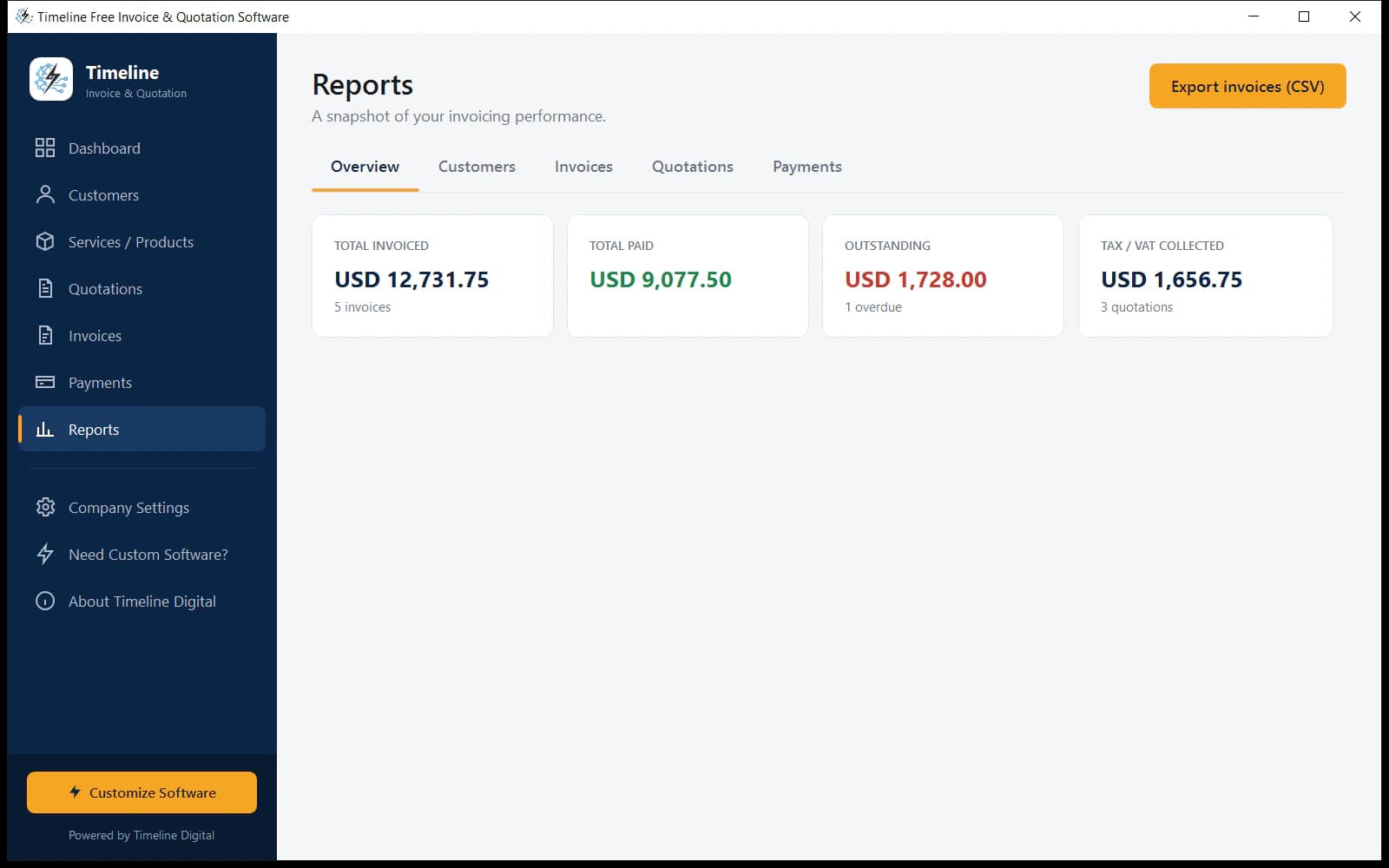
Step 9: Watch your business on the Dashboard & Reports
The Dashboard shows totals, outstanding money and recent documents at a glance. Reports breaks it down by customer, invoice, quotation and payment, and exports to CSV. A full backup of all your data (ZIP) is one click away in Company Settings → Data & backup.
Free offline software vs. online invoice tools
The same daily invoicing jobs, without the monthly bill or the account.
| Timeline Invoice (free) | Typical online invoicing tools | |
|---|---|---|
| Price | Free forever | $10–$35 per month |
| Works offline | Yes, fully | No |
| Sign-up required | No | Yes |
| Your data stored | On your PC | On their servers |
| Invoice limit | Unlimited | Often capped on free plans |
| Quotations included | Yes + 1-click convert | Often a paid feature |
| Branded PDF export | Yes | Often a paid feature |
| WhatsApp sharing | Yes | Rare |
| Countries & currencies | 199 | Varies |
What's included free, and what we build on request
The free version is complete for daily invoicing. When your business needs more, Timeline Digital builds it around your exact workflow. That's our business, and why the software is free.
| Included FREE | Available as CUSTOM build |
|---|---|
| Unlimited invoices & quotations | Client portal |
| Customers & product catalog | Recurring invoices |
| Payment tracking & balances | Online payments (cards, gateways) |
| Branded PDF export with logo | Multi-user roles & permissions |
| WhatsApp & email sharing | Cloud sync & mobile app |
| Reports + CSV/ZIP data export | CRM & website integration |
| Flexible VAT/GST/tax, 199 countries | Advanced tax reports, branches, workflows |
Frequently asked questions
What is free invoice software?
Free invoice software is a program that lets a business create invoices, quotations, customer records and payment tracking without paying monthly fees. Timeline Invoice is a free Windows version: unlimited invoices, branded PDFs, payment tracking and reports, fully offline, with no subscription or account. You download one 56 MB installer, enter your company details once, and can send your first invoice the same day.
Is Timeline Invoice really free? What's the catch?
Yes, completely free. No trial period, no invoice limit, no watermark, no subscription. There's no catch: Timeline Digital offers the software free and earns by building custom versions for businesses that need advanced features later, such as client portals, online payments or multi-user access. If you never need those, the free version simply keeps working forever, exactly as it is.
Is free invoice software good for small businesses?
Yes. For most small businesses it covers everything needed: professional invoices, quotations, customer records, payment tracking and PDF export. Timeline Invoice adds offline privacy (your data stays on your PC) and zero monthly cost, where a typical online tool charges $10–$35 every month for the same daily work. Businesses that outgrow it can upgrade to a custom version without losing anything.
Can I create quotations and invoices in the same software?
Yes. Timeline Invoice is free quotation and invoice software in one app: send a quote, then convert it to an invoice in one click when the client accepts. Line items, taxes and terms carry over automatically, and the quotation is marked as converted so nothing is billed twice. Both document types share the same customers, item catalog and automatic numbering, so nothing is retyped between them.
Can I download free invoice software for Windows?
Yes. Timeline Invoice is a free download for Windows 10 and 11 (64-bit). The installer is about 56 MB, needs no admin rights, and bundles everything required, with no account, no internet and no extra software needed to start invoicing. Download the setup file from this page, run it, and the app opens from your Start Menu or desktop shortcut in under a minute.
Does it work without internet?
Yes, it is 100% offline. Invoices, quotations, customers, payments, PDFs and reports all run on your computer without internet. You only go online if you choose to share a document by WhatsApp or email. That makes it dependable in shops with weak Wi-Fi, on job sites, while travelling, anywhere an online invoicing tool would lock you out of your own records.
Do I need to create an account?
No. Download, install, and start invoicing. No sign-up, no email required, no password to remember. Because everything is stored on your own computer, there is no server to register with and nothing to log into, and the app opens straight to your dashboard. Your business records are never tied to an online account that could be locked, expire or change its pricing.
Can I add my company logo and VAT/GST/tax to invoices?
Yes. Upload your logo once and it appears on every invoice and quotation PDF with your company details and tax number. Tax is flexible: set a default VAT/GST/sales-tax rate, override it per line item, or use no tax, and it works for any country's system. Each document also prints a clear tax summary, so clients see exactly what was charged and at which rate.
Can I export invoices as PDF?
Yes. Every invoice and quotation exports to a clean, branded PDF in one click, showing your logo, customer details, line items, tax summary, totals and terms. Save it, print it, or share it directly by WhatsApp or email. The layout is a standard professional format that opens correctly on phones and desktops, so clients can read it anywhere without any special software.
Can I send invoices through WhatsApp or email?
Yes. Every invoice and quotation has one-click WhatsApp and email buttons that open a pre-filled message with the document number, amount and due date, with the PDF ready to attach. Sending happens from your own WhatsApp or email account, so clients see the message coming directly from you, and the app never sends anything on your behalf in the background.
Which countries and currencies does it support?
199 countries. Selecting your country sets the matching currency automatically (you can still change it): PKR, USD, GBP, EUR, AED, SAR, INR, CAD, AUD and 150+ more. The right currency symbol and format then appear on every invoice, quotation, payment record and report, and the flexible tax settings cover VAT, GST and sales-tax systems, so nothing is hard-coded to one region.
Where is my data stored? Is it private?
All data is stored locally on your computer in a private database. Nothing is uploaded to any server. You can export a full backup (ZIP of CSV files) anytime from Company Settings → Data & backup, and use it to restore your records or move them to another PC. No one at Timeline Digital can see your invoices, customers or prices, because the software has no remote access at all.
What is the difference between invoice software and billing software?
Invoice software creates and tracks individual invoices for products or services. Billing software is broader, and can also cover recurring charges and account statements. For most small businesses the terms overlap, and Timeline Invoice handles both jobs: invoices, quotations, payment tracking and reports in one free app. If you specifically need automatic recurring billing on a schedule, Timeline Digital offers that as a custom build.
Which Windows versions are supported? What about Mac or mobile?
Windows 10 and Windows 11 (64-bit), and everything needed is bundled in the installer, with no extra runtimes to download. The free version is Windows-only; Timeline Digital builds custom Mac, web and mobile versions on request. Any ordinary desktop or laptop from the last several years runs it comfortably, and there are no special hardware requirements beyond a standard Windows PC.
When should I upgrade to a custom version? Can I add online payments, recurring invoices, or a client portal later?
Upgrade when your workflow outgrows one computer: several users, online payments, recurring invoices, a client portal, cloud backup or mobile access. Timeline Digital builds those as paid customizations on top of the same software, so you lose nothing by starting free. Your existing customers, items and invoices carry over into the custom version, and the free app keeps working while yours is being built.
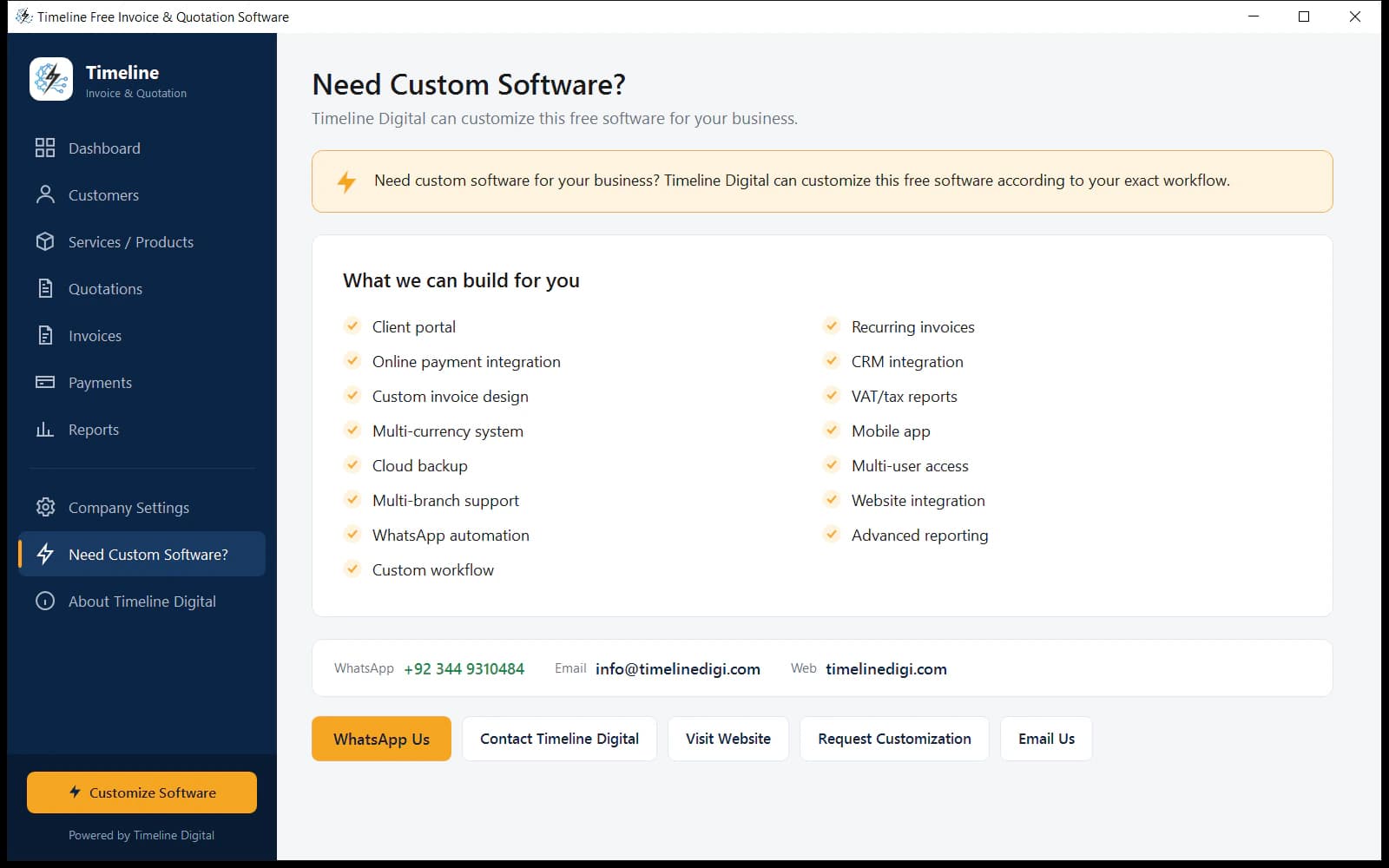
Need more than invoicing?
Timeline Digital can customize this software around your exact workflow.
The free version covers invoicing end-to-end. When you’re ready for more, we build it:
Questions? Message us on WhatsApp or send a brief through our contact form.
Free download
Start invoicing in the next 5 minutes, free.
Professional invoices and quotations, offline on your Windows PC, with nothing to pay and no account to create.
Last updated July 2026 · v1.0.0 · 56 MB · Windows 10/11 · Free forever
Powered by Timeline Digital, custom software that runs your business. Building software since 2013.