From appliance dealers in Batangas to phone shops in Cebu and motorcycle dealers in Davao, hulugan is how Filipino retail runs: a down payment today, then weekly or monthly hulog until the balance is paid. What breaks it is record-keeping — the notebook, the missing resibo, the customer who says "bayad na ako no'ng isang linggo." This page shows how to run hulugan on proper software, free, with real peso examples.
Sino ang para dito? (Who is this hulugan software for?)
Timeline Free Installment Manager (v1.6.0, by Timeline Digital) fits Filipino businesses that offer in-house installment:
- Phone and gadget shops — a ₱18,000 phone on 7 monthly hulog
- Appliance dealers — ref, washing machine, aircon, TV on 6–12 month terms
- Motorcycle dealers — underbones and scooters on weekly or monthly hulugan, with co-maker
- Furniture stores and general merchandisers — sala sets, beds, kitchen packages
- Sari-sari-adjacent retailers — small shops that extend gadget or appliance hulugan to suki customers in the neighborhood
Choose Philippines in the 2-step setup and the whole app switches to ₱ automatically, with your preferred date format. It installs in under a minute on Windows 10/11 (about 90 MB) with no email or login.
Paano gumawa ng hulugan plan? (₱18,000 phone example)
A suki wants a phone with a total hulugan price of ₱18,000:
| Item | Amount (PHP) |
|---|---|
| Phone — total hulugan price agreed | ₱18,000 |
| Down payment ngayon | ₱4,000 |
| Balance sa hulugan | ₱14,000 |
| Monthly hulog | ₱2,000 × 7 |
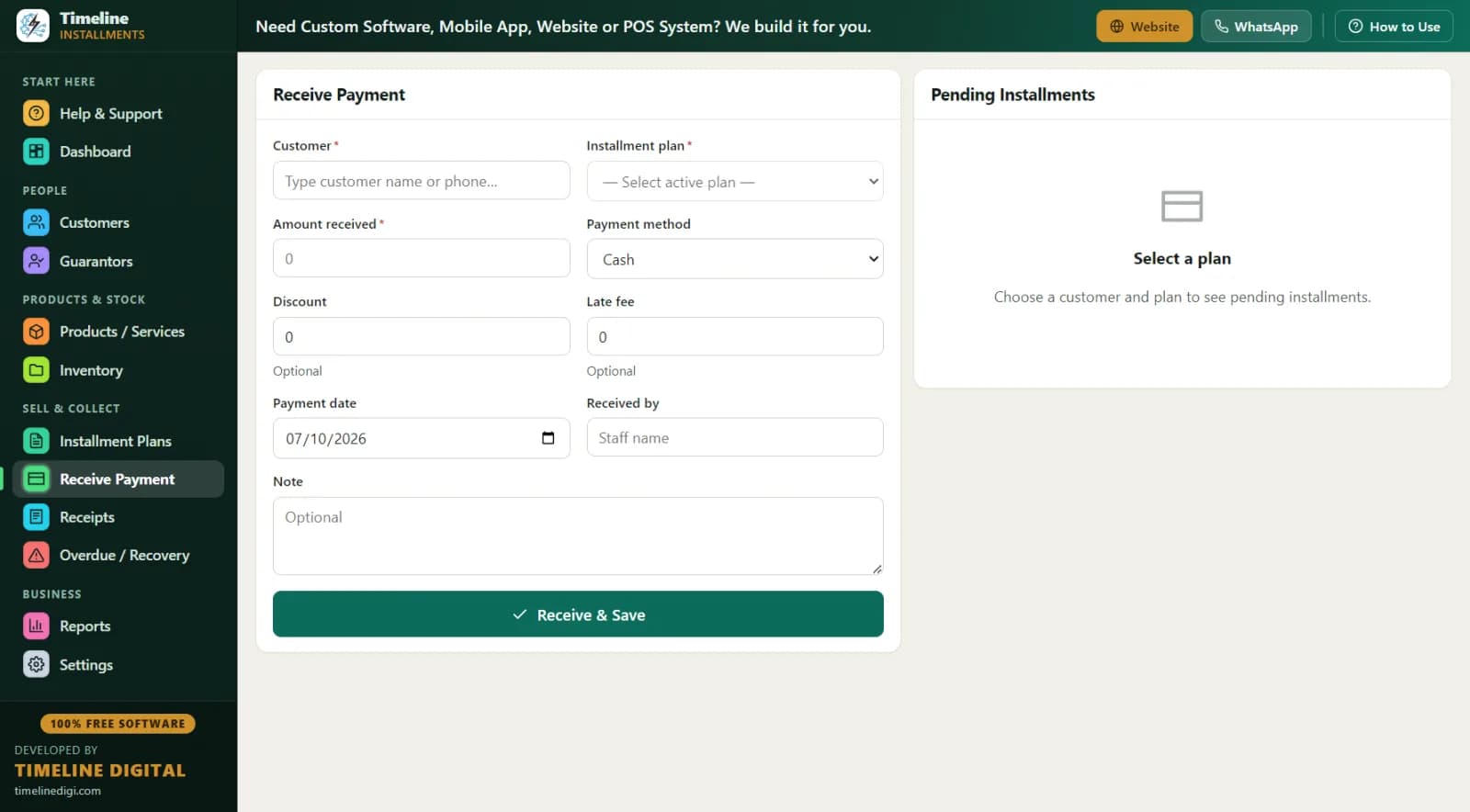
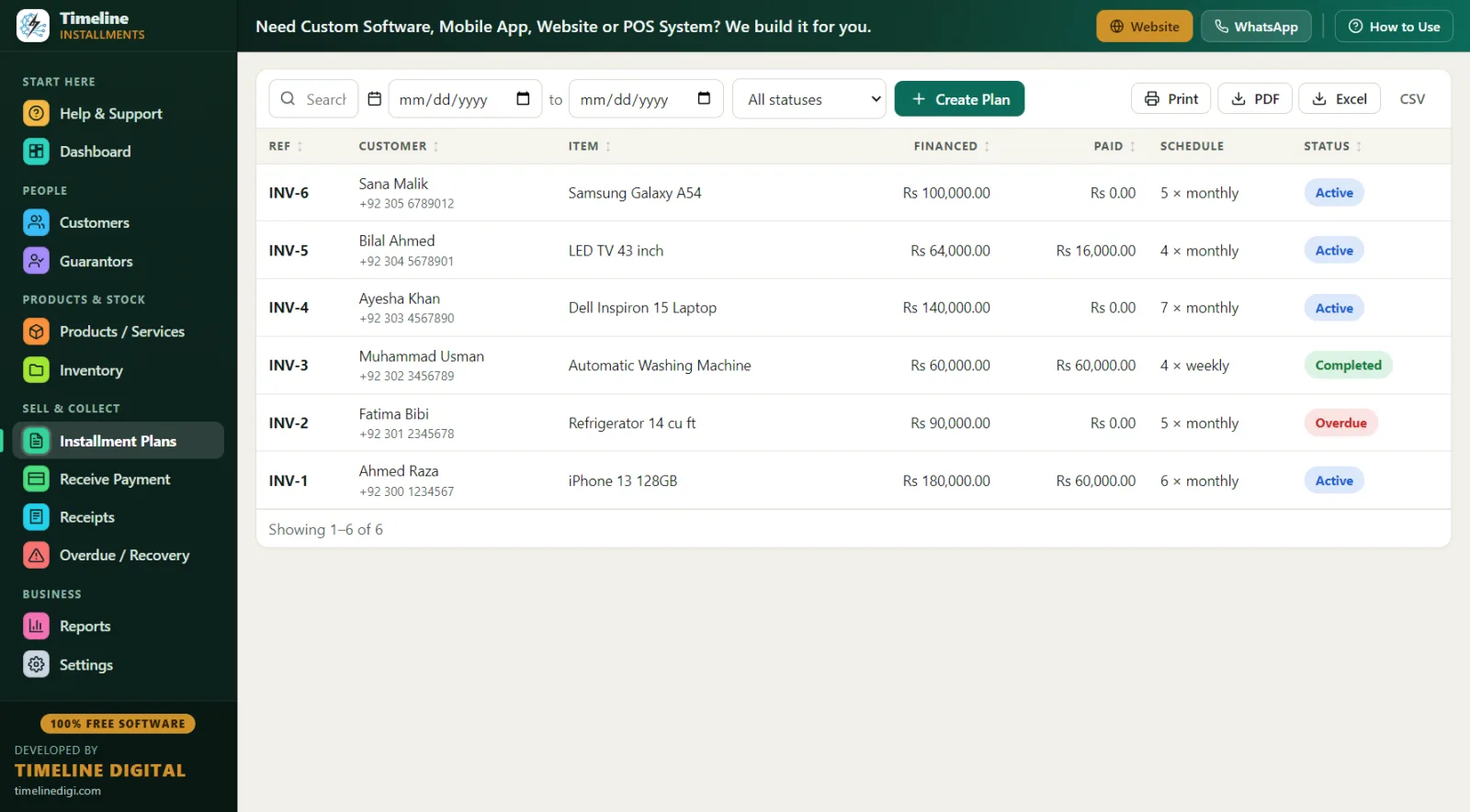
In the software: type-to-search the product, click "New Customer" to create the customer and plan in one save, set monthly frequency, and check the live schedule preview — the customer sees all 7 due dates before anything is final. The ₱4,000 down payment is automatically recorded as the first payment with a printed resibo, the plan gets a reference like INV-1, and stock drops by one for tracked products (with low-stock alerts when inventory runs thin). The warranty field keeps the phone's warranty on record too.
There's no interest engine — you set the total hulugan price yourself (cash price or a higher installment price, your call as the negosyante) and the software splits and tracks it. Weekly and even daily plans work the same way, so a tricycle driver paying ₱500 weekly fits as easily as an office worker paying ₱2,000 monthly.
Paano ang koleksyon at resibo? (Receiving payments)
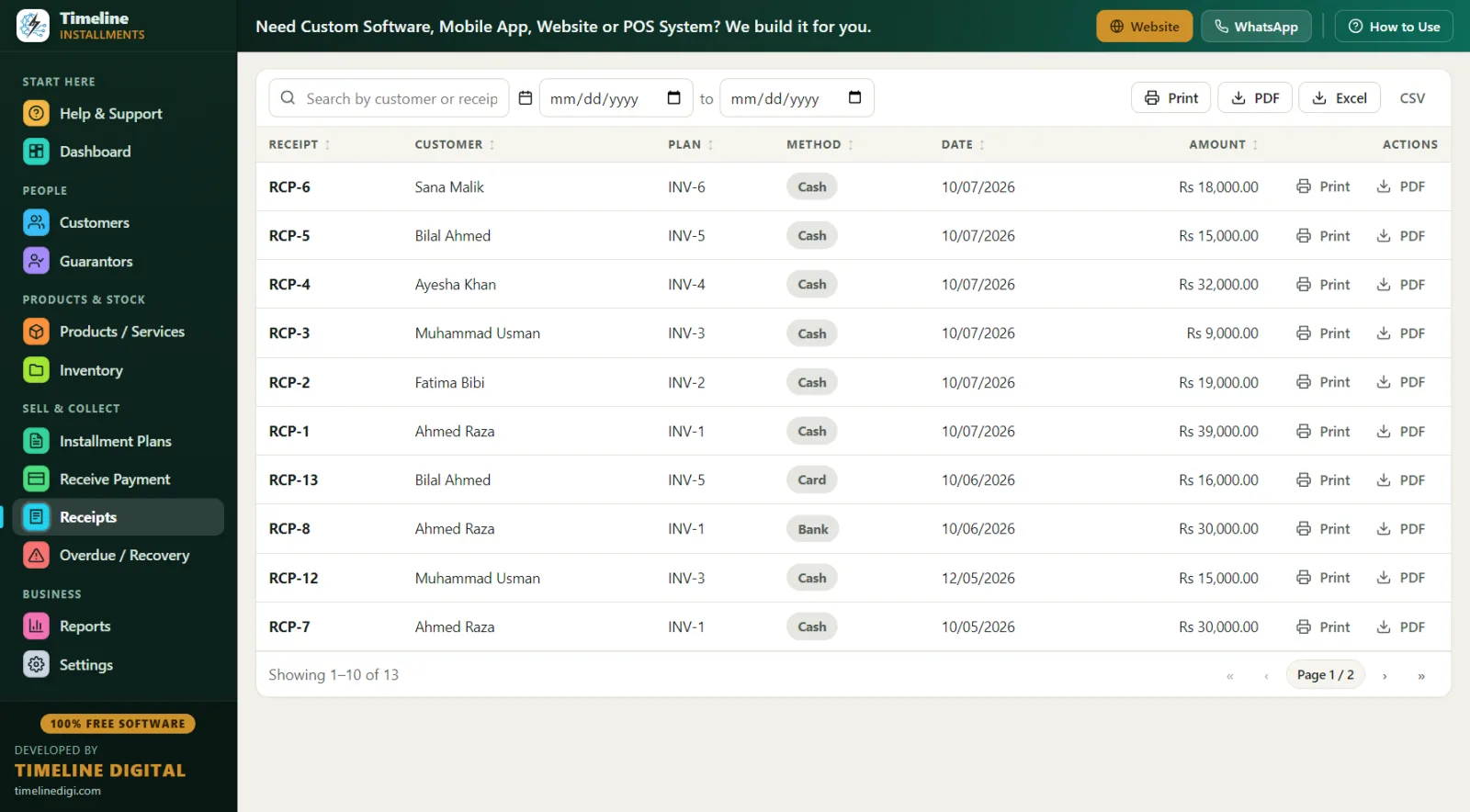
Collection day is where the software earns its keep. Open Receive Payment, search the customer, and the next hulog due auto-fills. Record the method — cash, bank, card, online or other. GCash-style e-wallet payments go under "online", with the reference number typed into the notes. Every payment prints (or PDFs) a branded resibo on any Windows printer: your logo, shop contact, plan reference, the item, the amount in big numerals, "Installments Paid 3 of 7", the remaining balance, signature lines and an editable terms footer — in English, Tagalog or both.
Partial payments are handled the Filipino way, because life happens: a customer who can only give ₱1,200 of a ₱2,000 hulog has it applied to the oldest amount due first, with the shortfall visible. Early-settlement discounts count toward closing the plan, so "tapusin na natin, bawas ₱500" closes cleanly.
Paano habulin ang mga late? (The barangay-level recovery angle)
Hulugan recovery in the Philippines is neighborhood work. You don't send a collections agency — you know the customer's barangay, you know their co-maker, and often the kagawad knows everyone involved. The software is built for exactly that:
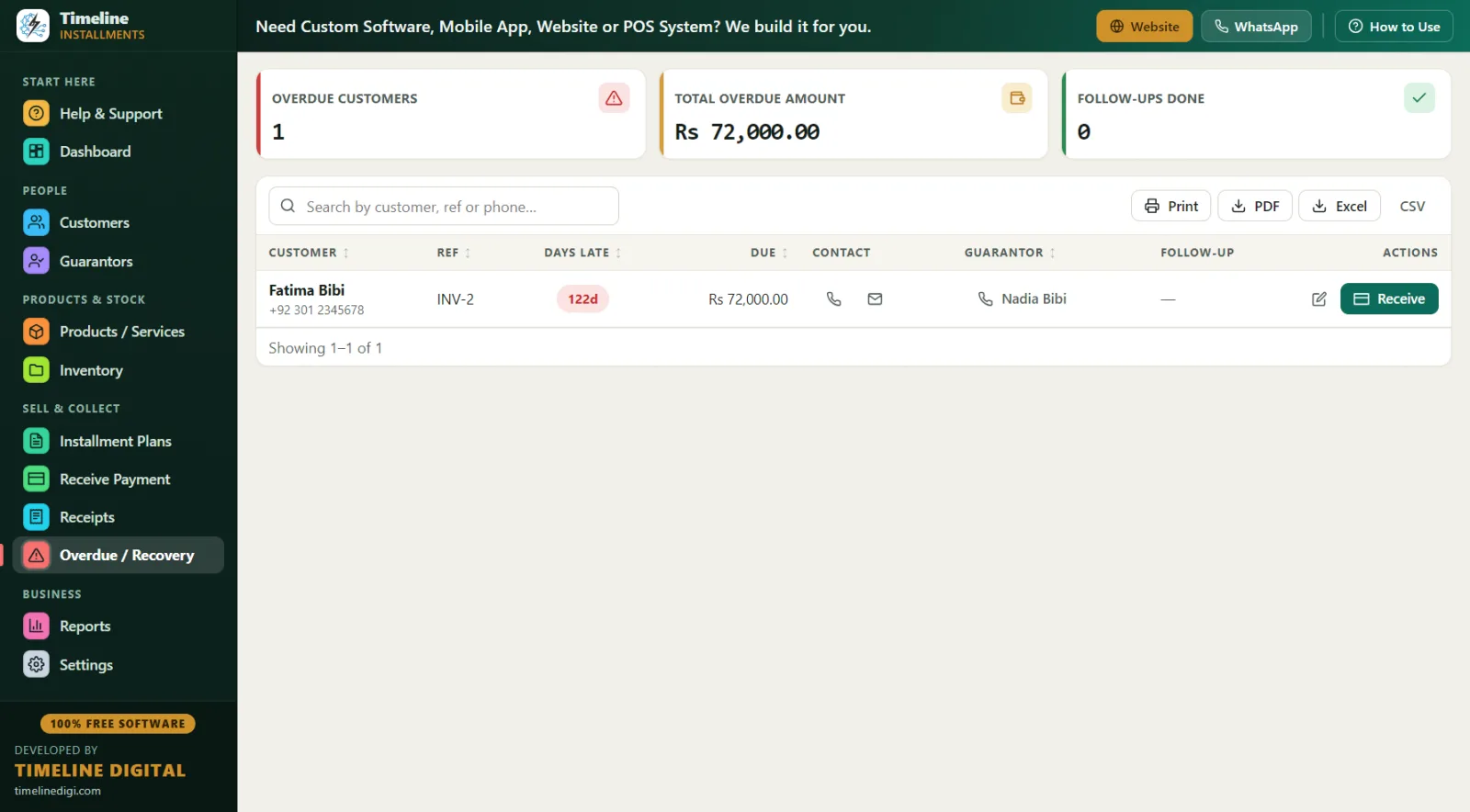
- Overdue screen — plans flip to overdue automatically; you see days late, amount, the customer's phone, the co-maker's (guarantor's) contact, and your follow-up notes ("nag-usap kami sa tindahan, babayaran sa Sabado")
- Customer records — city and full address fields put the barangay and street on file at sale time, when everyone is smiling, not at recovery time
- Guarantor/co-maker per plan — name, relation, phone and ID, linked to the specific plan
- Area Wise report — receivables grouped by city/area, so a collection round through two or three barangays is planned on paper before you leave the shop
- Next 30 Days Recovery report — due date, customer, phone, city, reference, item, amount: your week's reminder list for text and Messenger follow-ups before dates are missed
For the ID field, use whatever the customer carries: PhilSys National ID, passport or driver's license — choose the ID type and enter the number. Name and phone are the only required fields.
Isang araw sa buhay ng appliance dealer (A day in the life)
8:30 am — Open the shop in Batangas City. Dashboard shows today's expected collections; print the Daily Collection list — nine customers due.
9:15 am — First GCash-style payment arrives with a screenshot on Messenger. Receive Payment, amount auto-fills, recorded under "online" with the reference in notes, PDF resibo sent back. One minute.
11:00 am — Walk-in sale: a washing machine at ₱22,000 total hulugan price — ₱5,000 down, ₱1,700 monthly for 10 months. Customer's kapitbahay signs as co-maker, recorded with phone and ID. Down payment resibo printed, schedule handed over.
2:00 pm — Brownout. Walang problema — the software is fully offline, and when the power returns everything is exactly as saved. No cloud, no login, no lost session.
4:00 pm — Overdue check: three accounts. One paid over the phone after a friendly text; one co-maker contacted; one flagged for a pasyal to their barangay on Saturday — address is on file. Notes saved on each.
6:30 pm — Run Next 30 Days Recovery for the week's reminders, one-click Backup to a USB drive, close up.
Notebook vs libreng hulugan software
| Notebook / kwaderno | Timeline Free Installment Manager | |
|---|---|---|
| Presyo | ₱50 | ₱0 — libre habambuhay |
| "Sino ang due ngayon?" | Basahin lahat ng pahina | Dashboard + Daily Collection report |
| Patunay ng bayad | Sulat-kamay, madaling pagtalunan | Naka-print na resibo: RCP number, "Paid X of Y", balanse, pirmahan |
| Listahan ng late | Kailangan tandaan | Awtomatiko — days late, halaga, telepono, co-maker |
| Sunog, baha, nakaw | Wala nang record | I-restore mula sa USB backup sa ilang minuto |
| History ng suki | Nakakalat sa lumang kwaderno | Buong history bawat customer, isang click |
| Month-end na kwenta | Oras-oras sa calculator | Monthly Collection report, instant, export sa Excel |
Best practices para sa hulugan business
- Laging may down payment. Around 20–25% (₱4,000 sa ₱18,000) filters serious buyers; it's auto-receipted as the first payment.
- Kumuha ng co-maker sa malalaking item. Motorcycles and aircons deserve a co-maker linked to the plan with phone and ID.
- Kunin ang address hanggang barangay level. At sale time, not recovery time. The Area Wise report pays you back later.
- Itapat ang due date sa sweldo. Kinsenas at katapusan — set hulog due on the 16th and 1st. The live schedule preview confirms every date before saving.
- Resibo sa bawat piso. Even a ₱1,200 partial. "Installments Paid X of Y" on paper ends most tampuhan.
- Mag-remind bago ang due date. Run Next 30 Days Recovery weekly; text or message two days ahead. Recovery by reminder is cheaper than recovery by visit.
- Gamitin nang maingat ang late fee. Fixed or percentage of the remaining balance, per plan — set it, but consider waiving for suki who communicate.
- Mag-backup linggo-linggo. One click, with reminders; keep the USB at home. Practise first in Sample Data mode with the in-app 6-step quick start and the How-to-Use drawer on every page.