Updated April 2026 · USA Restaurant Owners · 6 Options Compared

Cheapest POS System for Restaurant

Free POS System for Restaurants — No Monthly Fees Ever

Most restaurant POS systems charge $69–$165/month before transaction fees. Timeline POS charges $0 per month, $0 per transaction, and $0 forever. It is a Windows desktop app built for US restaurants — menu management, order billing, inventory, sales reports, and full sales tax support. Download it free today.

$0 / month — forever $0 transaction fees Works 100% offline No contracts or lock-in 4.8★ · 203 reviews
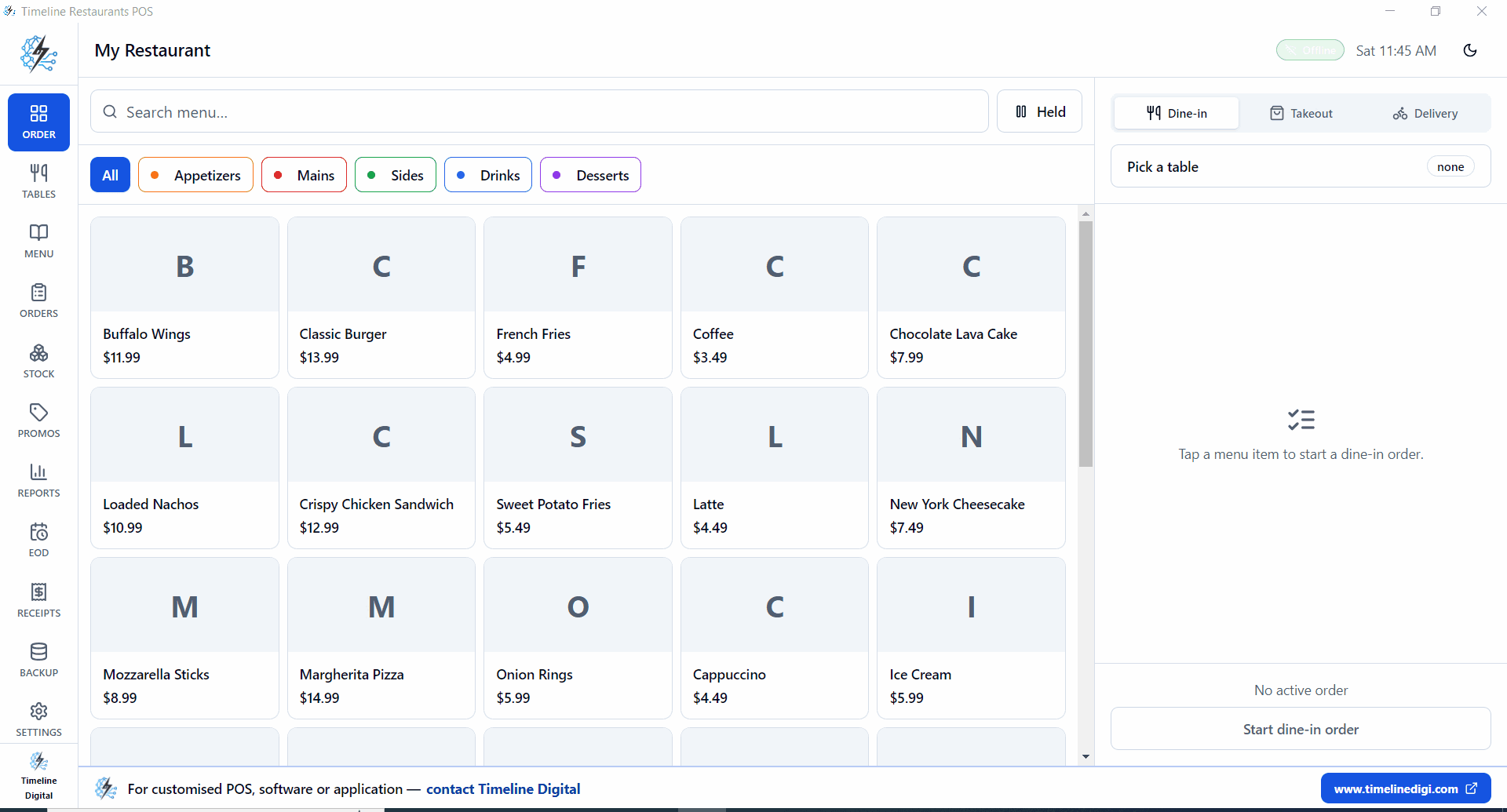
Cheapest POS system for restaurant USA — Timeline POS free dashboard
100% FREE

Short Answer

The cheapest POS system for a restaurant in the USA is Timeline POS: $0 per month, $0 in transaction fees, no subscription, no processor contract. It runs on any Windows computer you already own and works fully offline. The next cheapest options are Square for Restaurants (free software, but 2.6% + 10¢ per card transaction) and Loyverse (free software, ~1.69% processing via SumUp). Toast charges $0–$165/month plus processing fees and locks you into a 2-year contract. Clover locks you into a 3-year processor contract. The only restaurant POS with a true $0 total cost is Timeline POS.

Why Most Restaurant POS Systems Cost More Than They Should

Restaurant owners in the USA are often sold on a POS system’s “low” monthly fee and miss the real cost. Here is what the pricing actually looks like.

Monthly Software Fees

  • Toast: $0–$165/month
  • TouchBistro: $69+/month
  • Lightspeed Restaurant: $69+/month
  • Clover: $14.95–$84.95/month
  • Timeline POS: $0

Hidden Transaction Fees

  • Square: 2.6% + 10¢ per swipe
  • Toast: 2.49% + 15¢ per order
  • Clover: 2.3% + 10¢ and up
  • $15k/mo restaurant = $270–$300 in fees
  • Timeline POS: $0 in transaction fees

Long-Term Contracts

  • Toast Starter: 2-year contract
  • Clover: 3-year processor lock-in
  • Early termination fees: $250–$500+
  • Hardware often non-transferable
  • Timeline POS: No contract, ever

A small restaurant doing $15,000/month can save $1,500–$2,100/year by switching from Square or Toast to Timeline POS.

Cheapest Restaurant POS Systems Compared (USA 2026)

Real monthly fees, real transaction fees, and real contract terms. All pricing is current as of April 2026.

POS SystemMonthly FeeTransaction FeeContractRestaurant Features
Timeline POSCheapest
$0 — forever$0 (no processor built in)NoneMenu management, billing, orders, inventory, sales reports, tax support
Square for Restaurants
$0 (Free) / $60 (Plus) / $153 (Premium)2.6% + 10¢ per in-person card swipeNoneMenu builder, table maps, online ordering (paid plan)
Toast Starter
$0 Starter / $69 Point of Sale / $165 Build Your Own~2.49% + 15¢ per transaction2-year contractKDS, online ordering, tip management, staff tracking
Clover Dining
$14.95 – $84.95/mo2.3% + 10¢ and up3-year processor contractTable service, tabs, tips, floor plans
Loyverse POS
$0 base; add-ons $5–$25/moVia Square, SumUp, or Zettle (1.69%–2.75%)NoneMenu, split checks, basic kitchen tickets; advanced features are add-ons
TouchBistro
$69+/moSeparate payment processorAnnual contractTable management, floor plans, menu engineering, staff scheduling

Pricing verified April 2026 for USA merchants. Always confirm current rates with the vendor before purchasing.

Real Monthly Cost for a USA Restaurant

Example: restaurant doing $15,000/month in sales, 70% on card = $10,500 in card transactions, ~140 average tickets per month.

POS SystemSoftware FeeCard Processing FeesTrue Monthly Cost
Timeline POS + bank merchant account$0~1.5% × $10,500 = $157~$157/mo
Loyverse + SumUp$01.69% × $10,500 = $177~$177/mo
Square for Restaurants Free$02.6% + 10¢ × 140 tickets = $287~$287/mo
Toast Starter$02.49% + 15¢ × 140 tickets = $282~$282/mo
Clover Dining (Starter)$14.952.3% + 10¢ × 140 = $255~$270/mo
TouchBistro Essential$69Separate (est. 2.5%+ = $262)~$331/mo

Timeline POS monthly cost assumes a standard US bank merchant rate (~1.5%). Your actual rate may vary. Square, Toast, Clover fees are based on published USA rates as of April 2026.

Savings with Timeline POS vs Square

~$130/mo

~$1,560/yr

Savings with Timeline POS vs Toast

~$125/mo

~$1,500/yr

Savings with Timeline POS vs TouchBistro

~$174/mo

~$2,088/yr

Restaurant POS Features — All Free, All Included

Everything a small or mid-size US restaurant needs to run daily service. No paid upgrades for core features.

Menu & Order Management

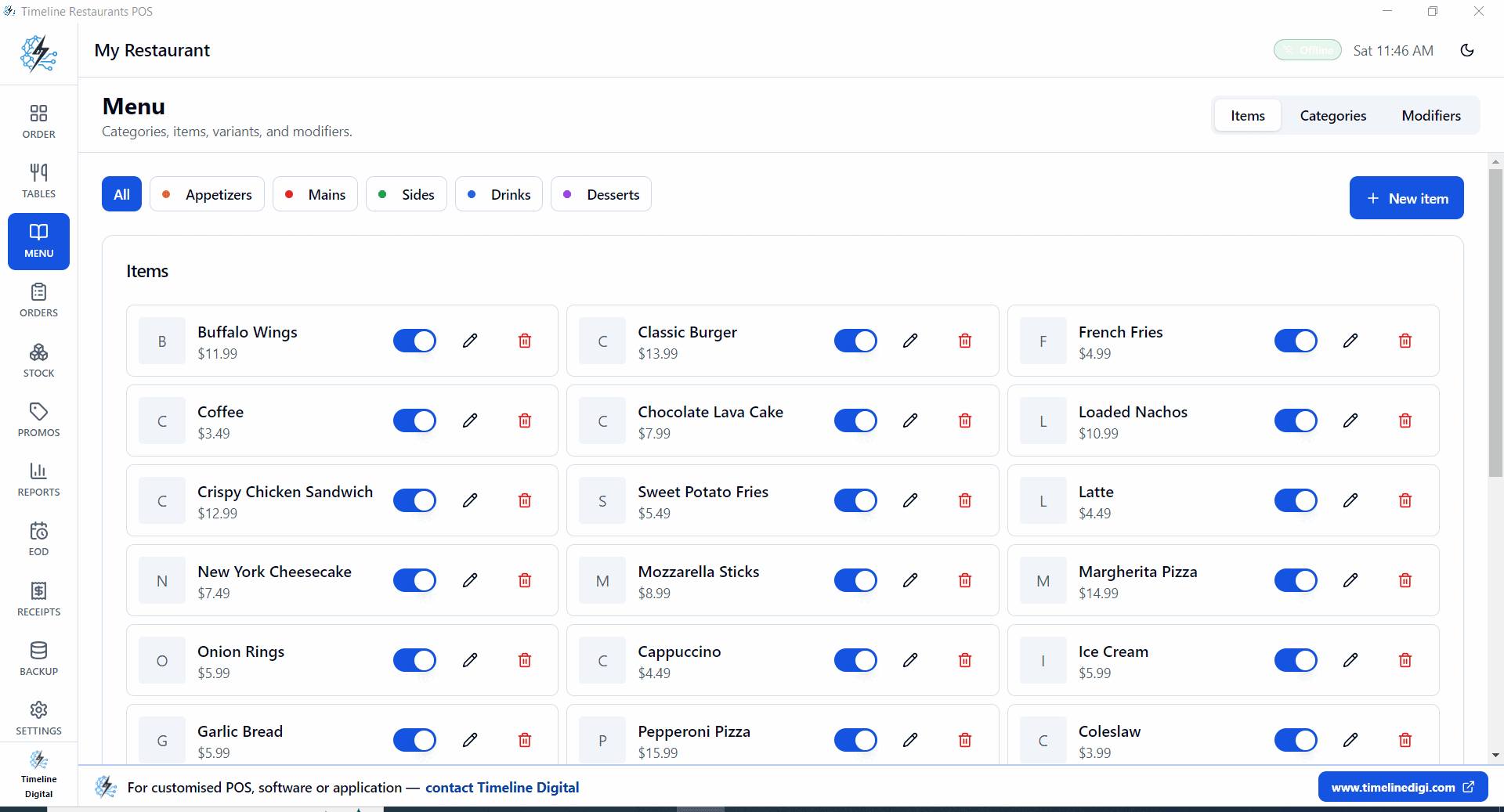
Build your full menu with categories, modifiers, and pricing. Take dine-in and takeout orders on your Windows PC without a cloud subscription.

Billing & Receipts

Print itemized bills instantly. Apply discounts, split checks, and track every transaction with a full billing history.

Inventory Tracking

Track ingredient and product stock levels. Get low-stock alerts before you run out during service.

Sales Reports

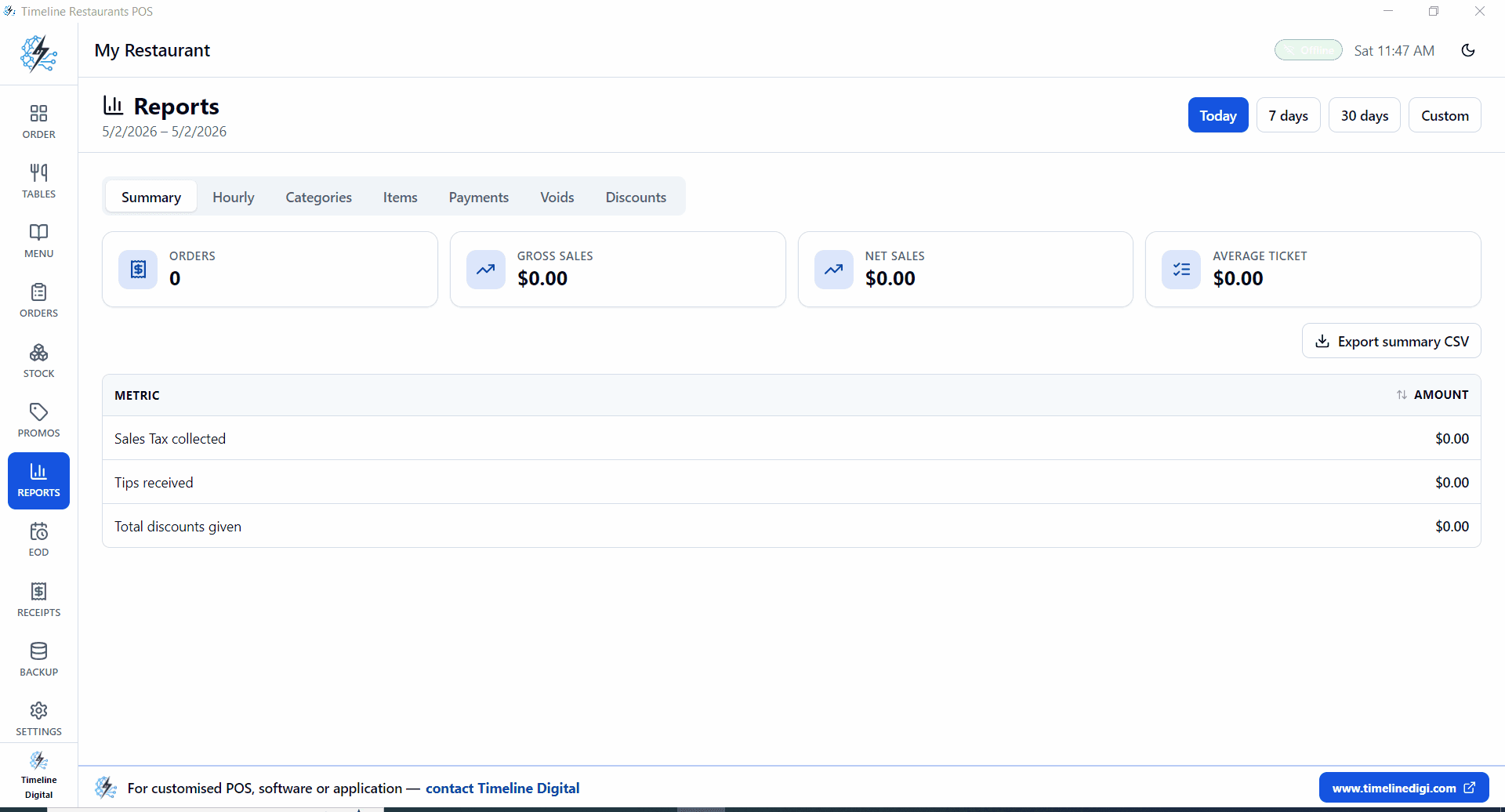
End-of-day, weekly, and monthly reports. See top-selling items, peak hours, and revenue trends at a glance.

USA Tax Support

Set custom tax rates for any US state. Timeline POS calculates sales tax on every transaction automatically.

Works 100% Offline

No internet required. Your restaurant keeps selling during outages. Data is stored locally on your Windows PC.

No Transaction Fees

Timeline POS does not process payments. Use any bank merchant account or card reader you choose — no percentage skimmed.

Fast Setup — Under 10 Min

Download, install, enter your menu, start billing. No configuration wizard, no account setup, no onboarding call required.

Timeline POS order management screen — free restaurant POS USA

Why Timeline POS Is the Best Free Restaurant POS for the USA

Built for US restaurant operations. Not a watered-down version. Not a free trial.

US-Specific Features

  • USD pricing throughout — no currency confusion
  • State-level sales tax configuration (all 50 states)
  • Tipping support for table service restaurants
  • US-format receipts (date, time, tax breakdown)
  • Works on standard US Windows PCs and laptops
  • Compatible with US-standard thermal receipt printers
  • No US payment processor required — use any bank

Best For These US Restaurant Types

  • Pizza restaurants and takeout counters
  • Cafés and coffee shops
  • Diners and family restaurants
  • Quick-service and fast-casual restaurants
  • Food trucks (run on a Windows laptop)
  • Bakeries and dessert shops
  • Food courts and market stalls
  • Ghost kitchens and delivery-only restaurants

The Free Advantage — In Real Numbers

$0

Monthly software cost

$0

Transaction fees taken

$1,500+

Saved per year vs. Square

Restaurant POS Systems: Detailed Breakdown

What each option is actually like to run — including where the hidden costs appear.

1. Timeline POS — Cheapest Overall

Best for USA Restaurants

$0/month · $0 transaction fees · Windows desktop · Works offline

Timeline POS is built by Timeline Digital — a custom software company that has served 200+ enterprise clients across the USA, UK, and Europe. We ship it free because small restaurant owners should not pay $69–$165/month just to ring up an order. It runs on any Windows 10 or 11 PC, stores all data locally (no internet required), and gives you the full feature set with no trial expiry or feature lockout.

Included for Free

  • Menu management with categories and modifiers
  • Order billing and itemized receipts
  • Inventory and low-stock alerts
  • Daily, weekly, and monthly sales reports
  • US state sales tax configuration
  • Unlimited menu items, orders, and customers
  • Offline operation — no internet dependency

Limitations

  • Windows only (macOS on roadmap)
  • No built-in card processor — use your bank reader
  • Visual floor-plan table map is on roadmap
  • No built-in online ordering integration
Download Free Restaurant POS

2. Square for Restaurants — Free Plan

$0/mo (Free) or $60/mo (Plus) · 2.6% + 10¢ per in-person card

Square for Restaurants is the most popular free restaurant POS in the USA. The free plan covers menu management, basic table management, and order workflows on an iPad. The catch: at 2.6% + 10¢ per card transaction, a restaurant doing $10,500 in card sales pays ~$287/month in processing fees. That is your real monthly cost, regardless of the $0 software price. For restaurants with low card volume (under $5,000/month), Square Free remains a solid choice.

3. Toast POS — Starter Plan

$0–$165/mo · ~2.49% + 15¢ per transaction · 2-year contract

Toast is the leading restaurant POS in the USA with full KDS (kitchen display), online ordering, and payroll integrations. The $0 Starter plan sounds attractive but bundles in high processing rates and requires a 2-year contract. On $10,500 in card sales, processing fees run ~$282/month. The $69/month Point of Sale plan lowers processing to a more negotiable rate, but you are now paying $69 + processing. Best for established restaurants where the advanced features justify the cost. Not the cheapest option.

4. Clover Dining

$14.95–$84.95/mo · 2.3% + 10¢ per transaction · 3-year processor contract

Clover has the lowest published transaction fee among the major restaurant POS brands (2.3%). But Clover locks you into a 3-year payment processor contract. Early termination fees can reach $500 or more. The hardware is also Clover-proprietary, so you cannot migrate your terminal to another POS. Read the full contract before signing. For restaurants that can negotiate a good processor rate and want the Clover ecosystem, it can be cost-effective — but it is never “cheap.”

5. Loyverse POS

$0 base · via SumUp/Square (~1.69%–2.6%) · No contract

Loyverse runs on an iPad or Android tablet and is popular with small cafés and quick-service restaurants. The free plan includes menu management, order billing, split checks, and basic kitchen tickets. Employee management and advanced inventory are paid add-ons ($5–$25/month). For card processing, Loyverse integrates with SumUp (1.69% per card in the US) or Square (2.6%), so your processing cost depends on which partner you use. No contract required — cancel anytime.

Free Download · Windows · No Account Required

Download Free POS Software for Your Restaurant

One download. One installation. No subscription form, no credit card, no cloud account. Timeline POS runs on your Windows PC and is ready to take your first restaurant order in under 10 minutes.

  • No cost — free for life$0 forever, no trial expiry
  • No transaction feesUse any card reader or merchant account
  • Easy 10-minute setupEnter menu items and start billing
  • Works offlineNo internet connection required during service
  • Safe and secure downloadOfficial installer from Timeline Digital
  • No hidden fees or upsellsThe free version is the full version
Timeline POS sales reports screen — free restaurant POS for Windows

How to Get Started in 4 Steps

From download to first order in under 10 minutes. No tech skills required.

1

Download

Click Download Free POS Now. The Windows installer is under 50 MB. No account required.

2

Install

Run the installer on your Windows 10 or 11 PC. Accept the defaults. Done in 2 minutes.

3

Set Up Your Menu

Add your restaurant name, state tax rate, and menu items with categories and prices.

4

Start Billing

Open an order, select menu items, apply tax, and print the receipt. You are live.

Cheapest Restaurant POS — FAQs

Direct answers to what USA restaurant owners ask before choosing a POS system.

What is the cheapest POS system for a restaurant in the USA?

Timeline POS is the cheapest restaurant POS system available in the USA. It costs $0 per month, charges $0 in transaction fees, requires no subscription, and runs on any Windows computer you already own. You use your own merchant account or bank card reader for payments, which means no processor contract and no percentage taken from every sale. For restaurants that want built-in card processing, Square for Restaurants Free is the next cheapest option at $0/month, though you pay 2.6% + 10¢ on every card transaction.

Is there a free POS system for restaurants in the USA with no monthly fee?

Yes. Timeline POS is a completely free restaurant POS for Windows with no monthly fee, no trial period, and no hidden costs. Square for Restaurants and Loyverse also offer free plans, but both charge per-transaction fees (2.6% and ~1.69% respectively) which function as a variable monthly cost. Timeline POS charges nothing because it does not process payments itself — you pair it with any card reader or merchant account you already have.

Can I use a POS system for my restaurant without a subscription?

Yes. Timeline POS has no subscription. You download it once and use it forever at no cost. Most cloud-based restaurant POS systems (Toast, TouchBistro, Lightspeed) require a monthly subscription. Offline desktop POS systems like Timeline POS have no ongoing fees because they store data locally instead of in a cloud server.

How much does a restaurant POS system cost per month in the USA?

Restaurant POS costs range from $0 to $165+ per month in software fees, plus 1.5%–2.75% in payment processing on every card transaction. For a small restaurant doing $15,000/month with 70% on card, the real monthly cost is: Timeline POS ~$157 (bank merchant rate only), Square Free ~$287, Toast Starter ~$282, Clover Dining ~$270, TouchBistro ~$331. Choosing a free POS like Timeline POS can save $1,500–$2,100 per year versus Square or Toast.

Does Timeline POS work for a pizza restaurant?

Yes. Timeline POS supports any restaurant type including pizza shops, cafés, diners, food courts, and quick-service restaurants. You can set up your full pizza menu with toppings and sizes, take orders, print bills, track inventory (ingredients, beverages, supplies), and run daily sales reports. It runs on any Windows PC at your counter.

Can Timeline POS handle table management?

Timeline POS handles order management and billing for any table setup. You can assign orders by table number, track open orders, and print itemized checks per table. Visual floor-plan drag-and-drop table maps (like Toast or TouchBistro) are a feature on the roadmap. For the large majority of small restaurants and cafés, the current order-by-table-number workflow covers all daily operations.

Is there a free POS for a food truck in the USA?

For a food truck, the best free options are: (1) Timeline POS on a Windows laptop — free, offline-capable, no internet required. Pair with a Bluetooth card reader from your bank. (2) Square — free software on an iPad or Android with a $49 Square Reader, but 2.6% + 10¢ on every card sale. (3) Loyverse on an Android tablet with SumUp card reader (~1.69% processing). For strictly offline mobile vending, Timeline POS on a laptop gives you the lowest total cost.

Does Timeline POS support USA sales tax?

Yes. Timeline POS lets you set any tax rate for your state. Whether you are in California (8.68% average), Texas (8.19%), New York (8.52%), or any other state, you enter your exact tax rate and it is applied automatically to every bill. Multiple tax categories for different item types (food, beverage, alcohol) are supported.

What is the difference between Toast POS and Timeline POS?

Toast POS is a cloud-based restaurant POS designed for full-service restaurants. It costs $0–$165/month in software fees plus a mandatory 2-year processing contract at 2.49% + 15¢ per transaction. It includes kitchen display systems, online ordering, and payroll integrations. Timeline POS is a free offline Windows desktop POS with no monthly fee, no transaction fees, no contract, and no cloud dependency. Toast is the better choice if you need kitchen display screens and integrated online ordering. Timeline POS is the better choice if your priority is zero ongoing cost.

Can I use a free restaurant POS offline during internet outages?

Yes. Timeline POS works 100% offline. It stores all data locally on your Windows PC, so internet outages, Wi-Fi problems, or router failures have zero impact on your service. Cloud POS systems like Toast and Square require an active internet connection; they have limited offline modes but eventually freeze or drop data. For reliability during service, a local offline POS is the safer choice.

How long does it take to set up a free restaurant POS?

Timeline POS takes under 10 minutes to set up. Download the installer, run it on your Windows PC, enter your restaurant name, add your menu items and prices, set your tax rate, and start billing. There is no account creation, no payment required, and no onboarding call. Most restaurateurs are processing their first sale within 10 minutes of downloading.

Is a free restaurant POS system safe and reliable?

Yes. Timeline POS stores your data locally on your own computer, which means your sales records, customer data, and inventory never leave your premises. There is no third-party server that can be breached or go offline. For additional safety, back up your database folder to an external drive or cloud storage periodically. Reputable paid POS systems use PCI DSS-compliant cloud servers; the local approach in Timeline POS is a different but equally valid security model for small restaurant operators.