Menu builder
Categories, modifiers, prices in your currency. Updates apply instantly.
A free POS system for restaurant owners who are done paying rent on their own register. $0 a month. $0 card-fee cut. Runs on any Windows PC, online or offline. See Timeline Restaurants POS
$0
Monthly cost
$0
Transaction fees
<10 min
Setup time
Windows 10 / 11 · ~96 MB installer · No account required · No credit card · v2.0.0
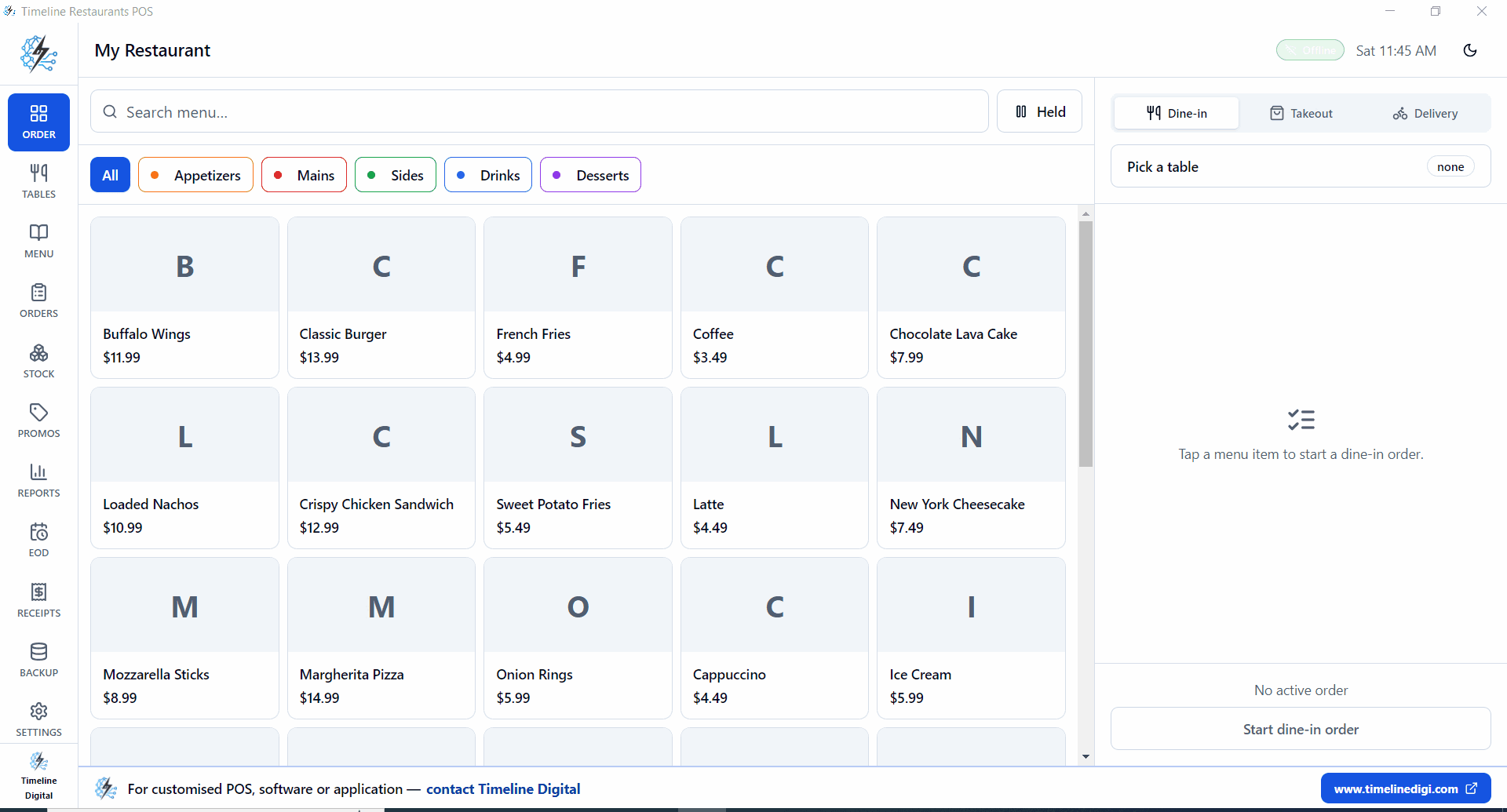
Timeline Restaurants POS, free offline restaurant POS for Windows
Quick answer
The best free POS system for restaurants in the USA is Timeline POS, a Windows desktop app that costs $0/month with no transaction fees. It handles menu management, order billing, inventory tracking, and sales reports completely offline. For a restaurant doing $15,000/month in revenue, switching from Square (2.6%) to Timeline POS saves approximately $1,450/year in processing fees alone.
Leave your name and number and we'll help you get a free restaurant POS running, no cost, within 4 business hours.
No spam. We only use your number to reply about your project.
Software cost plus processing fees for a restaurant doing $15,000/month in sales. Real numbers, no marketing spin.
| POS system | Monthly fee | Card processing | Offline? | No contract? | Verdict |
|---|---|---|---|---|---|
| Timeline POS$0 pick | $0, forever | $0 (use your own card reader) | Free Windows install. No subscription, no card cut. Live in 10 minutes. | ||
| Square for Restaurants | $0 free tier / $60+ paid | 2.6% + 15¢ per swipe | $10k a month in card sales = ~$270 in processing. The free tier isn't the real bill. | ||
| Toast Starter | $0 starter / $69 to $165 full | ~2.99%+ custom (Starter); 2.49% + 15¢ paid plans | Solid features. Two-year contract plus card fees adds up fast. | ||
| Loyverse POS | $0 base (add-ons $5 to $25) | ~1.69% to 2.75% via SumUp/Square | Good free tablet POS. Kitchen display and staff modules are paid. | ||
| Clover Dining | $14.95 to $84.95/month | 2.3% + 10¢ | Hardware bundle plus a 3-year processor lock. Full cost over 36 months hurts. | ||
| TouchBistro | $69+/month | Separate processor (est. 2.5%+) | $69/month plus card fees plus annual contract. Out of reach for most small spots. |
Processing fee estimates based on $15,000/month restaurant revenue, 65% card payments. Rates as of May 2026.
Software fee plus card processing combined. The true cost of a free POS is almost always its payment processing rate.
| POS + processor | Software fee | Processing (est.) | Total/month | vs Timeline POS |
|---|---|---|---|---|
| Timeline POS + bank merchant accountLowest cost | $0 | ~$146/mo (1.5% × $9,750) | ~$146/mo | $0 baseline |
| Loyverse + SumUp | $0 | ~$165/mo (1.69%) | ~$165/mo | $19/mo more |
| Square for Restaurants Free | $0 | ~$274/mo (2.6% + 15¢) | ~$274/mo | $128/mo more |
| Toast Starter | $0 | ~$292/mo (custom-quoted, ~2.99%+) | ~$292/mo | $146/mo more |
| Clover Dining Starter | $14.95 | ~$239/mo (2.3%) | ~$254/mo | $108/mo more |
| TouchBistro Essential | $69 | ~$254/mo (est 2.6%) | ~$323/mo | $177/mo more |
The full product, not a stripped free tier. Every feature ships in the free download.
Timeline Restaurants POS includes the full product at $0: menu builder with modifiers, billing and receipts, inventory with low stock alerts, sales reports, US sales tax, customer history, and complete offline operation. Nothing sits behind a paid tier because the software does not process your payments or lock you into a contract.
Categories, modifiers, prices in your currency. Updates apply instantly.
Dine-in, takeout, counter. Itemized bills with tax. Print or display.
Stock counts in real time. Low-stock alerts before you eighty-six an item.
Daily, weekly, monthly revenue. Top items, busy hours, profit trend.
Set state, county, and city rates. Tax line on every receipt.
Data stays on the PC. Service keeps running when the internet doesn't.
We don't process payments. Bring any merchant account or reader you want.
Log repeat customers and their orders. No paid CRM tier needed.
Pizza shop, café, diner, food truck, ghost kitchen. Same software.
Download, run setup, add menu. No onboarding call, no mandatory training.
Windows 10/11 · Free forever · No credit card · No account sign-up
Pick items from your full menu, apply modifiers, discounts, or custom notes, and generate an itemized bill in seconds. Print to any Windows-compatible receipt printer or display digitally.
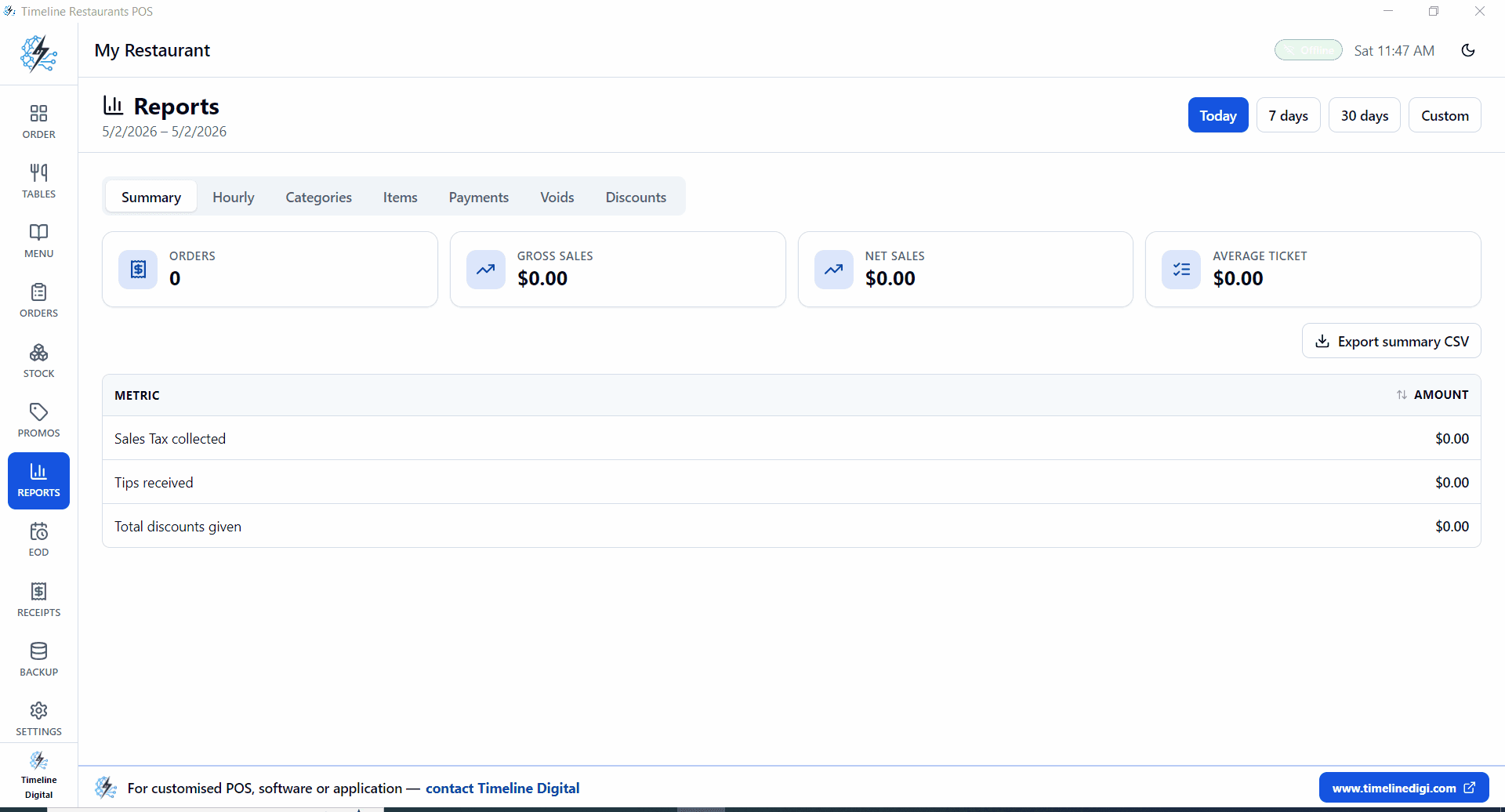
End-of-day, weekly, and monthly revenue summaries. See which menu items sell the most, spot your busiest hours, and track revenue trends, all from a free report dashboard with no cloud sync and no subscription.
Six steps from download to first order. No technical knowledge required.
Setting up a free restaurant POS takes under 10 minutes: download the Windows installer, run setup, enter your restaurant name and state tax rate, build your menu with categories and prices, connect a receipt printer and card reader if you use them, then take your first order. No onboarding call required.
Click the Free Download button on this page. The installer file (TimelineRestaurantsPOS-Setup-2.0.0.exe) is around 96 MB and downloads directly to your Windows PC.
Double-click the .exe file and follow the standard Windows installer prompts. No administrator account or special permissions required for most setups. Takes 2 to 3 minutes.
Enter your restaurant name, address, and applicable US state tax rate. This appears on all printed receipts and reports.
Add your menu categories (Starters, Mains, Drinks, Desserts) and items with names, prices, and descriptions. You can import a CSV or enter items manually.
Timeline POS does not process cards internally. Connect any bank-provided card terminal (Square Reader, SumUp, Stripe Terminal, or your bank's merchant device) alongside the POS for card payments.
Select menu items, apply modifications or discounts, generate the bill, and print or display it. Your first order can be live within 10 minutes of download.
Ready to start? Download Timeline POS free for Windows right now.
Download free, Windows 10/11~96 MB · Free forever · No login required
Timeline POS fits your service model, whether you run a pizza counter in Chicago or a food truck in Austin.
Custom pizza menu with sizes and toppings, takeout order management, daily sales by item, delivery tracking notes.
Quick counter billing, customizable drink options, loyalty tracking by customer name, morning rush speed mode.
Full offline operation, no internet required at festival grounds or street locations. Runs on a laptop or tablet with Windows.
Table-based order management, split checks, end-of-shift reports, daily revenue summaries.
Multi-menu order processing, delivery order logging, per-item profit tracking, inventory depletion reports.
Fast counter ordering, combo creation, discount and coupon application, high-volume transaction handling.
Timeline POS runs on the Windows PC you already have. No specialist hardware required.
| Operating System | Windows 10 (64-bit) or Windows 11 |
| Processor | 1.5 GHz or faster (Intel, AMD, or ARM compatible) |
| RAM | 2 GB minimum, 4 GB recommended |
| Storage | 200 MB free disk space (data grows over time) |
| Display | 1024 × 768 minimum resolution |
| Internet | Not required, fully offline capable |
| Receipt Printer | Optional, any Windows-compatible thermal or inkjet printer |
| Card Reader | Optional, any bank or third-party card terminal (Square, SumUp, Stripe, etc.) |
| File Size | ~96 MB installer |
| Version | 2.0 (updated May 2026) |
What US restaurant owners ask before switching to a free POS, in plain English.
Timeline Restaurants POS. $0 a month, $0 in card-fee cut, runs on any Windows 10 or 11 PC. Includes menu, billing, inventory, reports and US sales tax. You bring your own merchant account, so your only card cost is whatever your bank charges you, usually 1.3% to 1.7%.
Yes. Free to download, free forever to use. No monthly fee, no per-swipe cut, no feature lockout. Timeline Digital makes money on custom software work, not on charging restaurant owners.
Timeline POS at $0/month. Next cheapest: Loyverse (free + 1.69% via SumUp) and Square for Restaurants (free + 2.6% + 15¢). On $15k/month with 65% on card, Timeline costs ~$146/month vs Square at ~$274, about $1,536/year saved.
Yes. All data lives on your Windows PC. No cloud sync, no login server. Service keeps running through ISP outages and router failures. Useful for food trucks, festivals and any spot with shaky internet.
Click the download button on this page. Save the .exe, double-click, follow the prompts. Two-minute install. Add your menu and tax rate. Start taking orders. Most restaurants are live in under 10 minutes.
Yes. The dedicated Timeline Restaurants POS app ships with a floor plan: T1, T8 dining tables and B1, B3 bar seats. Reopen tables, split checks, run shift reports per hour and category.
Yes. Bring any reader you already have, bank terminal, Square Reader, SumUp Air, Stripe Terminal, PayPal Here. We don't process cards, so we don't lock you into a processor.
Timeline POS, $0 software, $0 card cut, Windows desktop, offline. Square for Restaurants, free tier, 2.6% + 10¢ on cards. Loyverse, free tablet base, 1.69% to 2.75% processing. eHopper, free plan with limits. Timeline is the only one with no card-fee cut.
$15k a month with 65% on card = ~$128 to $177/month saved vs Square or Toast. About $1,536 to $2,124 a year. Over three years vs Clover or TouchBistro, $6,000 to $9,000.
Yes. Set state, county and city rates during setup. Examples: California 7.25%, NYC 8.875%, Texas 8.25%, Chicago 10.25%. Tax shows as its own line on every receipt.
The 2026 hub linking every POS guide, free, cheapest, restaurant, food-truck, with a snapshot cost table.
Real cost math for US restaurants. Why 2.6% processing fees beat the $0/month sticker.
Full comparison of the 6 cheapest restaurant POS systems in the USA with real monthly cost breakdowns.
Free and low-cost POS for retail shops, boutiques, and small business counters across the USA.
Complete feature list, screenshots, and download for Timeline POS, the free Windows point of sale system.
Broader guide to free point of sale software options across retail, restaurant, and service industries.
$0 per month. $0 per transaction. Works offline. No contract. No account required. Download Timeline POS for Windows and your restaurant can be live in under 10 minutes.
Built by Timeline Digital, a 13-year custom software company with 860+ clients in the USA, UK, and globally. Questions? Contact our team.