Built for offline
Free offline restaurant POS, no Wi-Fi needed
This free offline restaurant POS runs on local SQLite on a Windows PC, so service keeps going when your ISP doesn't.
v2.0.0 · 96 MB · Single device · No cloud
In 60 seconds
Why offline matters
Cloud POS freezes the second your router reboots. Mid-rush, a frozen screen means a guest waiting at the counter with cash in hand and a manager trying to log into the modem.
A local SQLite file doesn't care about Wi-Fi. The POS reads and writes to the disk. Service keeps running.
Back up at the end of shift to a USB drive. Optional cloud copy via OneDrive or Google Drive. That's the whole pattern.
Four real situations
ISP outage during dinner rush
Comcast goes down. Cloud POS locks the screen. This one keeps ringing up orders. Receipts, reports, EOD all keep working.
Festival or pop-up stall
No router on site. No mobile data. The POS doesn't care. Battery, Windows tablet, USB receipt printer, and you're open.
Rural diner with one bar of LTE
Cloud POS thrashes when bandwidth dips. Local SQLite doesn't. Reads and writes are sub-second regardless of upstream.
Food truck on the move
Park anywhere. Open the laptop. Sell. No tethering, no SIM card, no monthly data plan for the POS itself.
Five-step habit
The reason offline doesn't mean fragile.
- 1
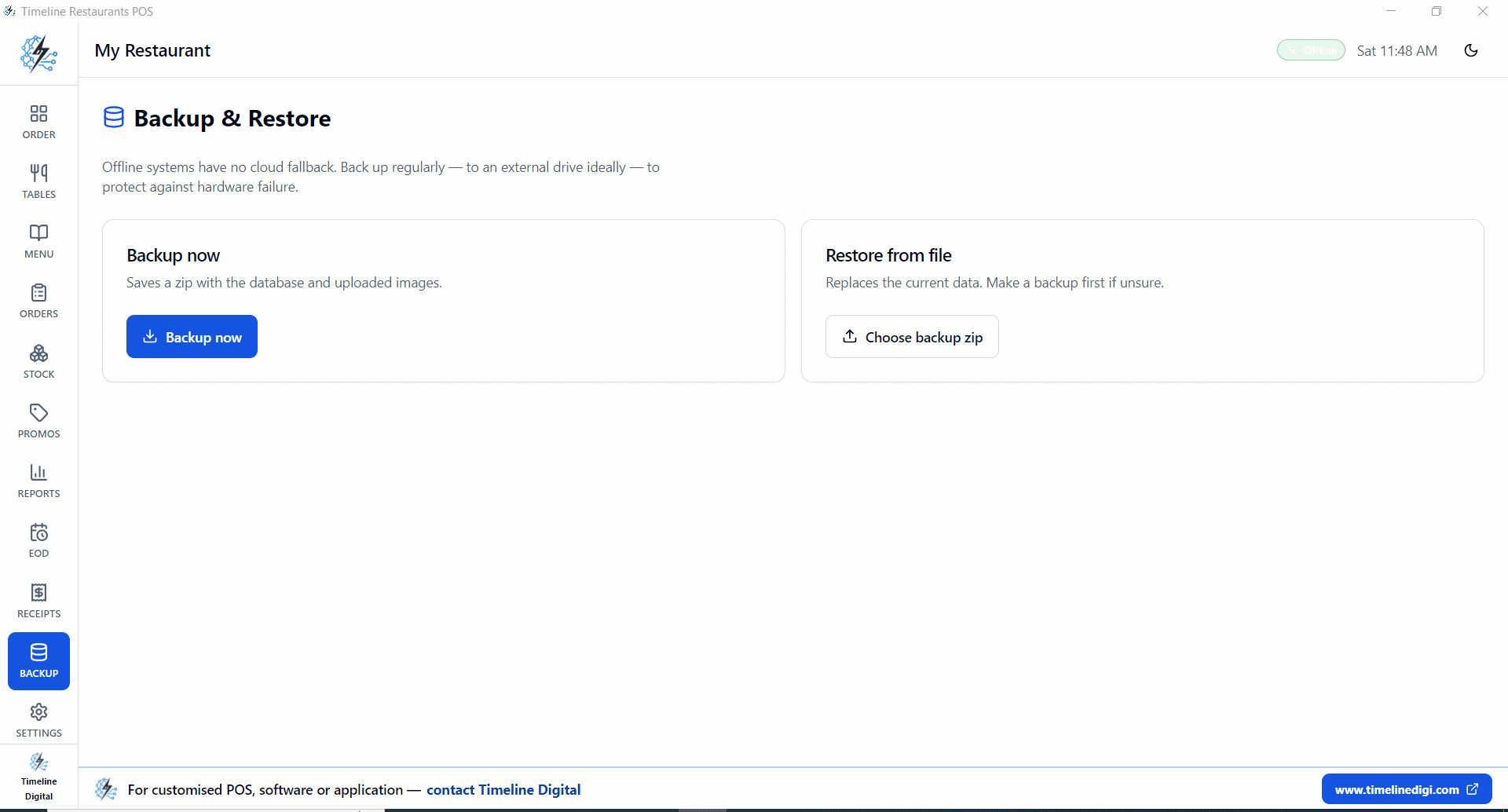
Settings, then Backup, then Backup now. Creates a zip with the SQLite database and any uploaded images.
- 2
Save the zip to a USB stick at the end of every shift.
- 3
Optional: drop the zip into a OneDrive, Google Drive or Dropbox folder for an off-site copy.
- 4
If something goes wrong, Restore from file picks up the zip and reverts.
- 5
Recommended: keep the last 7 daily backups, plus a monthly archive.
Local-first specs
Storage
SQLite file on disk
Internet
Not required
Login server
None
Cloud sync
None (by design)
After the outage
What happens to sales data when the internet comes back?
Nothing needs to sync. Every sale is already written to the local SQLite database the moment you ring it up, so there is no upload queue waiting for a connection. When the internet comes back, the only optional step is copying your latest backup zip to a cloud drive folder.
Most cloud POS systems treat offline as an exception: sales queue up on the device and push to a server once the connection returns, and a device failure before that upload can lose those sales. This POS has no queue because the disk is the primary record. An order rung up mid-outage is stored exactly like an order rung up on a perfect connection, and it shows in reports immediately.
There is no cloud account, no login server, and no sync requirement in the free version. Multi-device sync exists only as a paid custom module, which is part of why the single PC version can stay free.
The one habit worth keeping once connectivity returns: drop your latest backup zip into a OneDrive, Google Drive, or Dropbox folder for an off-site copy. The zip itself is created from Settings, then Backup, online or not. The full feature list behind this build lives on the free restaurant POS system page.
Offline questions
Does it really work with no internet at all?+
Yes. Order entry, payments, receipts, reports, EOD, all of it runs from the local SQLite file on the POS PC. No login server, no sync requirement.
How does card payment work offline?+
Card processing happens on your reader, not the POS. Most modern readers (Square Reader, Stripe Terminal, bank terminals) cache offline payments and submit when connectivity returns. The POS records the sale either way.
What if the PC dies mid-shift?+
If you have a recent backup zip, install on a second PC, restore the zip, and you're back. Recommended habit: back up at the end of every shift to a USB drive.
Can I sync between two POS PCs?+
Not in the free version. The single-device design is what makes it free. Multi-device sync is a paid custom module.
What's the worst case for data loss?+
If the hard drive dies between backups, you lose whatever was rung up since the last backup. With a daily backup pattern that's a single shift at most. Most operators back up to a USB drive at close.
Do I have to re-enter sales after an internet outage?+
No. Orders rung up during an outage are written straight to the local SQLite file, the same place they go when you are online. Nothing sits in a pending state and reports include those sales right away. The only follow-up is your normal end-of-shift backup.
Run service when the router doesn't.
Free offline restaurant POS for Windows.
Download Timeline Restaurants POS