Compared by category, 2026

Best Labor Management Systems in 2026, Compared

Labor is usually the biggest cost you can actually control, and the software that measures it ranges from a free desktop app to a six-figure enterprise rollout. Ranking vendors by name is a trap: the product that wins for a 600-person distribution center is wasted money for a 15-person workshop. This page compares the best labor management systems by category and by who each one fits, so you can match the tool to your floor instead of a review score.

The short answer

The best labor management systems are not one product but four categories, and the right pick depends on your operation. Enterprise systems bundled with a warehouse management suite fit high-volume distribution centers. Standalone labor management platforms suit single large sites. Workforce time and attendance tools cover smaller teams. A custom build fits rules no package matches. Small single-site teams can start with free software.

The Four Categories of Labor Management Systems

There is no single best system, and any list that claims otherwise is selling you something. Every product on the market falls into one of these four buckets, plus a free tier that sits underneath them. The useful question is not which brand ranks first, but which category matches your headcount, your budget, and the rules you have to follow. Get the category right and the shortlist inside it is short.

CategoryWhat it isBest forCost model
Enterprise LMS bundled with a WMSLabor module inside a large warehouse suiteHigh-volume distribution centersPer-project plus per-user license
Standalone labor management platformDedicated LMS that connects to your existing WMSSingle large sites wanting depth without a full suitePer-site or per-user license
Workforce time and attendance softwareScheduling, clock-in, hours and pay for any teamSmaller teams that need hours and rosters, not task standardsPer-user monthly subscription
Custom-built labor management systemSoftware written around your exact rulesOperations a package cannot fitOne-time build fee
Free desktop appOffline attendance, overtime and payrollSmall single-site teams starting outFree

New to the category? Read what a labor management system is for the plain-English definition before you compare.

Each Category, Explained

Enterprise labor management systems bundled with a WMS

An enterprise labor management system that ships inside a warehouse management suite is the heavyweight option. It carries engineered standards, live dashboards and deep cost reporting out of the box, and it is built to run a high-volume distribution center with hundreds of staff. The trade-off is cost and setup: the implementation, including building a standard for every task, often costs more than the software licenses, and it needs industrial-engineering input to configure. For a large operation that already runs the matching WMS, the bundle is the natural fit. For everyone else it is more system than the work requires. The top warehouse labor management systems mostly live in this tier; the warehouse-specific mechanics are covered on our warehouse labor management system page.

Standalone labor management platforms

A standalone labor management platform gives you the same measurement depth without buying a whole warehouse suite. It connects to the WMS you already run, reads task data from it, and adds the standards, scoring and cost reporting on top. This suits a single large site that wants serious labor measurement but does not want to replace a working WMS to get it. The catch is integration: you pay for, and maintain, the connection between two systems from different vendors, so check how cleanly a given platform talks to your existing stack before you sign.

Workforce time and attendance tools

Below the warehouse-specific tier sit the workforce tools: scheduling, clock-in, timesheets, overtime and pay for any kind of team. These are the labor management solutions most small and mid-size businesses actually need, because their problem is accurate hours and rosters, not scoring a pick against an engineered standard. They bill per user per month, which stays cheap for a small team and climbs as you add staff. If you do not run a warehouse, this is usually where a sensible search starts.

When is a custom-built labor management system worth it?

A custom build is the right call when your rules do not fit any packaged product, and that is more common than vendors admit. Think task standards tuned to your own layout, per-client cost-to-serve for a third-party logistics operation, labor data that has to feed straight into job costing, or a mix of attendance, piece-rate and shift rules no template supports. A custom labor management platform costs a one-time build fee instead of a per-user subscription, and you own the result. Timeline Digital has built operations software since 2013 and develops custom labor systems sized to your floor rather than a generic template, including changes built on top of the free app below.

What Is an Enterprise Labor Management System?

An enterprise labor management system is workforce software built for organizations running multiple sites, shifts, and departments on one platform. It combines demand-based scheduling, time and attendance, shift compliance rules, and payroll-ready reporting, and it integrates with WMS, ERP, and HRIS systems so labor data stays consistent across every location.

Enterprise buyers are rarely shopping for a time clock. They need one platform that enforces the same scheduling and approval rules across every warehouse, store, or plant, then rolls the results up into reports leadership can compare site by site. Shift compliance is the hard part at this scale. Break rules, overtime thresholds, and rest periods often differ by state or country, so the system has to apply the right rule automatically and keep an audit trail behind every exception. In distribution operations, WMS integration matters just as much, because productivity targets and engineered labor standards only work when the labor system can read task data straight from the warehouse system.

In the UK the same category is usually written labour management system, and buyers there evaluate an identical feature set: the spelling changes, the comparison does not.

Shopping for labor compliance software?

Many buyers reach this comparison while searching for labor compliance software, and that framing is the right one. The best labor management systems earn their place by applying break rules, overtime thresholds, and working time limits automatically, then keeping the audit trail that proves you followed them. Whichever category you land in, weigh every option against those compliance features first.

How to Compare Labor Management Vendors: 6-Point Scorecard

A fair labor management vendor comparison ignores the logo and checks the same short list of capabilities against your own needs. Score every product on your shortlist on these six points:

1

Task-level standards or only clock hours?

Does it measure task-level standards, or only clock hours? Standards matter for a warehouse; hours are enough for a shop floor.

2

Live performance or next-day reports?

Does it show performance live during the shift, or only in a report the morning after, when the overtime is already paid?

3

Direct vs indirect labor

Does it separate direct labor from indirect labor such as cleaning, meetings and waiting? That split is often where quiet cost hides.

4

Cost by site, shift and client

Can it report cost by site, shift and, for a third-party logistics operation, by client? Without that split you cannot see which work pays.

5

Clean payroll and accounting exports

Does it export cleanly into your payroll and accounting, or lock your data in? Labor data is only useful when finance trusts it too.

6

True annual cost

What does it truly cost per year once setup, licenses and per-user fees are added together? Compare totals, never sticker prices.

The free option

Is There Free Labor Management Software?

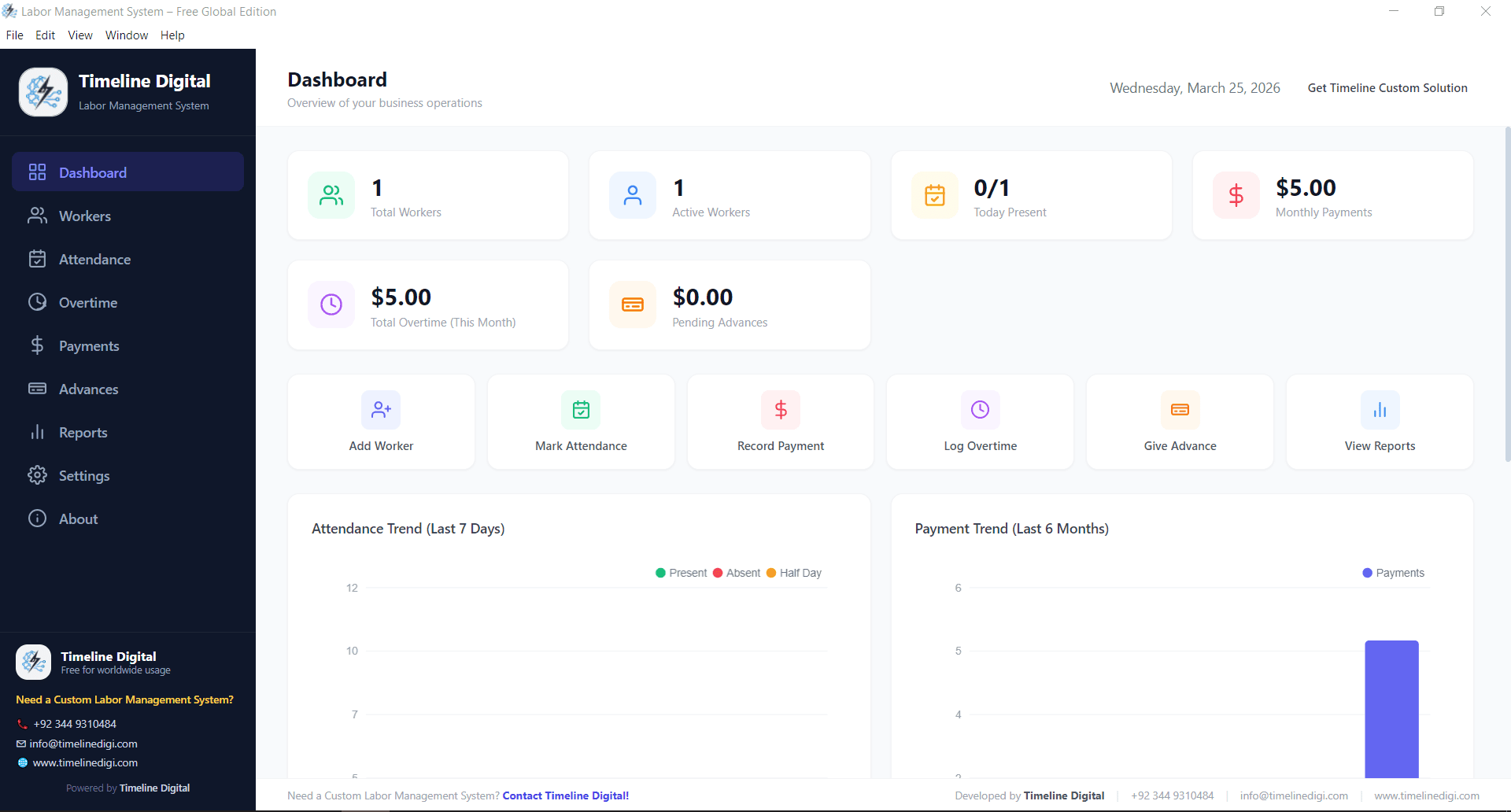
Yes, and for a small single-site team it is the honest place to start. Timeline’s free labor management system runs fully offline on Windows and covers worker records, attendance, shifts, overtime, advances and payroll at no cost, with no per-user fee and no account to create.

It does not carry engineered task standards, and a high-volume distribution center measuring output per pick will outgrow it. But most smaller operations get accurate labor cost without paying anything, and when the free app almost fits but needs one business-specific rule, Timeline can customize it or add a module rather than pushing you toward an enterprise suite.

  • Workers, attendance, overtime, advances and payroll in one app
  • Works fully offline on Windows 10+, data stays on your PC
  • No subscription, no worker cap, no feature lockout
Free labor management system dashboard, the free tier in this comparison

Which Labor Management System Should You Pick?

Match the category to your operation, not to a ranking. A small team needs accurate hours, so start with free software or a per-user attendance tool. A large distribution center measuring output per task needs an enterprise or standalone LMS with engineered standards. Anything with rules a package cannot hold is a custom build, and Timeline Digital can scope one after a free consultation.

Rules no package can hold?

Tell us how your floor actually runs and we will scope a custom labor management system around it: your standards, your shift rules, your payroll handoff.

Best Labor Management Systems: FAQs

Straight answers to the questions buyers ask while comparing systems.

What is the best labor management system?

There is no single best labor management system, because the right product depends on your operation. For a high-volume warehouse, the best option is an enterprise or standalone system with engineered task standards. For a smaller team that needs accurate hours, rosters and overtime, a per-user time and attendance tool is a better fit. Operations with rules no package supports are better served by a custom build, and small single-site teams can start with free offline software. Match the category to your headcount and your rules first, then compare the short list of products inside it.

How much does labor management software cost?

Cost depends entirely on the category. Free desktop software covers attendance, overtime and payroll at no charge and suits small single-site teams. Cloud time and attendance tools bill per user per month, so the price grows with headcount. Enterprise labor modules inside a warehouse suite are quoted per project, and the setup, including building engineered standards, often costs more than the licenses themselves. A custom build is a one-time project fee with no per-user charge, which makes sense when your rules do not fit a packaged product. Add setup, licenses and per-user fees together before comparing two options on price.

What is the difference between a WMS and a labor management system?

A warehouse management system, or WMS, directs the physical work: where to store stock, which items to pick, and how to route a shipment. A labor management system measures the labor that work consumes and scores it against a standard. The WMS answers what to do; the LMS answers how efficiently it was done and what it cost. They are complementary rather than competing. A labor management system usually reads task data from the WMS, then attaches a time and a cost to every movement, which is why the two are often sold together by the same vendor as a bundle.

Is there free labor management software?

Yes. Timeline’s free labor management system runs fully offline on Windows and covers worker records, attendance, shifts, overtime, advances and payroll with no subscription and no per-user fee. It is a practical starting point for a small single-site team that needs accurate hours and labor cost before paying for anything larger. It does not include engineered task standards, so a high-volume distribution center measuring output per pick will eventually outgrow it. For most small businesses, though, it delivers accurate attendance and payroll at no cost, and it can be customized if the standard app almost fits but needs one extra rule.

Do small businesses need a labor management system?

Most small businesses do not need a full warehouse labor management system with engineered standards, but they do need a reliable way to track hours, shifts and overtime. Paper timesheets and spreadsheets lose accuracy the moment headcount grows, and most payroll errors and overtime disputes trace back to bad hours data. A simple, free or low-cost tool that records attendance and calculates pay solves the real problem without the expense of an enterprise platform. The rule of thumb: fix accurate hours first, and only add task-level standards once your team is large enough that output per task drives cost.