Custom business software
Best project management software for small teams: how to choose
Best Project Management Software For Small Teams gives everyone one clear view of tasks, due dates, who is doing what, and how each job is going. No more missed updates or arguing over which file is current.
Timeline Digital builds custom project trackers, client portals and agency management software when a ready-made tool does not fit how the team works. You see 2 to 3 key modules working in a free pilot before the full build.
- Built around how you work
- Connects to your other tools
- Clear scope agreed up front
The short answer
What is project management software for small teams?
The best project management software for a small team is the simplest tool that shows every task, owner, due date and status in one shared view, with comments and file links. Free tiers of tools such as Trello, Asana or ClickUp suit many small teams; per-seat paid plans add reporting and automation, and a custom tracker suits teams with their own workflow.
Teams looking at project management software for small teams usually need more than a basic tool. They need custom software that turns their day-to-day data into clearer decisions, faster work, and reports they can rely on.
The best project management software for small teams is not a pile of disconnected tools. It brings your daily steps, your team, your data, and your reports together, so you can decide faster and do less by hand. That is why Timeline Digital treats each project as one complete system, not a single feature.
Project management options for small teams at a glance
| Question | Free tier of a SaaS tool | Paid per-seat plan | Custom-built tracker |
|---|---|---|---|
| Cost | $0 within the tier’s limits | A monthly fee for every person | Quoted after scoping; no per-seat fee |
| Limits | Users, storage or features capped | Higher caps; more features per tier | Set by what you build |
| Fit to your workflow | Generic boards and lists | Configurable fields and automations | Built around your stages and approvals |
| Best for | Teams starting out | Teams that need reporting and automation | Teams with their own process or client portal |
What do the free plans of popular project management tools include?
The free plans of popular project management tools differ mainly in how many people can use them. On the vendors’ own pricing pages, Asana and monday.com cap free use at 2 users, Basecamp at 3 and Trello at 10 collaborators, while ClickUp allows unlimited members but limits storage and views. Checked 2 November 2026.
| Tool | Free plan limits | How paid plans are charged |
|---|---|---|
| Trello | Up to 10 collaborators and 10 boards per workspace; unlimited storage with a 10 MB limit per file; Calendar, Timeline, Table, Dashboard and Map views are listed under Premium | Plans named Standard, Premium and Enterprise |
| Asana | Personal plan for up to 2 users; unlimited tasks and projects with list, board and calendar views | Per user per month on Starter and Advanced; Enterprise by quote |
| ClickUp | Unlimited members, 5 Spaces and 60 MB of file storage; List, Table, Calendar and Board views; Gantt, Timeline and Workload views are trial-only | Per user per month |
| monday.com | Up to 2 seats, 3 boards and 3 Docs on its work management product | Per seat per month; plans start from 3 users |
| Basecamp | 1 active project, 3 users and 1 GB of storage | Paid plans are listed on the vendor’s pricing page; check current terms before you commit |
Which project management software suits a team of 10 to 50 people?
A team of 10 to 50 people needs project management software with shared reporting, role-based access and a clear cost per person, because free plans rarely stretch that far. Compare two or three tools on one live project, and price each at your real headcount. A custom tracker suits teams whose workflow no tool fits.
| Check | Why it matters at 10 to 50 people | What to ask before buying |
|---|---|---|
| Cost at your headcount | Per-seat plans multiply by every person, and some have minimum seats | Price the plan at your real headcount, and ask about minimum seats and annual billing |
| Reporting and progress | Managers need status without asking each person | Check which dashboards and reports are in the plan you would buy, not only the top tier |
| Timelines and deadlines | Deadline-driven teams need dependencies and a schedule view | Check whether Gantt or Timeline views are on the free tier or a paid one |
| Permissions and clients | Bigger teams need roles, guests and client access | Check guest pricing, private projects and who can see what |
| Time, workload and billing | Agencies and consultancies track hours and workload | Check whether time tracking, workload and invoicing are included or need another tool |
| Getting your data out | Switching later is costly if data is locked in | Check export formats and API access |
Why businesses switch to custom project management software for small teams
Teams invest in project management software when task tracking, deadline visibility, and resource allocation rely on shared spreadsheets that fall out of sync as projects scale.
Tasks, deadlines, and responsibilities slip because there is no centralized system for project visibility.
Team members waste time switching between email, chat, and file sharing instead of working from one platform.
Project budgets and timelines are hard to track when updates are spread across disconnected spreadsheets.
Small teams get stuck with project tools that are crammed with features they never touch.
Inside custom project management software for small teams
Custom project management software for small teams should be built around how your team actually works, the data you keep, the tools it connects to, and who does what.
- Task creation and assignment management
- Gantt chart and timeline visualization
- Time tracking and effort logging
- Budget and resource allocation tracking
- File sharing and document collaboration
- Milestone and deadline notifications
- Custom reporting and project dashboards
- Integration with communication and finance tools
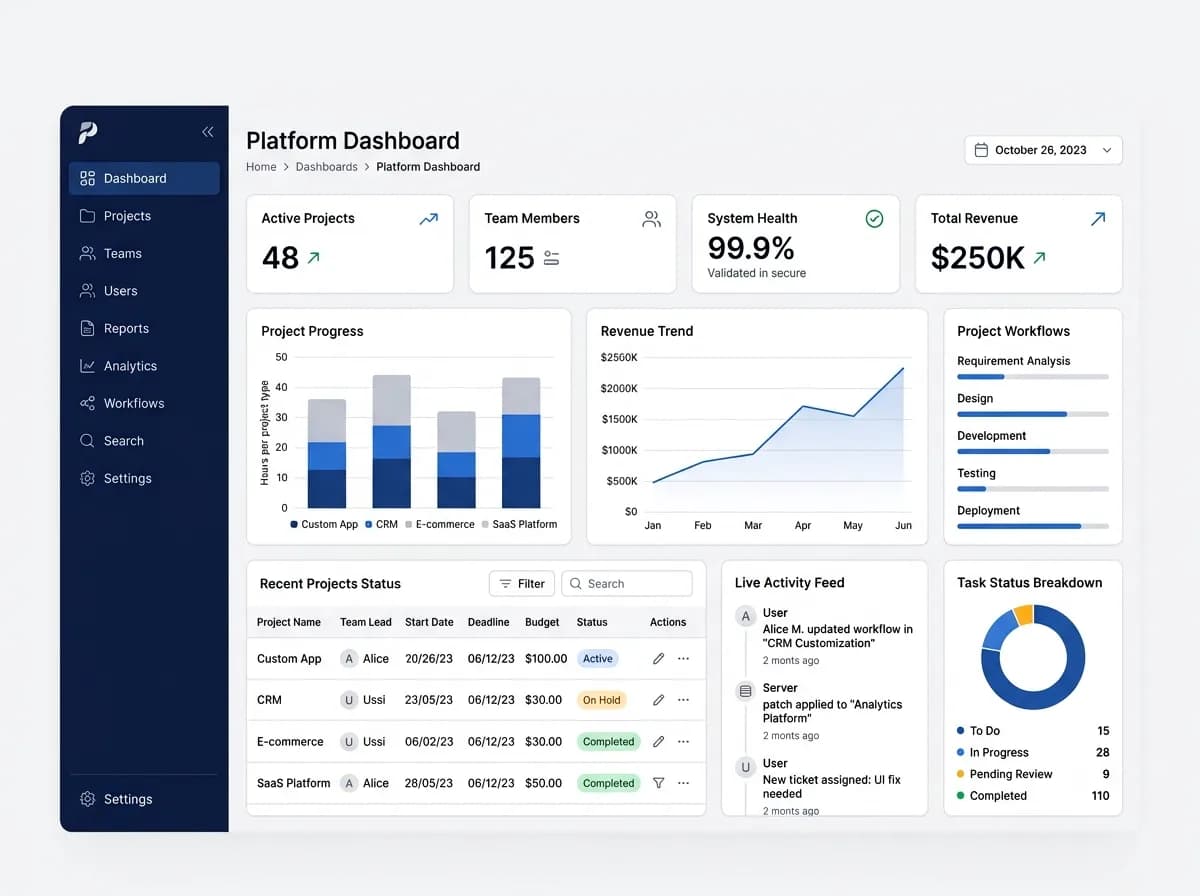
One place for all your data
When your daily work, reports, and team all draw from the same data, owners get a clearer picture of the business.
Automatic steps instead of manual work
Approvals, alerts, and status updates happen on their own, so no one has to chase them by hand.
Easy for your team to use
Simple enough for daily use by everyone, while still giving managers the reports and controls they need.
Business benefits of custom project management software for small teams
Well-built project management software for small teams helps your team work faster, keeps your data accurate, keeps everyone in sync, and gives you more control over your business.
- Everyone knows who owns each task and when it is due
- Better use of your team across projects
- Less time lost to status meetings and email chains
- Accurate project budget tracking and reports
Who we build for
Timeline Digital builds custom project management software for small teams for businesses that want smoother day-to-day work, data they can trust, and more control over how things run. Typical buyers include small teams looking for collaborative project management tools who have outgrown disconnected tools or need their teams to share the same data.
How Timeline Digital delivers custom project management software for small teams
Custom software built around the way your business works. Every project follows the same five steps, and you test our work in a pilot of your most important modules before the full build.
Step 1: Understand
We learn how your business works.
Your requirements, workflow, challenges and goals, understood before anything is recommended.
Step 2: Plan
We design the right solution around your workflow.
Modules, workflows, roles, approvals, reports and integrations, agreed before development.
Step 3: Select Technology
Choose the right technical foundation.
Technology options matched to your users, security, budget and growth, not one fixed stack.
- Free pilot
Step 4: Pilot
Test our work before full project development.
Free. You choose 2 to 3 key modules and we build them first, so you can judge our work.
The full project starts only after you approve the pilot.
- Full project
Step 5: Build & Scale
From approved pilot to complete digital system.
Full development, testing, deployment, training and support, built to grow with you.
Related pages
Comparisons, guides, and the services behind custom project management software for small teams.
Free CRM Software
Manage leads, deals, invoices, and your sales pipeline 100% free on Windows with Timeline CRM. No subscription, fully offline, and no account needed to download.
Read this pageBest Project Management Software For Construction
Best Project Management Software For Construction tracks costs, crews, materials, subcontractors, and progress for every job in one place. You see problems early, before they turn into overruns and delays.
Read this pageDigital Marketing Services
Digital marketing services from Timeline Digital bring you more customers through Google Ads, social media, and email, with clear, measurable results instead of vanity numbers.
Read this pagePayroll Software
Payroll Software works out pay, deductions, payslips, and direct deposits for your staff. It removes the by-hand effort and the mistakes that payroll spreadsheets cause.
Read this pageCloud Accounting Software Development
Custom cloud accounting software for invoicing, payroll, tax, bank feeds, multi-currency and audit trails, built around how your finance team works. Free pilot first.
Read this pageBest Invoice App
Best Invoice App creates invoices, tracks who has paid, and sends reminders for you. It cuts the late payments and cash-flow gaps that come from billing by hand.
Read this pageBest Project Management Software For Small Teams FAQs
Direct answers to the questions business owners ask before choosing project management software for small teams.
Is there free project management software for small teams?
Yes. Several well-known tools, including Trello, Asana and ClickUp, have free tiers with limits on users, storage or features. Check the current limits on each vendor’s pricing page, because they change.
When should a small team build its own project tracker?
When the team pays for several tools that do not share data, when clients need their own portal, or when your stages, approvals and reports do not fit a generic board. A custom tracker can connect to your CRM, invoicing and time tracking.
Which project management software would you recommend for a team of 10 to 50 people?
The right choice depends on the work, so shortlist two or three tools and test them on one live project. At 10 to 50 people look for shared reporting, roles and guest access, and price each plan at your real headcount. Trello, Asana, ClickUp, monday.com and Basecamp all publish their plans; if none fits your workflow, a custom tracker can.
Which project management software has built-in reporting and progress tracking?
Most paid plans of the major tools include dashboards and progress reports, but free plans often limit them. Trello, for example, lists its Dashboard and Timeline views under Premium on its pricing page. Check which reports sit in the plan you would pay for, and confirm they can show progress by project, person and deadline.
What project management software suits deadline-driven teams?
Deadline-driven teams need a schedule view with dependencies, such as a Gantt or timeline, plus reminders and workload visibility. These views are often paid features: ClickUp lists Gantt, Timeline and Workload as trial-only on its free plan, and Trello lists Timeline under Premium. Test the schedule view on a real deadline before you commit.
What is the best project management software for an agency with under 50 employees?
An agency needs project management plus time tracking, resource planning and billing, which some all-in-one agency tools combine and general project tools do not. If no ready-made tool matches your workflow, see our agency management software, built custom around your clients, retainers and invoicing, with a free pilot of 2 to 3 key modules first.
What is project management software for small teams?
The best project management software for a small team is the simplest tool that shows every task, owner, due date and status in one shared view, with comments and file links. Free tiers of tools such as Trello, Asana or ClickUp suit many small teams; per-seat paid plans add reporting and automation, and a custom tracker suits teams with their own workflow.
Who needs project management software for small teams?
Small teams looking for collaborative project management tools benefit most when their current tools keep data apart, force manual workarounds, or leave gaps in their reports. It helps most once a business has outgrown spreadsheets, disconnected apps, or rigid off-the-shelf tools.
What should modern project management software for small teams include?
A modern system should handle routine steps automatically, give each person the right access, show clear reports, and connect to the tools you already use. The exact features depend on what matters most to you: speed, accurate data, or keeping your team in sync.
How long does it take to build custom project management software for small teams?
There is no fixed timeframe: the schedule for your business software is set from your requirements in the Plan step. The free pilot of 2 to 3 key modules is ready in about 2 days, and with 1,200+ developers we have the capacity to deliver a focused system in as little as 2 weeks. Long-term support under a service level agreement (SLA) follows launch. We start by understanding how your team works, then you choose the pilot modules, so you see real, working software before the full build starts.
Can project management software for small teams integrate with existing tools?
Yes. We regularly connect custom software to accounting tools, CRMs, payment systems, email, and reporting tools, so your team enters data once instead of in several places. We plan these connections from the start.
Can Timeline Digital build custom project management software for small teams?
Yes. We build custom project management software for small teams around how your team works, what data you keep, and the reports you need. You keep the steps that work well, hand the slow ones to the software, and skip features your team never touches.
Need project management software for small teams built around your workflow?
Timeline Digital builds custom software for businesses that want smoother work, data they can trust, and more control. Comparing tools, replacing an old system, or rolling out in stages? Tell us where you are. A senior engineer replies with a plan, not a sales pitch.