100 percent free, forever
No subscription, no trial period, no feature lockout, no per-student charges. Download once, install, use forever. Built by Timeline Digital as a free tool for schools.
Windows 10 · Offline · Lifetime free · v2.5.0
Students, fees, staff, and exams on one Windows 10 PC. No internet, no subscription.
Download Timeline School Manager, a complete free offline school management software for Windows 10. Run admissions, classes, subjects, fees, exams, staff payroll, and accounts on a single Windows PC with zero internet required. No per-student charges, no monthly fees, no feature lockout. Installs in under a minute.
File: Timeline School Manager Setup 2.5.0.exe · ~105 MB · 64-bit Windows
Free offline school management software for Windows 10 is a desktop application that runs a school’s office work on one Windows 10 or 11 PC: student records, admissions, classes, fees, exams, staff payroll and accounts, with no internet connection and no subscription fee. Timeline School Manager is one, made by Timeline Digital, a software company founded in 2013 in Islamabad, Pakistan.
Much of the school management software sold today is cloud-based, billed per student or per month, and stops working when the internet drops. For schools with unreliable connectivity, load-shedding or tight budgets, a free offline program on Windows 10 is a better fit. You install once, your data stays on your PC, and the system keeps running regardless of network conditions.
Seven modules cover every part of running a school. No paid tier, no upgrade prompts, no feature caps.
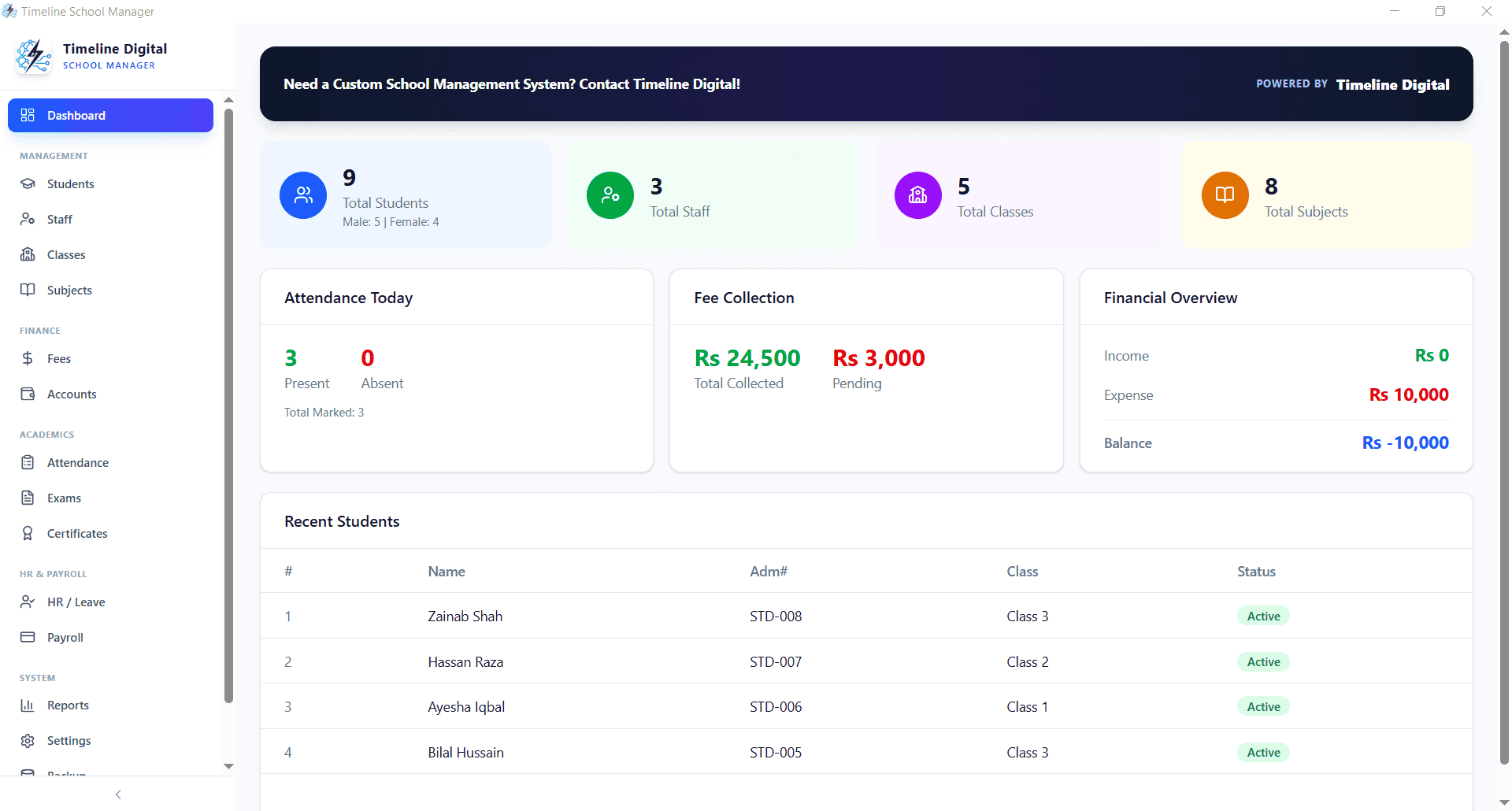
See total students, pending fees, staff attendance, and today's activity on one screen. No reports to run, no filters to configure. Open the software and you have today's picture.
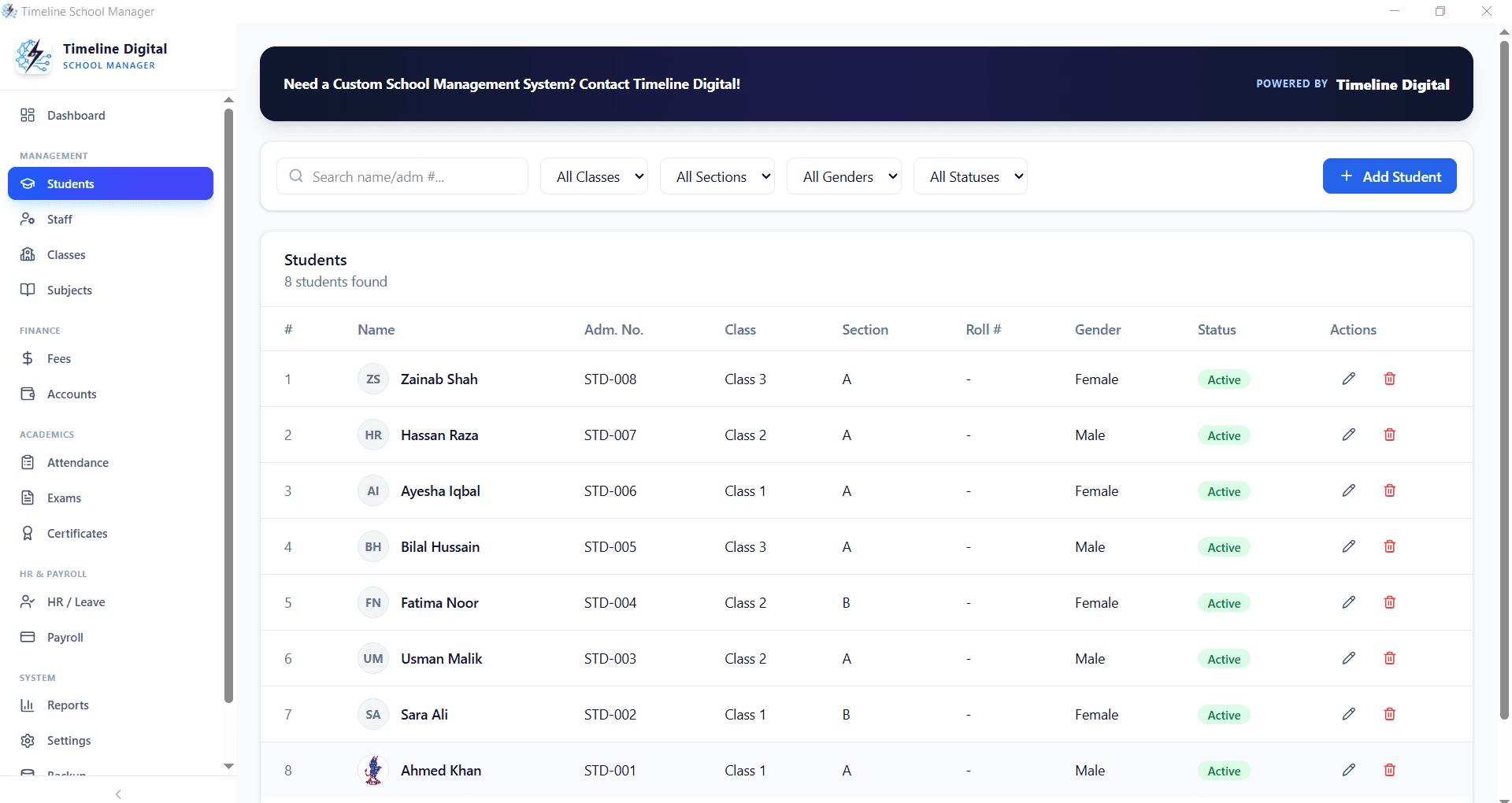
Add, edit, and organise every student record. Personal details, parent contacts, admission date, class, section, roll number, fees status, and academic history. There is no cap on students.
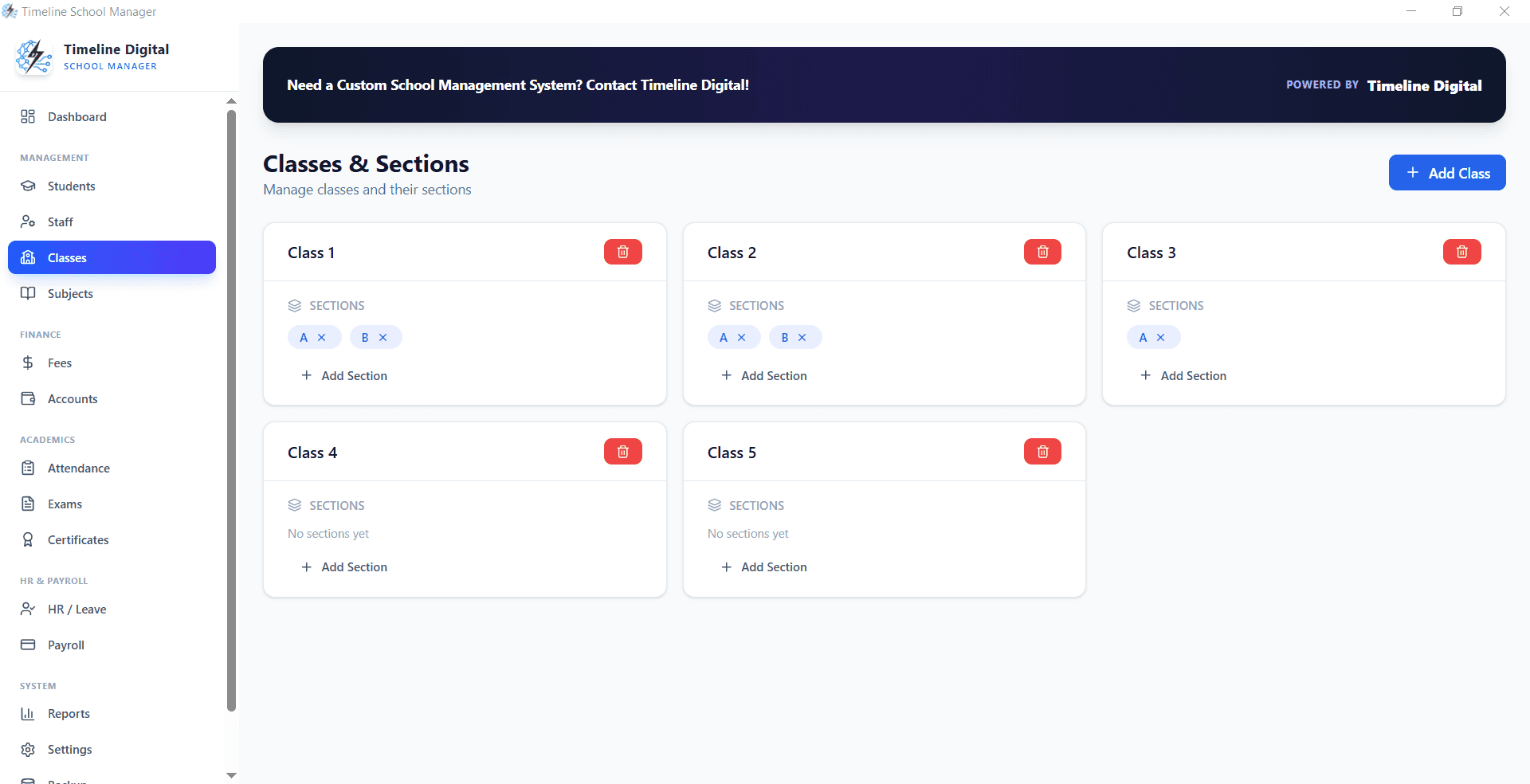
Create classes and sections, assign class teachers and subjects, and manage timetables. The structure your school already uses, mirrored in software.
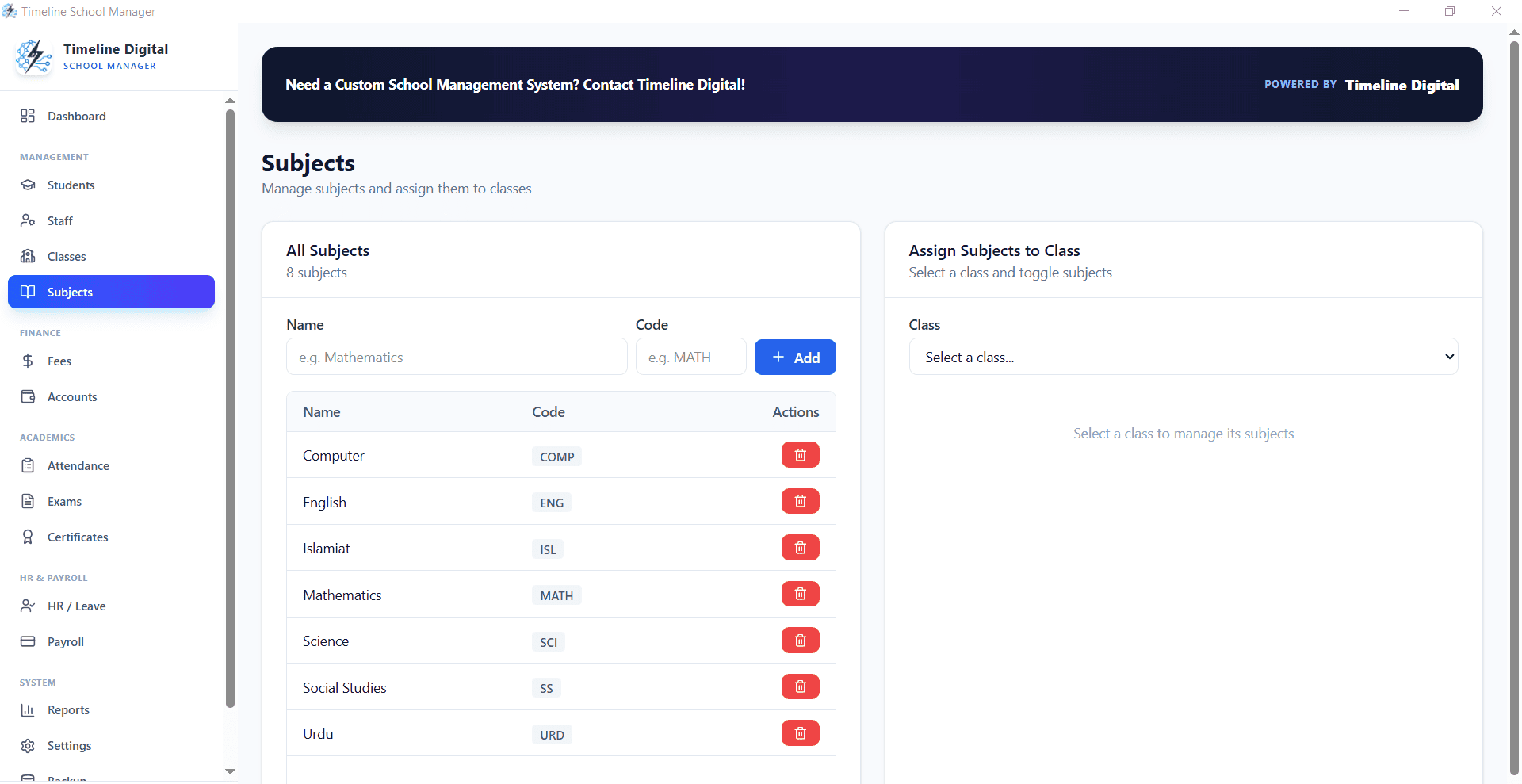
Manage subjects per class, assign teachers, track marks and grades. Exam records and printable report cards. All generated locally with zero internet required.
Fee plans, monthly billing, discounts and dues, all tracked per student. Generate printable receipts, track outstanding balances, and never chase a payment twice.
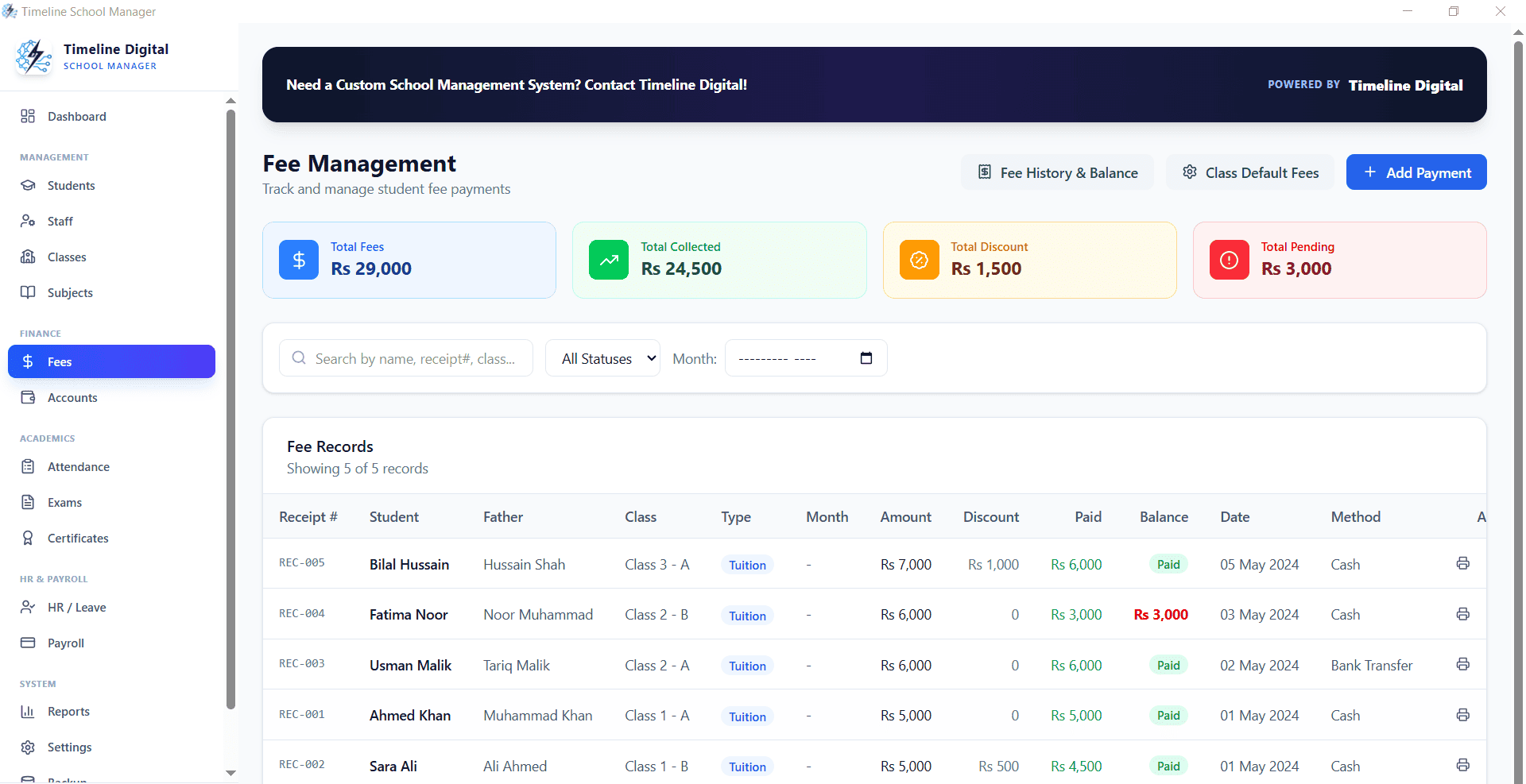
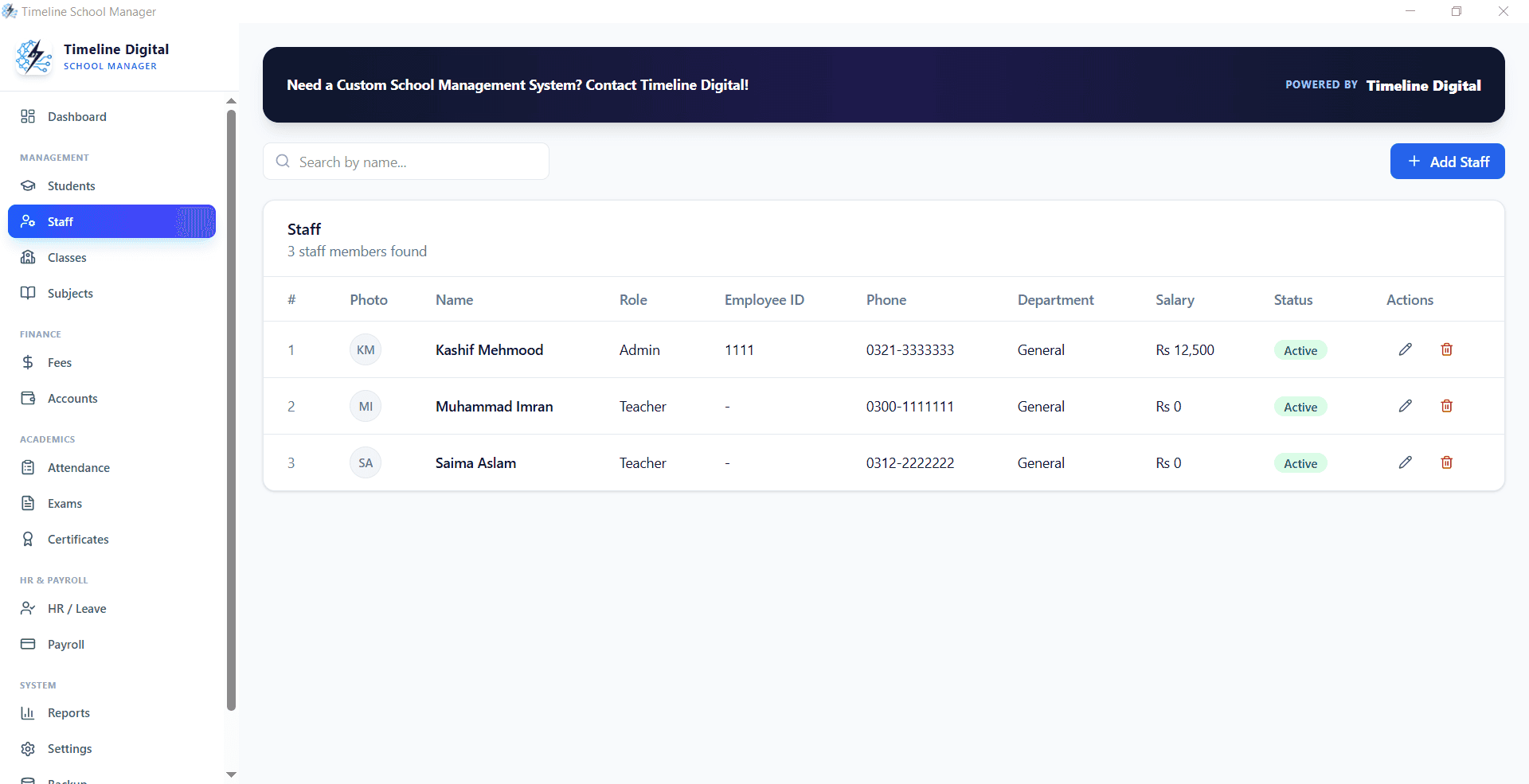
Teacher and staff records, staff attendance, salaries and payroll. Generate monthly salary slips and keep a full salary payment history.
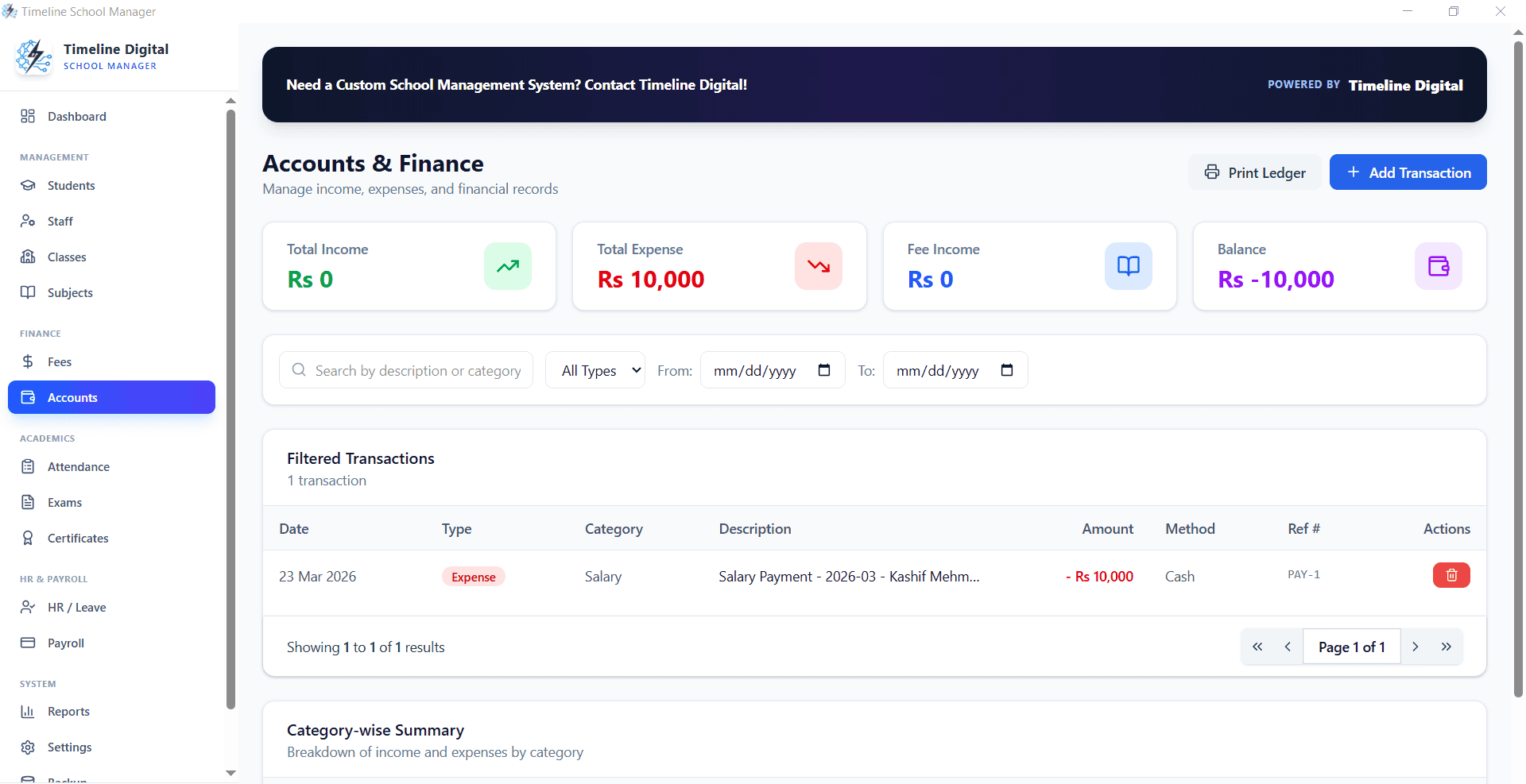
Income, expense, and daily cash-book entries, with print-ready financial summaries. Share with auditors, board members, and owners without rebuilding the numbers in a spreadsheet.
Free download, v2.5.0, Windows 10 and 11
Click the button below for the Windows setup file, about 105 MB. Run the installer, follow the wizard, and start running your school in minutes. No registration, no credit card, no internet required after the download finishes.

Click the "Download Free" button below. The file "Timeline School Manager Setup 2.5.0.exe" (about 105 MB) will start downloading to your Windows 10 PC.
Double-click the downloaded .exe file. If Windows SmartScreen shows a warning, click "More info" then "Run anyway". The warning appears because the installer is not code-signed; you can verify your download against the SHA-256 checksum published on this page.
Click "Next" through the setup screens. Choose the default install location or pick your own. Installation completes in under a minute on most Windows 10 computers.
Open Timeline School Manager from your desktop shortcut or Start menu. Go to Settings first, add your school name and logo, then start adding classes, students, and fee plans.
File name: Timeline School Manager Setup 2.5.0.exe
Size: ~105 MB
Platform: Windows 10 / 11 (64-bit)
Price: Free for lifetime
Version: 2.5.0
Last updated: 2026-07-11
SHA-256: c2810c00308edf9a481dedafb1ec994bd2d6e35069ba49786bbfb7ad5aba2486
Having trouble installing? Message us on WhatsApp or email our contact form
Six reasons schools pick Timeline School Manager over cloud-based subscription systems.
No subscription, no trial period, no feature lockout, no per-student charges. Download once, install, use forever. Built by Timeline Digital as a free tool for schools.
Designed for Windows 10 and Windows 11 PCs. Internet goes down, load-shedding hits. Your school operations keep running. Every feature works without a network.
No cloud upload, no third-party servers, no data export. Student records, fees, staff data. All stored locally on your PC. Private by default.
Download a single Windows setup file (.exe), double-click, follow the wizard. Installs in under a minute on any Windows 10 PC. No database setup, no server config.
Add as many students, teachers, classes, subjects, and fee plans as your school needs. The software sets no caps and has no tier upgrades, from a small tuition centre to a large school.
Built for school administrators, not IT experts. Clean menus, plain-English labels, no technical jargon, so office staff learn it by using it.
Any education setup that wants a simple, offline, free tool, without the cost or complexity of cloud SaaS.
Small and mid-size private schools, K-12 institutes, and English-medium schools that need complete offline control over admissions, fees, and staff payroll.
Academies running classes in mathematics, science, languages, or test prep. Track students, batches, fees, and teacher payouts on a single Windows PC.
Madrasas, Sunday schools, community education centres. Simple, offline, free. Perfect for organisations running on donations with no IT budget.
Vocational training centres, IT institutes, and professional certification schools. Manage course batches, fees, certificates, and trainer payroll.
Early-years schools, kindergartens, and daycare centres. Manage parent contacts, attendance, monthly fees, and teacher records without a cloud subscription.
Rural schools, load-shedding-affected areas, or any location where cloud-based SaaS school software fails half the day. Offline means always on.
Two different models for school management software. Here is how they compare for an average small-to-mid-size school.
| Factor | Timeline School Manager (Windows 10 offline) | Cloud school software |
|---|---|---|
| Cost | $0, no subscription | Usually billed per student or per month; prices vary by vendor |
| Internet required | No, only for the download | Yes, for every task |
| Data location | Your Windows PC | Vendor servers |
| Setup | Run one installer, no account | Account set-up and vendor onboarding |
| Student limit | None set by the software | Often tied to the plan you pay for |
| During an internet outage | Keeps running | Stops until the connection returns |
| Parent logins and multi-branch sync | Not available | Usually available |
| Customisation | Custom builds available from Timeline Digital | Limited to the vendor's settings and roadmap |
Timeline Digital is a custom software development company founded in 2013 in Islamabad, Pakistan, that has delivered 1,500+ projects for 860+ clients in 25+ countries. We ship free tools: this school management software, a free POS system, and a free labor management system, as resources for schools and businesses worldwide.
If your school outgrows this free Windows 10 version and needs cloud sync across branches, parent mobile apps, SMS notifications, biometric attendance, or a school ERP with finance and HR, our team can build a tailored system around the workflows you already know, starting with a free pilot of 2 to 3 key modules. Talk to us for a free consultation.
Page by Usama Asif, CEO and CTO of Timeline Digital · Updated
Leave your name and number. We will help you install it, add the modules you need, move your current records in, and shape it around how your school already works. Free, no pressure.
No spam. We only use your number to reply about your project.
Straight answers to what schools ask before they download.
Yes. Timeline School Manager is 100% free for Windows 10 and Windows 11. No subscription, no trial period, no per-student charges, no hidden fees. Download the .exe setup, install on your Windows 10 PC, and use every feature forever. Timeline Digital ships this as a free resource for schools worldwide.
Yes. The software is a native Windows desktop application. Every feature. Students, classes, fees, exams, payroll, reports. Works with zero internet connection. Your data is stored locally on your PC, not in the cloud, so the software keeps running during internet outages, load-shedding, or network downtime.
Windows 10 (Home, Pro, Enterprise and Education) and Windows 11, 64-bit. No separate RAM or disk requirement is published; the installer is about 105 MB. There is no Mac, Linux, web or mobile version.
Timeline School Manager is published for Windows 10 and Windows 11 (64-bit) only, so Windows 7 and 8.1 are not supported and we cannot promise it installs or runs there. Microsoft no longer supports those versions either; a school still on Windows 7 should plan an upgrade to Windows 10 or 11 first.
Click the "Download Free" button on this page. Your browser will download a single setup file named "Timeline School Manager Setup 2.5.0.exe" (about 105 MB). Once downloaded, double-click it, follow the Windows installer wizard, and launch from the desktop shortcut. Installation takes less than a minute.
Yes. There is no licence limit. You can install Timeline School Manager on as many Windows 10 computers as your school uses. Office PC, principal's laptop, accountant's machine. Each installation runs independently with its own local data. For synchronised multi-PC operation, Timeline Digital can build a cloud-connected custom version.
All student records, fees data, staff records and accounts entries are stored locally on your Windows 10 PC and are not uploaded to Timeline Digital or any cloud service. Protect the PC with a Windows password and take a weekly backup of the data folder to an external drive or USB stick; your school remains responsible for its own data-protection obligations.
The installer is not code-signed, so Windows SmartScreen may show a warning. Download it only from timelinedigi.com, compare the file with the SHA-256 checksum published on this page, then click "More info" and "Run anyway".
The software sets no limit on students, staff, classes or fee plans, and there is no paid tier to unlock more. Everything runs from a local database on one PC, so a standard Windows 10 office computer is enough for a typical school.
Every feature is free. The Windows 10 download includes: dashboard, student management, classes and sections, subjects and academics, exam and marks records, fees collection and receivables, staff records, payroll, accounts and cash book, printable receipts and reports, and school settings. No paid tier, no feature lockout.
Yes. If you need SMS parent notifications, biometric attendance integration, cloud sync across branches, online fee collection or a parent mobile app, Timeline Digital can build a custom school system. It starts with a free pilot of 2 to 3 key modules, and the source code is yours on full payment.
Yes, at no charge. Use the contact form at timelinedigi.com/contact or message us on WhatsApp for help with installation, configuration, data import and usage questions. We typically reply within 4 business hours (Monday to Friday, 9:00 to 18:00 Pakistan time (PKT, UTC+5)).
When a new version is released, it is published on this page with its version number and checksum; the current version is 2.5.0, updated 2026-07-11. Back up your data folder, then run the new setup over the existing install to upgrade.
Cloud-based school software needs an internet connection, is usually billed per student or per month, and stores your data on the vendor's servers; in return it offers parent logins and access from any device. Timeline School Manager for Windows 10 is offline, free, has no per-student charge and keeps data on your own PC, which suits schools with tight budgets or unreliable internet.
One download, lifetime use, zero cost
Timeline School Manager runs students, fees, staff, exams, payroll and accounts on Windows 10 and 11. One PC, one download, no cost.
Need a custom cloud-connected or multi-branch school system? Talk to Timeline Digital.
Made in Islamabad, Pakistan
Timeline School Manager is a free offline app for schools, academies and madrasas in Pakistan that need student, fee, exam and payroll management on Windows 10 or 11 without a subscription or the internet. Built and supported by Timeline Digital in Islamabad.
Chat on WhatsApp in Urdu or EnglishPrint fee receipts and reports in Pakistani Rupees for monthly, term and annual billing structures used by Pakistani schools.
Offline-first was a design requirement because of load-shedding and patchy internet. The office keeps running when the power or connection drops.
Works for Pakistani madrasas, Islamic schools and coaching academies, not only standard grade schools.
Free forever with no per-student monthly charge, unlike cloud school software billed in PKR per student.
Administrators get setup help on WhatsApp, in Urdu or English.
Yes. It is free forever for schools in Pakistan, with no subscription and no per-student fee. It is built by Timeline Digital in Islamabad, and you can download it and run it on any Windows 10 or 11 PC.
Yes. It is fully offline, so admissions, fee collection, attendance, exams and reports keep working when the power or internet is down. All data is stored on the school computer, not in a cloud account.
Yes. You set PKR as the currency and print fee receipts and financial reports in Pakistani Rupees, with school, student, class and fee-head details suitable for Pakistani school billing.
Yes. Our Islamabad team helps administrators install and set up the software on WhatsApp, in Urdu or English, in your own time zone.