Short answer for busy operators: The cheapest POS system for restaurant use in the USA in 2026 is Timeline Restaurants POS at $0/month software with $0 transaction fees from the POS vendor, because Timeline doesn't process cards. You keep your own merchant account at whatever rate your bank quotes, typically 1.3% to 1.7% for established US restaurants. On a $15,000/month restaurant doing 65% card volume that lands at roughly $146/month all-in, which is $100 to $200/month cheaper than Square for Restaurants, Toast Starter or Clover Dining once you factor in the 2.3% to 2.99%+ processing cut plus per-ticket fees they take on every swipe. The $0 software label on Square, Toast and Clover is real, but the card-side bill on those platforms is not zero, and that's where almost every restaurant overpays.
Cheapest POS for restaurants, start with total cost, not the sticker
Most restaurant owners searching for the cheapest POS system for restaurant operations make the same mistake: they compare only the monthly software fee. That number is almost never the real cost, it's just the line that's easiest to put on a homepage.
A POS that says "$0/month" can still be expensive once you add:
- card processing rate (the 2.3% to 2.99%+ cut on every swipe)
- per-transaction flat fee (the extra 10¢, 30¢ on each ticket)
- contract length (2 to 3 year processor lock-ins are common)
- hardware financing payment (the "free" terminal that gets paid off over 36 months)
- paid feature add-ons (KDS, online ordering, employee management, loyalty)
For small and mid-sized US restaurants, those hidden costs quietly remove $1,500 to $5,000 a year from cash flow. On a single-location diner doing $15k/month in card sales, the gap between the cheapest POS for restaurant operations and the second-cheapest is usually larger than the entire monthly rent of a small-town storefront.
This guide shows the true cost structure and helps you pick the cheapest POS system for restaurant use based on total monthly spend at your card volume, not sticker price. If you run a retail shop or service business rather than a restaurant, read our cheapest POS system for small business guide instead, it runs the same all-in math for non-restaurant operators.
What "cheapest POS" actually means in 2026
Evaluate these four cost buckets together:
- Software subscription, monthly POS license fee
- Card processing, the percentage + per-transaction fee on every card payment
- Hardware requirements, whether you must buy proprietary devices
- Contract terms, termination penalties, multi-year lock-ins, forced processor usage
A system with a higher software fee can still be cheaper if your card processing rate is lower and there is no long contract.
Real cost: cheapest restaurant POS in the USA
Practical comparison based on a restaurant doing $15,000/month in revenue, 65% paid by card.
| POS Option | Software Fee | Typical Processing | Estimated Total Monthly Cost | Contract Risk |
|---|---|---|---|---|
| Timeline Restaurants POS | $0 | Your own merchant account (~1.3% to 1.7%) | ~$146 to $166 | None |
| Square for Restaurants | $0 (free tier) | 2.6% + 15¢ | ~$299+ | Processor lock-in |
| Toast Starter | $0 Starter Kit / paid plans after | ~2.99%+ custom-quoted on Starter (2.49% + 15¢ on paid plans) | ~$292+ | Often multi-year |
| Clover Dining | ~$14.95 to $84.95 | ~2.3% + 10¢ | ~$254+ | Commonly 3-year |
| TouchBistro | $69+ | Separate processor | ~$323+ | Usually annual |
| Loyverse | $0 base + add-ons | Depends on processor | ~$165+ | No long contract |
The cheapest POS for restaurant owners is usually the one with the lowest all-in total, not the lowest software headline. On the Square row, the math at this profile is: 2.6% of $9,750 = $253.50, plus 15¢ × ~305 card tickets = $45.75, for roughly $299 before any add-ons. On the Toast Starter row, ~2.99% of $9,750 alone is about $292 before per-ticket fees.
Why processing fees matter more than subscription fees
Restaurant operators often fixate on a $29 or $69 monthly plan and ignore card fees because they look small in percentage terms. Percentages compound fast.
On $9,750/month in card payments (65% of $15,000):
- At 2.6% → about $253.50/month before per-tx fees
- At 1.5% → about $146.25/month
That gap alone is over $1,287/year before software subscriptions.
This is exactly why so many "free" systems aren't actually the cheapest restaurant POS over 12 months.
Where Timeline Restaurants POS fits in
Timeline Restaurants POS is built specifically for the restaurant trade, _for restaurants, cafés, bars and food trucks_. It's our dedicated product for food service, separate from the general-retail Timeline POS.
Pricing model
- POS software fee: $0 forever
- Software transaction fee: $0
- Contract requirement: None
- Processor lock-in: None
We don't process payments. You bring whatever card reader and merchant account you already use, which means you can negotiate a lower rate with your bank.
What's included at $0
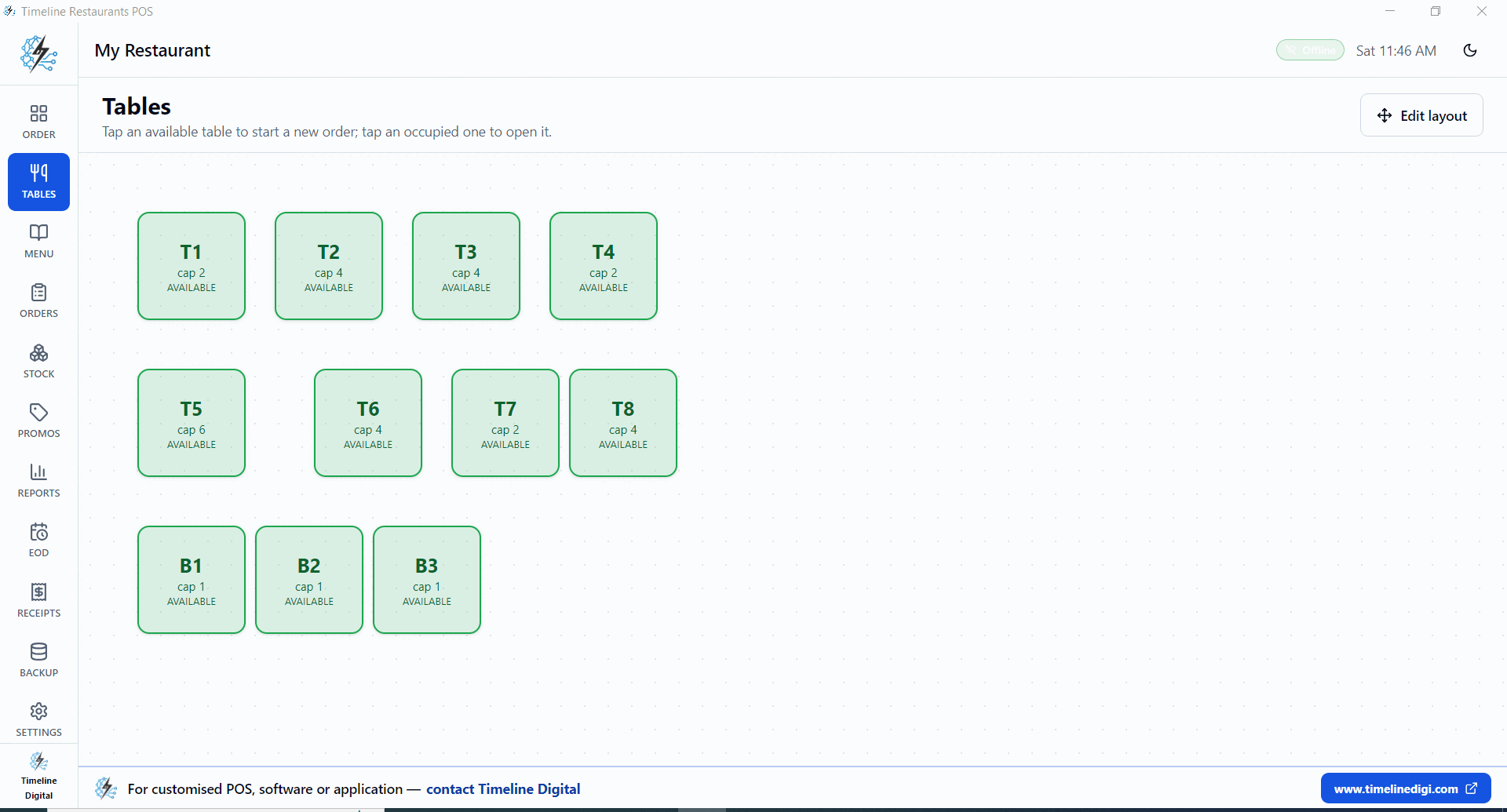
- Tables and floor plan, T1, T8 dining tables, B1, B3 bar seats, edit-layout mode
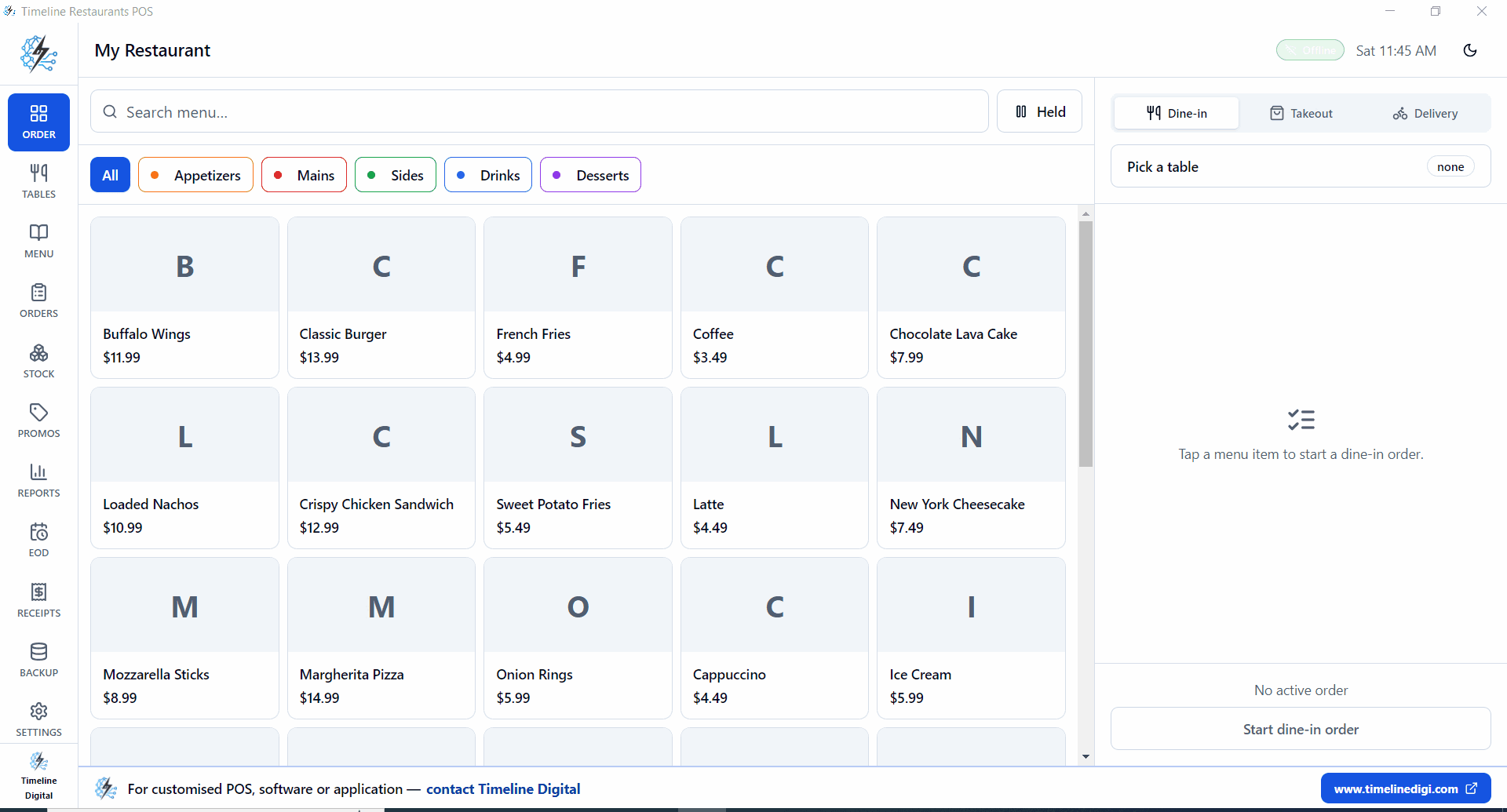
- Order screen, Dine-in / Takeout / Delivery in one workflow
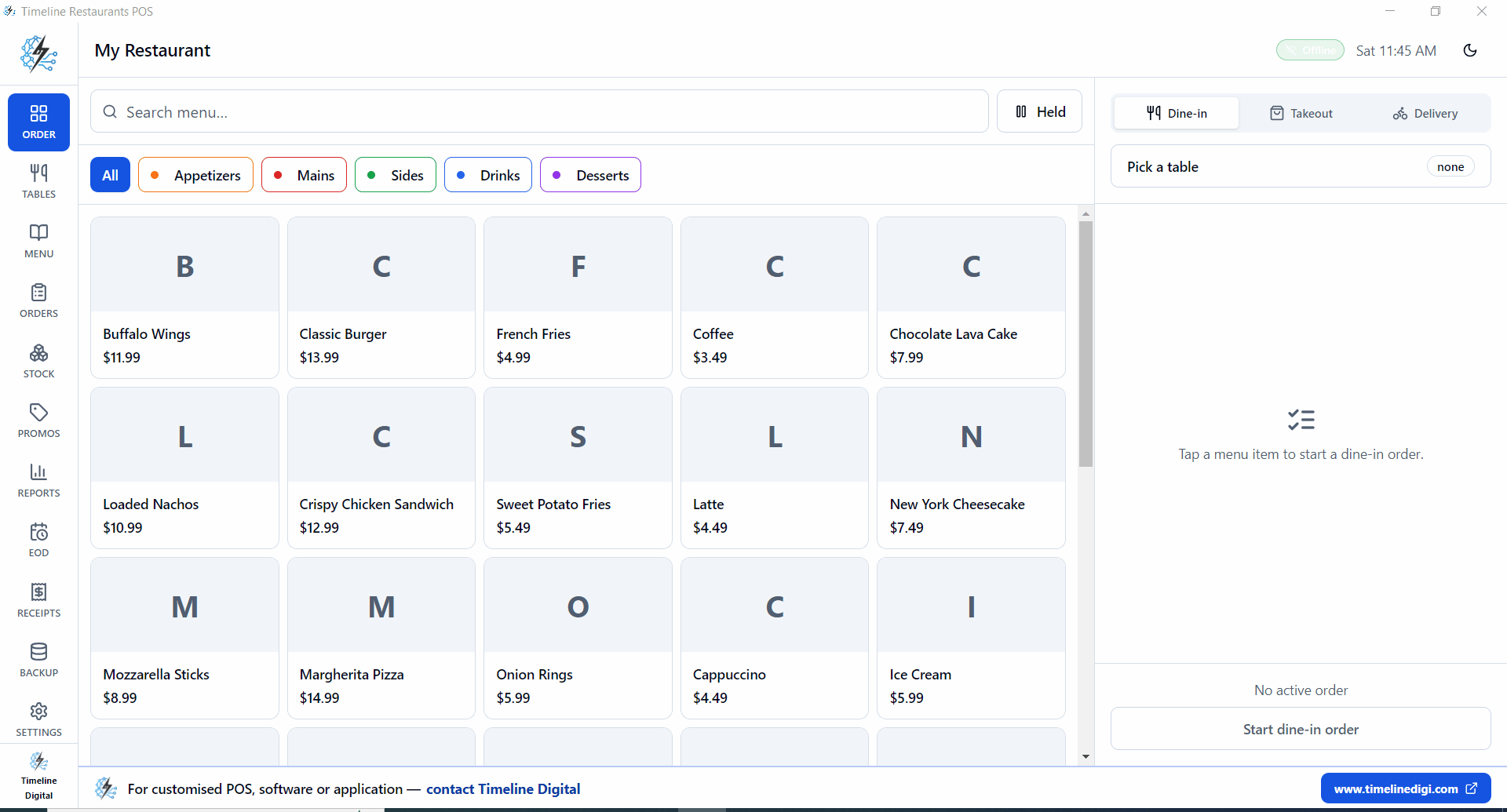
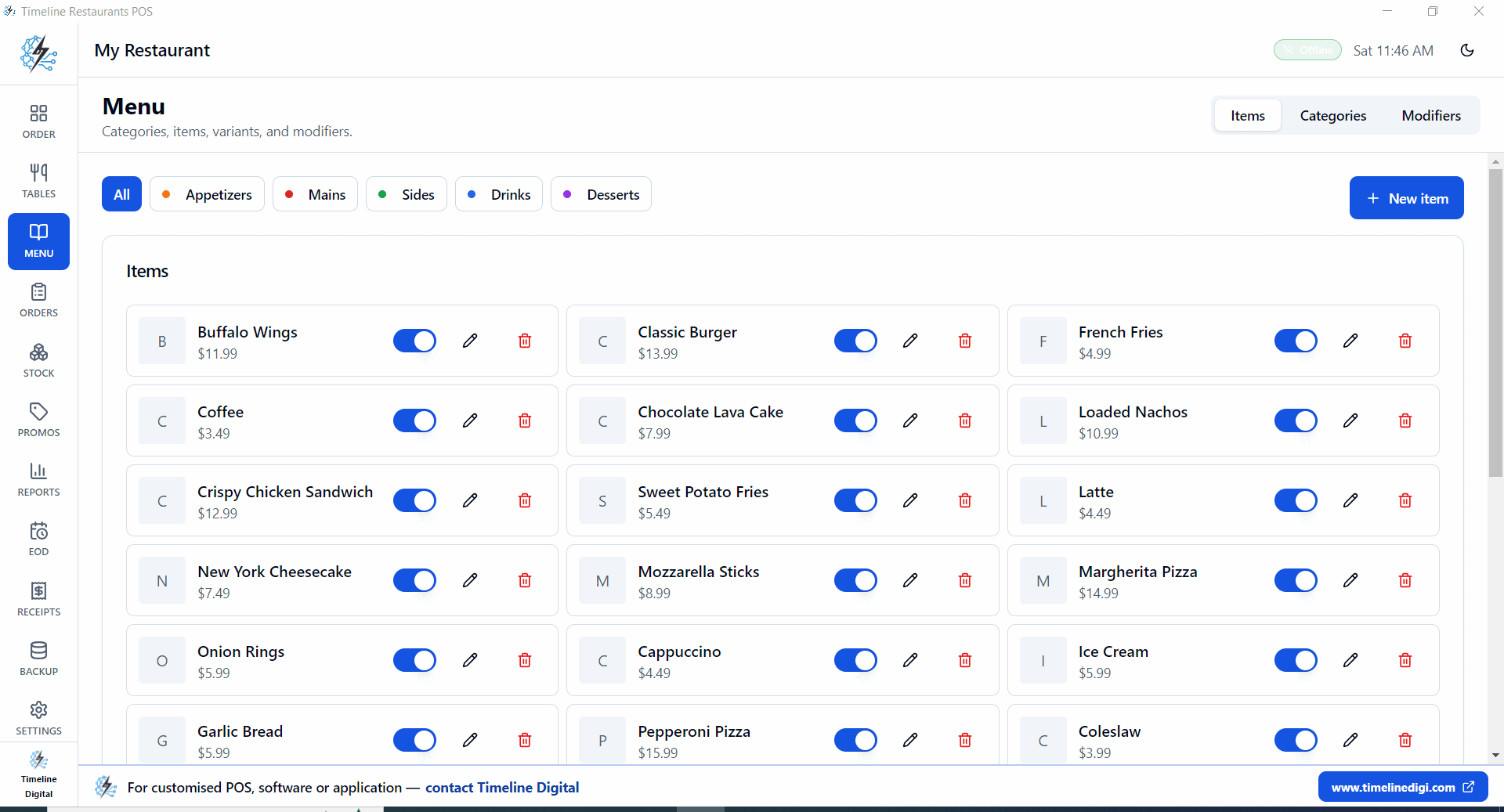
- Menu and modifiers, categories (Appetizers, Mains, Sides, Drinks, Desserts), per-item pricing, modifier groups (size, sides, toppings), one-tap 86 button
- Recipe-based inventory, link menu items to ingredients; stock auto-deducts on closed orders
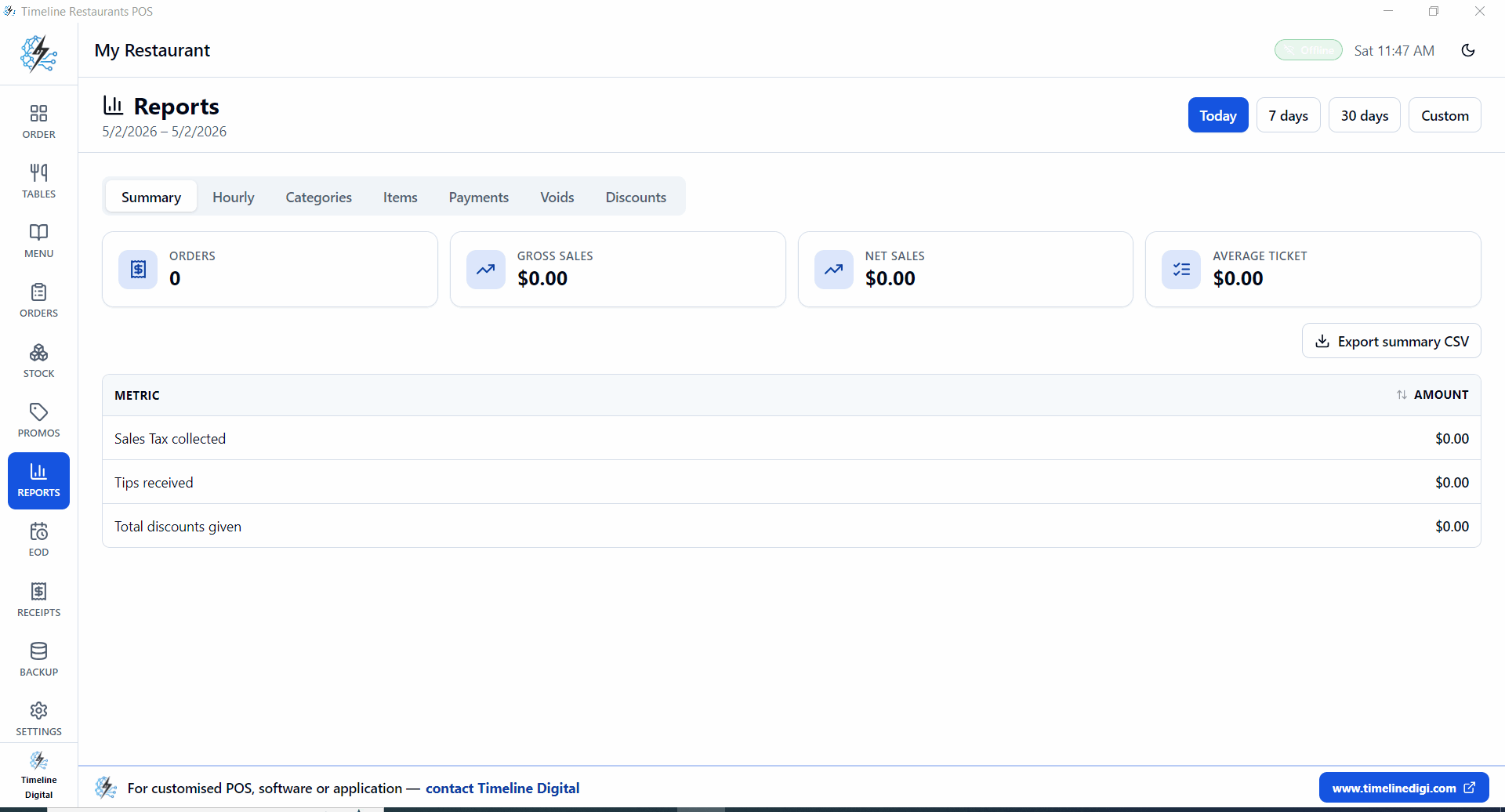
- Reports, Today / 7 days / 30 days; Orders, Gross Sales, Net Sales, Average Ticket; Sales Tax collected, Tips received, Total discounts
- EOD shift report + cash drawer count
- Local zip backups of database and uploaded images
- US sales tax engine, set state, county and city rates (NYC 8.875%, LA 9.5%, Chicago 10.25%, Houston 8.25%)
- Offline-first, runs from local SQLite on a single Windows PC; no internet required
For most independent restaurants, this combination makes Timeline Restaurants POS the cheapest POS for restaurant deployment in real-world use.
Cost example, small restaurant savings over 12 months
Profile:
- Revenue: $15,000/month
- Card mix: 65%
- Card volume: $9,750/month
Option A: processor-tied POS at ~2.6%
- Processing: ~$253.50/month
- Annual processing baseline: ~$3,042+
Option B: Timeline Restaurants POS + your own merchant at ~1.5%
- Processing: ~$146.25/month
- POS software: $0
- Annual processing baseline: ~$1,755
Estimated annual saving: ~$1,287+, often higher depending on ticket count and fees.
That covers equipment maintenance, part-time staff coverage, or local ad campaigns.
What the savings actually buy a US restaurant
Operators rarely think in monthly POS line items, they think in headcount, rent, food cost. Translating the same $1,287 annual saving into operating terms:
- about 6 extra full-day server shifts at $20/hr
- a full month of liability insurance for a small single-location diner ($90 to $150 typical)
- one month of QuickBooks Online Plus for the bookkeeper, plus the ServSafe renewal
- the monthly Yelp ads spend that most small diners use to reach $4 to $6k in incremental top-line
- a complete kitchen-side equipment service, fryer rebuild, range tune-up, hood cleaning
That's the real reason "cheapest POS for restaurant" matters. It isn't software shopping. It's recovered cash flow.
Setup, how fast you can start
- Download the installer from the Timeline Restaurants POS page (96 MB, single .exe)
- Run on Windows 10 or 11
- Pick country (USA) and tax rate
- Add menu items + prices
- Lay out tables (or load the sample 11-table floor plan)
- Take the first order
Most small locations are live in under 10 minutes.
Which restaurants benefit most
The cheapest POS for restaurant use is especially valuable for:
- New restaurants protecting early cash flow
- Single-location diners and cafés, café drink modifiers, name-on-cup
- Pizza shops, half-and-half toppings, slice vs whole pricing, kitchen ticket print
- Bars and pubs, open bar tabs, comp/spillage, happy-hour pricing windows
- Food trucks, full offline operation, USB receipt printer, USB-stick backups
- Family-owned restaurants replacing paper or Excel
When margins are tight, eliminating recurring software and processing overhead has direct impact on survivability.
When a more expensive POS might still be right
If your operation needs deep enterprise tooling today, a higher-cost POS can be justified:
- Multi-location centralized cloud control with franchise permissions
- Advanced integrated online-ordering platforms
- Complex loyalty engines with multi-brand support
- Heavy third-party app marketplace dependence
In those cases the higher monthly cost can be worth it. For most independent restaurants, low-cost reliable core POS is the priority, and that's what makes a free, offline option the better strategic choice.
Common mistakes when choosing a cheapest restaurant POS
Ignoring contract terms. A low monthly fee with a 2 to 3 year lock-in becomes expensive if you outgrow the system.
Looking at software fee only. Processing fees and add-ons usually exceed software spend over time.
Underestimating offline. ISP outages still happen. A POS that locks the screen when Wi-Fi drops costs you a full rush window.
Choosing before defining workflow. List your must-haves: counter speed, table billing, inventory visibility, reporting cadence.
Restaurant POS selection checklist
- Is total monthly cost modeled using your actual card volume?
- Can you use your own processor?
- Is there a long-term contract or termination penalty?
- Does it work during internet downtime?
- Are menu, billing, inventory, recipes, EOD and reporting included at base price?
- Can staff learn checkout flow in one shift?
Yes to most → strong candidate.
Final verdict
For 2026 USA operators focused on overhead, the cheapest POS for restaurant use is the one that keeps both software cost and card-fee drag low.
That means a no-subscription POS, no processor lock-in, reliable offline operation, and dedicated restaurant features (tables, recipes, EOD) included at $0.
Timeline Restaurants POS matches that model, purpose-built for restaurants, cafés, bars and food trucks.
Next steps
- Product page: Timeline Restaurants POS, for restaurants, cafés, bars and food trucks
- Direct download: Free Restaurant POS System Download
- Cheapest POS landing: Cheapest POS System for Restaurant
- Restaurant comparison: Free POS System for Restaurant
- By segment: Pizza shops · Cafés · Bars
- Cost-focused: No Monthly Fee Restaurant POS · Offline Restaurant POS
Calculate total cost using your own card mix first, then decide. That one exercise usually reveals the real cheapest option immediately.
How we evaluated these POS systems
This guide is built on three years of hands-on Timeline Digital deployments inside US restaurants, single-location diners, café-bar combos, food trucks and a few small chains. We do not run paid placements and we are not a payments processor.
For every system in this comparison we apply the same six-criteria framework:
- Software fee at base tier, the lowest published monthly rate that still includes a usable order-taking workflow.
- Card processing rate, the percentage + per-transaction fee charged on every card swipe at the system's default processor (or the most common third-party processor when bring-your-own is allowed).
- Hardware lock-in, whether the POS forces purchase of branded terminals or can run on commodity Windows PCs / iPads / Android tablets.
- Contract risk, termination penalties, multi-year minimums, forced processor relationships.
- Offline operation, does the POS function fully when internet drops, or does it degrade to a "queue and wait" mode.
- Restaurant-specific features included at base, table layout, modifiers, recipe-based inventory, EOD reports, kitchen ticket print, US sales-tax engine.
We then run the all-in monthly math against a representative US restaurant doing $15,000 in monthly revenue at 65% card volume ($9,750 in card payments per month). That number lets us turn a 1.1% processing-rate gap into a real-dollar comparison.
The 6 cheapest restaurant POS systems, deep-dive
1. Timeline Restaurants POS, Best free Windows POS for independent restaurants
| Software fee | $0/month forever |
| Transaction fee | $0 from Timeline (you bring your own card reader) |
| Hardware | Any Windows 10/11 PC + USB receipt printer (optional) |
| Contract | None |
| Offline | Yes, runs fully offline from local SQLite |
| Best for | Independent diners, cafés, bars, food trucks, single-location restaurants doing $5k, $30k/month |
Timeline Restaurants POS is a free desktop application built specifically for restaurant operators. Because Timeline Digital does not process card payments, you keep your existing merchant account at whatever rate your bank or processor of choice quotes, typically 1.3% to 1.7% all-in for established merchants, well below the 2.49% to 2.99%+ charged by integrated processors.
Pros
- Truly $0, no software fee, no transaction fee, no payment-processor middleman
- Offline-first: SQLite database on the local Windows PC; no internet needed
- Restaurant-specific features at base: tables T1, T8, bar seats B1, B3, modifiers, recipes, EOD reports, US sales-tax engine for all 50 states (NYC 8.875%, LA 9.5%, Chicago 10.25%, Houston 8.25%, etc.)
- Local zip backups of database + uploaded images
- 10-minute install, no account required
Cons
- Windows-only, no native iOS or Android tablet build today
- Not cloud-synced across multiple sites by default (multi-location requires Timeline-built sync)
- Requires you to choose your own card reader and processor (some operators prefer one-stop integrated billing)
Current release: v2.0.0 includes the full restaurant feature set. Online ordering integration is on the roadmap.
Download Timeline Restaurants POS, v2.0.0 (96 MB, single .exe, Windows 10/11)
2. Square for Restaurants, Best for brand-new operators wanting one-tap setup
| Software fee | $0 free / $60/month Plus |
| Transaction fee | 2.6% + 15¢ (in-person), 2.9% + 30¢ (online), 3.5% + 15¢ (manually keyed) |
| Hardware | Square Reader free for first device, then $59 to $799 |
| Contract | No long-term contract (processor lock-in) |
| Offline | Limited, orders queue but full feature set requires internet |
| Best for | First-time operators, small cafés, food trucks, pop-ups |
Square is the easiest POS to set up, sign up online, scan an ID, accept payments inside an hour. The free tier is genuinely free for the software, but every card swipe is 2.6% + 15¢. On $9,750 in monthly card payments that's roughly $253.50 plus 15¢ × ticket count, about $45.75 more at ~305 tickets. The free-tier sticker hides the real bill.
Pros
- Fastest go-live in the market, well under an hour for most operators
- Strong app marketplace and gift-card / loyalty extensions
- Hardware ecosystem is mature and predictable
- Genuine no-contract on the software side
Cons
- Processor lock-in: you cannot swap to a cheaper merchant account
- 2.6% card cut is among the highest for in-person restaurant transactions
- Free tier excludes Kitchen Display System (Plus required for KDS)
- Reporting is light compared to Toast
3. Toast Starter, Best for mid-size restaurants needing online ordering
| Software fee | $0 Starter Kit (limited) / $69/month Standard / $165+/month Pro |
| Transaction fee | ~2.99%+ custom-quoted on the $0 Starter Kit; 2.49% + 15¢ (in-person) on paid plans, higher for keyed-in / online |
| Hardware | $0 starter kit on annual commitment, otherwise $799+ |
| Contract | Often 2-year minimum, 3-year on financed hardware |
| Offline | Yes, orders take but card processing requires connection |
| Best for | Mid-size full-service restaurants, multi-location brands, online ordering heavy |
Toast is the most restaurant-feature-complete POS in the comparison, strong KDS, online ordering, employee management, payroll add-on. But the "$0 Starter Kit" plan locks you to a 2-year contract on hardware financing and bundles a higher custom-quoted processing rate, typically around 2.99% or more; the published 2.49% + 15¢ in-person rate applies to Toast's paid plans.
Pros
- Best-in-class restaurant feature set (KDS, online ordering, kitchen routing, gift cards)
- Mature reporting and labor-management tools
- Wide hardware ecosystem optimized for high-volume rush
Cons
- Contract terms (often 2-year+) reduce flexibility
- The Starter Kit's custom-quoted ~2.99%+ rate, and 2.49% + 15¢ on paid plans, add up fast on small-ticket restaurants
- Starter tier excludes KDS, online ordering and employee management
- Pricing tiers escalate quickly past $69/month for any real restaurant
4. Clover Dining, Best when bundled with your bank's merchant account
| Software fee | $14.95/month Essentials / $84.95/month Restaurant |
| Transaction fee | ~2.3% + 10¢ (varies by reseller) |
| Hardware | $749+ Clover Mini, $1,649+ Clover Station Solo |
| Contract | Commonly 3-year, depending on bank reseller |
| Offline | Limited |
| Best for | Restaurants buying through a bank reseller relationship |
Clover is sold heavily through banks (Bank of America, Chase, Wells Fargo, etc.). The good news: your bank may offer a competitive processing rate as part of the bundle. The bad news: bundles typically include 3-year processor lock-in and Clover-branded hardware that's expensive to replace.
Pros
- Strong hardware (Clover Mini 3 is well-built)
- Bank-bundle deals can land processing at ~2.0%
- Decent app ecosystem
Cons
- 3-year contract risk on the bank-bundled deal
- Hardware lock-in, Clover terminals only work with Clover plans
- Restaurant tier ($84.95) is expensive for single-location operators
- Processor relationship cannot be changed mid-contract
5. Loyverse POS, Best free tablet POS for cafés and small retail
| Software fee | $0 base / $5 to $25/month per add-on (Employee Management, Advanced Inventory) |
| Transaction fee | ~1.69% to 2.75% via SumUp / Square / Worldpay (third-party) |
| Hardware | Any iOS or Android tablet ($150+ off-the-shelf) |
| Contract | None |
| Offline | Yes, full offline mode |
| Best for | Cafés, small retail, single-counter operations |
Loyverse is a strong choice for café-style operations, fast checkout, decent inventory, runs on cheap Android tablets. The catch: Kitchen Display, Employee Management and Advanced Inventory each cost extra ($5 to $25/month), and there's no integrated processor.
Pros
- Zero-cost base tier with real functionality
- Cheap hardware, any Android tablet works
- Offline operation
- Small footprint, fast checkout
Cons
- Restaurant-specific features (KDS, table layout) are paid add-ons
- No integrated processor, you negotiate your own merchant account
- Reporting is basic compared to Square or Toast
6. TouchBistro, Best iPad-native workflow for established restaurants
| Software fee | $69/month per terminal |
| Transaction fee | Separate processor (~2.5%+) |
| Hardware | iPad ($329+) + TouchBistro stand + receipt printer |
| Contract | Usually annual |
| Offline | Yes, strong offline mode |
| Best for | Established restaurants on iPad, multi-terminal sites |
TouchBistro is a mature iPad-first POS aimed at full-service restaurants. The $69/month is per-terminal, a 4-terminal restaurant pays $276/month before processing. It's strong on offline reliability and on table-management workflow.
Pros
- Best-in-class iPad-native UX
- Strong offline reliability
- Menu management is well-thought-out for full-service
Cons
- $69 per terminal stacks fast on multi-terminal sites
- Hardware (iPad, stand, printer) costs $700+ per station
- Annual contracts reduce flexibility
Best cheapest restaurant POS by type
Different restaurant operations have different priorities. Use this segment guide:
Food trucks & market stalls
Pick: Timeline Restaurants POS on a Windows mini-PC, OR Square Mobile with a free reader.
Why: low signal areas need offline mode; small footprints need cheap hardware. Timeline runs offline indefinitely. Square is acceptable if your card volume is low enough that 2.6% + 15¢ is bearable.
Cafés & coffee shops
Pick: Timeline Restaurants POS for Windows, OR Loyverse on an Android tablet.
Why: drink modifiers (size, milk, syrups), name-on-cup, fast checkout. Loyverse has a tablet form factor café staff prefer; Timeline has the lower total cost.
Pizza shops
Pick: Timeline Restaurants POS (half-and-half toppings, slice vs whole pricing, kitchen ticket print).
Why: pizza-specific modifier complexity and split-topping pricing isn't well-handled by generic POS. Timeline supports this at $0.
Bars & pubs
Pick: Timeline Restaurants POS (open bar tabs, comp/spillage, happy-hour pricing windows) OR Toast Standard for online ordering integration.
Why: bar tabs and shift-based comp tracking matter more than online-ordering features for most independent bars.
Single-location full-service restaurants
Pick: Timeline Restaurants POS (cheapest), Toast Starter (more features at higher cost), or TouchBistro (premium iPad).
Why: all three handle table management. Cost difference is the deciding factor.
Multi-location chains (3+ sites)
Pick: Toast Pro or TouchBistro multi-terminal, Timeline Digital can also build a custom multi-site sync for established Timeline POS users.
Why: centralized reporting and menu sync matter; the cheapest option is rarely the right pick at this scale.
Cheapest POS for restaurant, picks by sub-type at a glance
For operators who only need the bottom line for one restaurant format, here's the side-by-side without the prose:
| Restaurant type | Cheapest POS recommendation | All-in monthly cost | Why this pick |
|---|---|---|---|
| Independent diner (single location) | Timeline Restaurants POS + 1.5% bank rate | $145 to $170 | $0 software, no processor lock-in, full table + tax engine |
| Café / coffee shop | Timeline Restaurants POS (Windows) or Loyverse Free (Android tablet) | $0 to $25 software + processing | Modifier groups, name-on-cup, low-volume friendly |
| Pizza shop | Timeline Restaurants POS | $145 to $170 | Half-and-half toppings, slice vs whole pricing, kitchen ticket |
| Bar / pub | Timeline Restaurants POS | $145 to $170 | Open tabs, comp/spillage, happy-hour pricing windows |
| Food truck / pop-up | Timeline Restaurants POS on a Windows mini-PC, or Square Mobile | $0 to $30 software + processing | Full offline mode, USB receipt printer support |
| Quick-service / takeout-heavy | Timeline Restaurants POS | $145 to $170 | Single-screen dine-in/takeout/delivery tabs |
| Full-service multi-terminal | Toast Standard or TouchBistro (per terminal) | $276+ | Centralised KDS + online ordering integration |
| Multi-location chain (3+) | Toast Pro or custom Timeline sync | $200 to $500/site | Central menu and reporting outweighs cheapest math |
For 80% of US independent restaurants, the cheapest POS for restaurant use is the same: a $0 desktop POS plus your own merchant account at 1.3% to 1.7%. The remaining 20% have legitimate reasons to spend more, multi-location chains, deep delivery-app integrations, or franchise reporting needs.
Hidden fees & contract red flags to avoid
The headline software fee is the easy number to compare. The real cost lives in seven hidden line items:
- Per-transaction fees beyond the percentage, many processors charge 10¢, 30¢ per swipe in addition to the percentage. On a $4 coffee that's a 2.5% to 7.5% effective hit.
- PCI compliance fees, typically $5 to $25/month from integrated processors.
- Statement fees, $5 to $15/month for the privilege of receiving your monthly statement.
- Cancellation penalties, Toast and Clover bundle deals can carry 36-month penalties of $500 to $2,000.
- Hardware financing interest, "free hardware" often means 36 monthly payments at high APR.
- Add-on subscriptions, KDS, online ordering, gift cards, loyalty, employee management each $5 to $50/month on most platforms.
- Processor minimums, minimum monthly card volume below which surcharges apply.
When evaluating, ask the rep three questions in writing: (1) total all-in cost at $X monthly card volume, (2) total cost over 36 months including hardware financing, (3) full list of recurring fees beyond the headline software fee.
The total-cost calculator framework
Use this five-step formula to compute the real all-in monthly cost of any restaurant POS:
Total Monthly Cost = Software fee + (Card volume × Card processing %) + (Card transactions × Per-tx fee) + Add-on subscriptions + Hardware financing payment + PCI / statement / monthly minimum fees
Worked example: $15,000 monthly revenue, 65% card mix, average ticket $32 → 305 card transactions/month at $9,750 card volume.
| POS | Software | Processing % | Per-tx | Add-ons | Hardware | Total |
|---|---|---|---|---|---|---|
| Timeline Restaurants POS | $0 | $146 (1.5%) | $0 | $0 | $0 | $146 |
| Square Plus | $60 | $253.50 (2.6%) | $45.75 (15¢ × 305) | $0 | $0 | $359.25 |
| Toast Standard | $69 | $242.78 (2.49%) | $45.75 (15¢ × 305) | $0 | $0 (financed) | $357.53 |
| Clover Restaurant | $84.95 | $224 (2.3%) | $30.50 | $0 | $50 (financed) | $389.45 |
| Loyverse + Employee | $25 | $253 (2.6%) | $0 | $0 | $0 | $278 |
| TouchBistro 1-terminal | $69 | $243 (2.5%) | $0 | $0 | $25 (financed) | $337 |
At this restaurant profile, Timeline Restaurants POS is roughly $130/month cheaper than the next-cheapest option (Loyverse with one paid add-on) and $190 to $240/month cheaper than Square, Toast, Clover or TouchBistro. Annualized, that's roughly $1,580 to $2,900 per year kept in the operator's pocket.
What to do next, a 30-minute decision
If you've read this far you don't need another comparison table. You need a decision. Here's the sequence we walk new US restaurant owners through:
- Pull last month's card volume from your bank statement. Not your gross, just the card-side dollars. That's the only number that matters in this exercise.
- Multiply by 2.6% and by 1.5%. The gap between the two is your real annual saving, usually $1,200 to $3,600/year for an independent restaurant.
- List your hard must-haves: tables, modifiers, kitchen ticket, sales-tax engine, EOD, offline. Tick them against this guide's six-criteria table.
- Download Timeline Restaurants POS and put it on a Windows machine you already own. Spend 15 minutes entering your real menu.
- Take five orders, print one EOD report, and check whether the math works on actual ticket counts. If yes, you've just selected the cheapest POS for restaurant operations available in the USA today, with zero contract, zero software fee and zero transaction cut.
Most restaurant owners are taking real orders in under 30 minutes. The system stays free forever after that, there's no upgrade nag and no countdown timer.
Download Timeline Restaurants POS, v2.0.0 (96 MB, single .exe, Windows 10/11)
About this guide & the author
This guide is published by Timeline Digital, a software development company that has been building restaurant and retail point-of-sale systems for US, UK, EU, Canadian and Pakistani operators since 2013. We are the makers of Timeline Restaurants POS and Timeline POS, and we have hands-on experience configuring Square, Toast, Clover, Loyverse and TouchBistro for client restaurants, single-location diners, food trucks, café-bar combos, pizza shops, and small chains across the USA.
We do not earn affiliate commissions on any system listed in this comparison. Pricing claims are sourced directly from the published rate cards and vendor pages of each POS company as of July 2026. Where rates vary by reseller (Clover bank bundles), we cite the most common range. When we recommend Timeline Restaurants POS over a competitor, we say so directly, and when a competitor is the right pick for your specific situation, we say that too.
Author: Usama Asif, Founder, CEO and CTO of Timeline Digital, 13 years building US restaurant POS deployments. Reviewed by the Timeline POS product team. Last edit: July 19, 2026.
For a free 30-minute consultation on which POS is cheapest at your restaurant's specific card volume, contact our team. We'll run the all-in math against your real numbers and tell you which option costs the least, even when that's not Timeline.