Free for Windows and Mac · Version 2.0.1 · Works offline
Free offline restaurant POS software in Saudi Arabia
Timeline Restaurants POS is free restaurant POS software for restaurants, cafés and takeaways in Saudi Arabia. It runs offline on one Windows PC or Mac, with no subscription and no account. It suits trying a cashier system, training staff and planning a menu. It is not a ZATCA e-invoicing system, so it cannot issue tax invoices.
Windows 10 and 11 (64-bit) · Mac with Apple Silicon or Intel · Version 2.0.1
Read this first if your restaurant is registered for VAT
Timeline Restaurants POS does not generate ZATCA e-invoices, QR codes or XML invoices. It is not an e-invoicing solution. A VAT-registered restaurant in Saudi Arabia cannot use it as its invoicing system. The screens and receipts are in English only. See what this means for you.
How does the free POS fit a restaurant in Saudi Arabia?
Timeline Restaurants POS fits a single-counter restaurant in Saudi Arabia as a practice and planning tool. Pick Saudi Arabia in the setup and the app sets the currency and number format. You then set VAT as one rate, choose whether prices include it, and print receipts on 58 mm and 80 mm paper. It does not produce tax invoices.
Whether you call it a "cashier system" or a "POS system for restaurant", in Riyadh, Jeddah or anywhere else in the Kingdom, this app is that kind of screen: menu on one side, the order on the other, then payment and a printed receipt. The table shows each local choice and where to find it.
| Setting | Where it is in the app | What to choose in Saudi Arabia |
|---|---|---|
| Country | Setup, step 1 | Pick Saudi Arabia from the list of 173 countries and regions. The app then sets the currency, the number and date format and a starting tax rate. |
| Tax name and rate | Setup, step 2, or Settings, Tax | Check the tax name and the rate, and change them if they are not right for you. You can type VAT as the name and 15 as the rate. |
| Tax added or included | Settings, Tax | Choose "included in prices" if your menu prices already contain VAT. Choose "added at checkout" if they do not. |
| Tax number on the receipt | Settings, Receipt, header text | Type your VAT registration number in the header text if you want it printed at the top of each receipt. |
| Paper size | Settings, Receipt | 58 mm and 80 mm receipt paper are both supported. |
| Payments | Payment screen | Cash with a change calculator, card payments that you record after the customer pays on your own terminal, and "Other" for vouchers or gift cards. |
Which VAT rate do I set?
The standard VAT rate in Saudi Arabia is 15%, as stated in the ZATCA Guideline for Tax Invoicing and Records under VAT Provisions. Timeline Restaurants POS applies one rate to every item, and you can change the starting rate at any time. This is general information. Confirm your own rate and tax treatment with your accountant or with ZATCA.
Should VAT be added at checkout or included in prices?
Match the setting to your menu. The same ZATCA guideline says a simplified tax invoice shows either the tax amount or a clear statement that the price includes VAT at 15%. If your menu prices already contain VAT, choose "included in prices". Ask your accountant which way is right for your business.
You can type your VAT registration number in the receipt header text, so it prints at the top of each receipt. A number in the header does not make the receipt a tax invoice. See every feature of Timeline Restaurants POS for the full list of receipt and tax settings.
Can a VAT-registered restaurant in Saudi Arabia use this free POS for invoices?
No. Timeline Restaurants POS does not generate ZATCA e-invoices, QR codes or XML invoices, and it does not connect to the FATOORA platform. It is not an e-invoicing solution. A VAT-registered restaurant in Saudi Arabia cannot use Timeline Restaurants POS as its invoicing system. It can still be used for practice, training and planning.
What ZATCA publishes about VAT and e-invoicing
The Zakat, Tax and Customs Authority (ZATCA) sets the rules. The table gives the main points in general terms, each with its official source. Rules change, so read the source and confirm with your accountant or with ZATCA.
| Topic | What ZATCA publishes | Official source |
|---|---|---|
| VAT rate | The standard VAT rate in Saudi Arabia is 15%. | ZATCA, Guideline for Tax Invoicing and Records under VAT Provisions (May 2026) |
| VAT registration | Registration is mandatory when taxable supplies in twelve months exceed SAR 375,000. It is optional above SAR 187,500. | ZATCA, Guideline for Tax Invoicing and Records under VAT Provisions (May 2026) |
| E-invoicing, phase one (generation) | Since 4 December 2021, taxpayers subject to VAT (non-resident taxpayers excepted) must generate and store tax invoices through an electronic solution. Handwritten invoices and invoices typed in a text editor are not e-invoices. | ZATCA, How to prepare for phase one |
| E-invoicing, phase two (integration) | From 1 January 2023, in waves, the e-invoicing solution must be integrated with ZATCA’s systems and must produce invoices in the required format. ZATCA tells each group at least six months before its wave. | ZATCA, E-invoicing roll-out phases |
| QR code | A simplified tax invoice, the kind a restaurant gives a customer, must carry a QR code generated by the taxpayer’s e-invoicing solution. | ZATCA, How to prepare for phase one |
| Language | Invoices must be issued in Arabic. Another language may be added beside the Arabic. | ZATCA, Guideline for Tax Invoicing and Records under VAT Provisions (May 2026) |
ZATCA also explains that a paper invoice that is copied or scanned is not an electronic invoice. See ZATCA, What is e-invoicing. For small businesses, the ZATCA SMEs Guidelines describe registration as optional between SAR 187,500 and SAR 375,000 of revenue in 12 months.
Who can still use the free app in Saudi Arabia?
Timeline Restaurants POS still suits Saudi restaurants that want to learn and plan before they buy. Use it beside your invoicing system, not in place of it.
- Trying out a POS workflow before you buy a system
- Training new staff on taking orders and closing the day
- Planning your menu, prices, modifiers and table layout
- Planning stock with ingredients and recipes
- A business that is not registered for VAT, but only after your accountant confirms what you must issue
What are the other limits for a Saudi restaurant?
- English only. The screens and the printed receipts have no Arabic.
- Card payments are recorded only. The customer pays on your own terminal.
- One till. The app runs on one computer and does not share data with other devices.
- No staff logins. Anyone at the computer can use the app.
A restaurant that must issue e-invoices needs a system built or set up for that job. That is the custom offer below.
What the free app covers and where it stops for a Saudi restaurant
Everything in the first column is in the free download. Nothing in the second column is in the app.
| Area | Included, free | Not included |
|---|---|---|
| Orders | Dine-in, Takeout and Delivery orders on one screen, with sizes, extras, notes, and hold and resume. | Online ordering, QR menus and delivery-app integrations. |
| Tables | A floor plan with each table shown as available, occupied, reserved or being cleaned. | Several tills, tablets or phones sharing the same tables. The app is for one computer at one counter. |
| Payments | Cash with change worked out, card and other payments recorded, tips and discounts. | Built-in card payments, splitting a bill, part payments and refunds. |
| Tax | One tax name and one rate, for example VAT at 15%, added at checkout or included in prices. | ZATCA e-invoices, XML invoices and any link to the FATOORA platform. The app is not an e-invoicing solution. |
| Receipts | Printed receipts with your logo, header and footer text, on 58 mm and 80 mm paper. | The ZATCA QR code, Arabic text (receipts are in English only), and email or SMS receipts. |
| Kitchen tickets | A printed kitchen ticket for any order, on the receipt printer or a separate kitchen printer. | A kitchen display screen, and automatic or per-station kitchen printing. |
| Stock | Ingredients and recipes, stock that goes down with each paid order, and low-stock warnings. | Barcode scanning, purchase orders, suppliers, and food-cost or profit reports. |
| Reports | Sales, best sellers, payments and discounts, with export to a CSV file. | Charts, PDF or Excel export, and mid-shift X-reports. |
| End of day | Open a shift, record cash in and out, count the drawer and print a Z-report. | Staff logins, user roles, cashier names and a time clock. |
| Backup | A one-click backup to a single zip file, and an optional backup each time you close the app. | Cloud sync, remote access and automatic updates. |
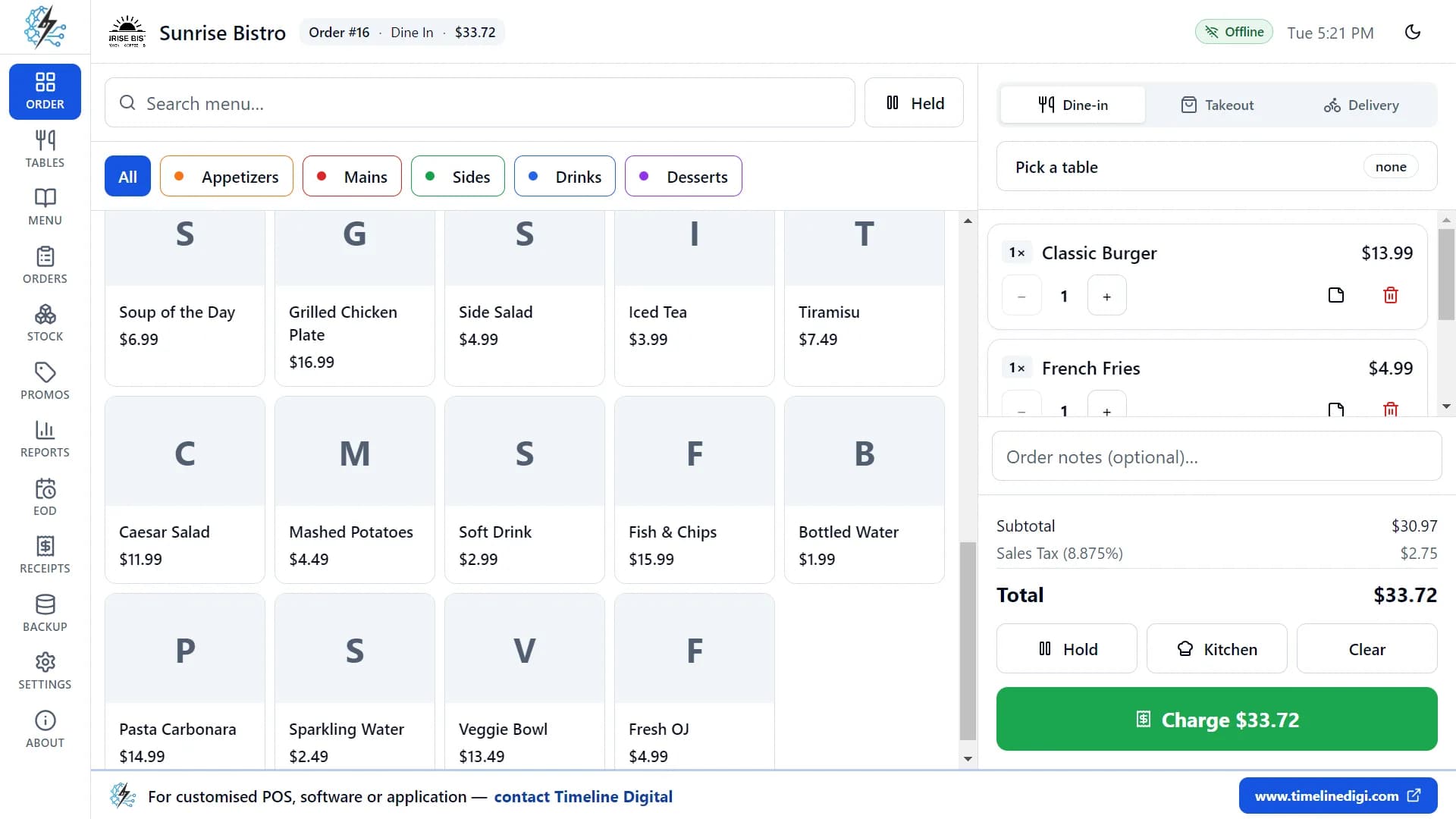
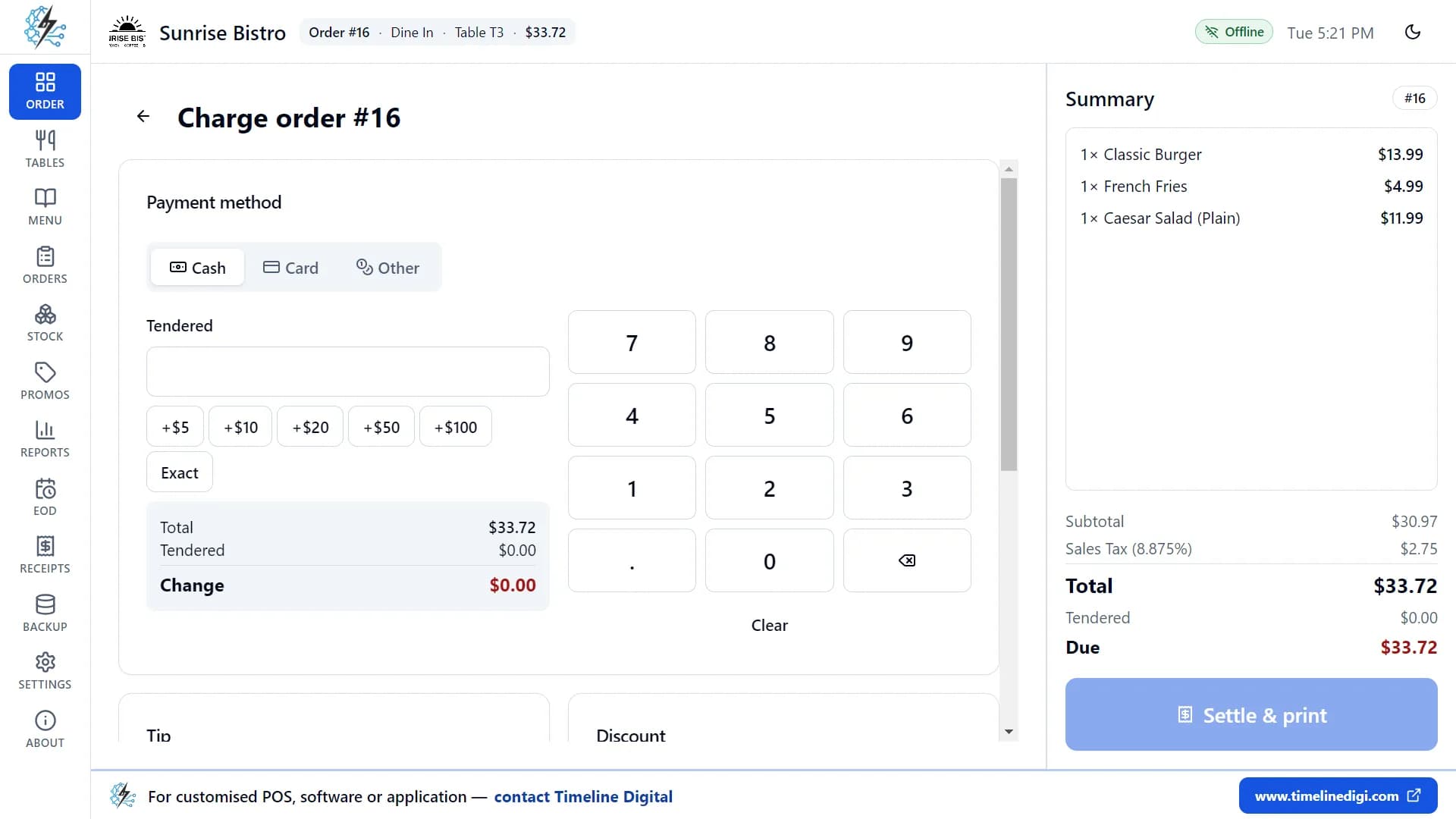
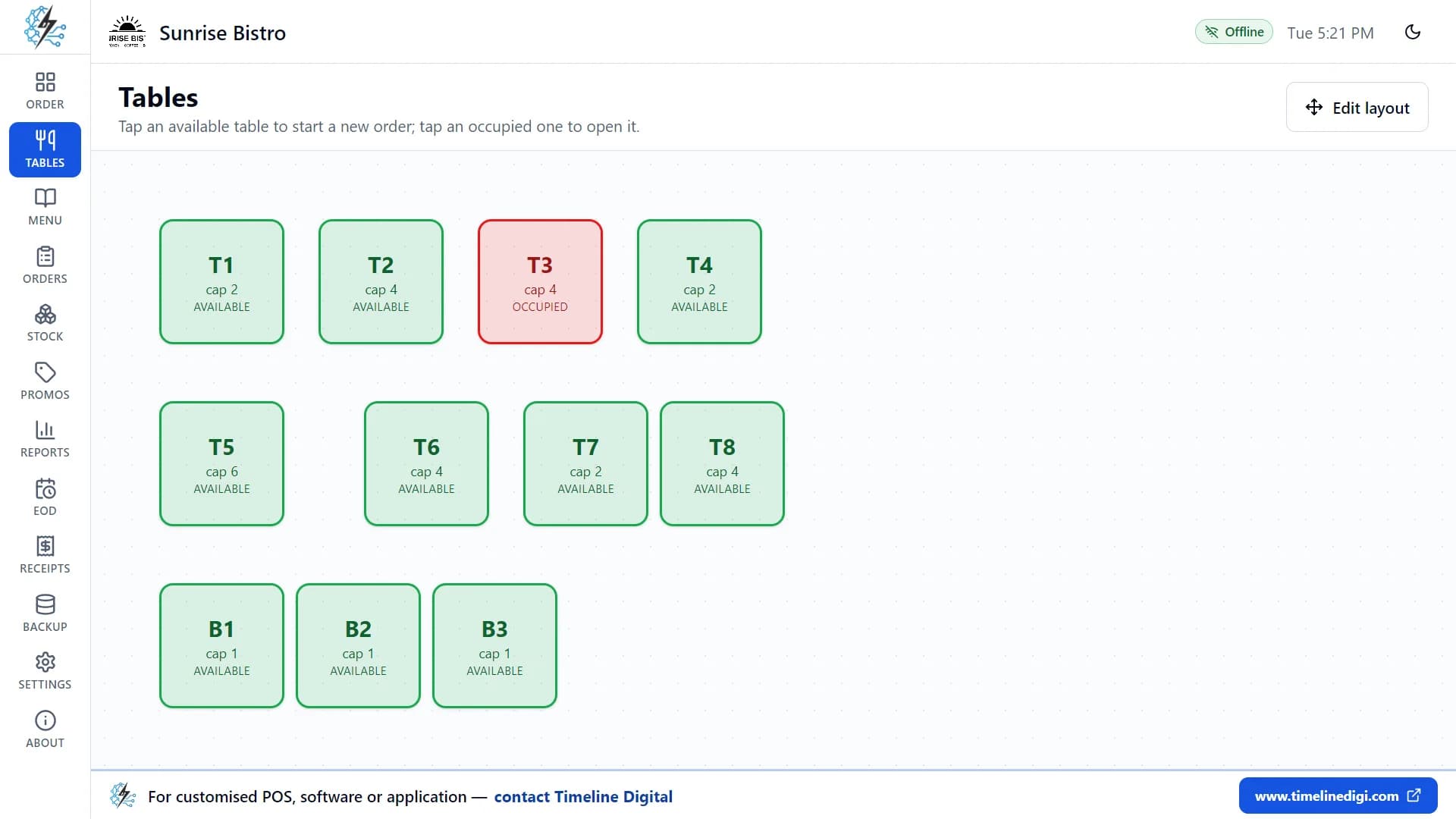
What does the restaurant POS look like?
Three screens from the app. The demo restaurant and its numbers are made up.
Watch the first lesson
Lesson 1, "First-time setup" (3:03), shows the setup from start to finish. There are 18 free video tutorials, about 74 minutes in total, in English.
See all 18 video tutorialsHow to start in 3 steps
- 1
Download and install
Download the Windows file or the right Mac file from this page and install it. There is no account to create and no card to enter.
- 2
Choose Saudi Arabia and check the tax
In the short setup, enter your restaurant details and pick Saudi Arabia. Check the tax name and rate on the next step, and change them if you need to.
- 3
Load the sample menu and take a test order
Switch on the sample data to get 34 menu items and 11 tables. Take a practice order, then add your own dishes and prices.
Need the install steps or the system requirements? See the restaurant POS download and install guide.
What can I do when my restaurant outgrows the free POS?
When a restaurant in Saudi Arabia needs e-invoicing, Arabic, several tills or several branches, the free app is no longer enough. Timeline Digital builds custom restaurant and POS systems as managed projects. Each project starts with a free pilot of your key modules, which your team tests before you decide.
How the free pilot works
Before you commit to the full project, we build 2 to 3 of your key modules as working software, free of charge, ready in about 2 days. Your team tests the pilot, and the full build starts only after you approve it.
Delivered remotely from our Islamabad headquarters, with scheduled video meetings in your working hours; on-site visits only when agreed in the contract.
Who builds it
Timeline Digital is a custom software development company founded in 2013 in Islamabad, Pakistan, that builds ERP, CRM, POS, web, mobile and AI systems for businesses in the US, UK, Gulf and worldwide, delivered remotely as managed projects that start with a free pilot of 2 to 3 key modules the client tests before deciding.
Tell us your e-invoicing needs at the start, as your accountant has confirmed them, so they are part of the requirements.
- Custom POS software developmentA POS built around your counters, branches and reports.
- Restaurant management software developmentOrders, kitchen, stock and branches in one system.
- Software development for companies in Saudi ArabiaHow Timeline Digital delivers custom software remotely for companies in Saudi Arabia.
Free restaurant POS in Saudi Arabia: questions owners ask
Is Timeline Restaurants POS really free in Saudi Arabia?
Yes. Timeline Restaurants POS is free for restaurants in Saudi Arabia, as it is in every country. There is no subscription, no paid plan, no trial period and no card details. You download the Windows or Mac file from this page and use every feature. Custom software from Timeline Digital is a separate, paid service.
Does the restaurant POS need internet to work?
No. Timeline Restaurants POS works offline on one Windows PC or Mac. You need the internet only to download the file. Orders, payments, receipts and reports keep working when the connection is down. When setup finishes, the app sends your registration details to Timeline Digital once, the next time the computer is online.
Is Timeline Restaurants POS ZATCA compliant?
No. Timeline Restaurants POS is not a ZATCA e-invoicing solution. It does not create electronic invoices in the format ZATCA sets, it does not produce XML invoices, and it does not connect to the FATOORA platform. A VAT-registered restaurant in Saudi Arabia cannot use it as its invoicing system. Ask your accountant which system you need.
Does it print the ZATCA QR code on receipts?
No. Timeline Restaurants POS does not print a QR code on receipts. ZATCA says a simplified tax invoice must carry a QR code generated by the taxpayer’s e-invoicing solution. The free app cannot create that code, so a receipt from the app is not a simplified tax invoice under the Saudi e-invoicing rules.
Can it calculate 15% VAT?
Yes, as a rate. In Timeline Restaurants POS you can set the tax name to VAT and the rate to 15%, and choose whether tax is added at checkout or included in your prices. One rate applies to every item. This is only a calculation on the receipt. It does not turn the receipt into a tax invoice.
Is there an Arabic version of the POS?
No. Timeline Restaurants POS is in English only. The screens and the printed receipts are in English, and there is no Arabic interface. ZATCA’s invoicing guideline says invoices must be issued in Arabic, with any other language added beside it. This is one more reason the free app cannot issue tax invoices in Saudi Arabia.
Which receipt printers work with the POS?
Most receipt printers work. On Windows, Timeline Restaurants POS prints to any printer installed in Windows, to a network thermal printer by its IP address, or to a serial (COM) port. ESC/POS printers from Epson, Xprinter, Rongta, Sewoo and Star are supported on 58 mm and 80 mm paper. The printer setup guide shows each step.
Can I use the restaurant POS on a Mac?
Yes. Timeline Restaurants POS has two Mac downloads, one for Macs with Apple Silicon and one for Macs with an Intel processor. To check which Mac you have, open the Apple menu and choose About This Mac. The Mac app is the same free app as on Windows. There is no iPad, Android or Linux version.
How do card payments work, for example mada?
Timeline Restaurants POS records card payments. It does not take them. The customer pays on your own card terminal, for example the mada or credit card machine from your bank. You then mark the order as paid by card and can type a reference. The app does not connect to card terminals or payment gateways.
Can I get a custom restaurant POS for Saudi Arabia?
Yes. Timeline Digital builds custom restaurant and POS systems as managed projects. You tell us what you need, for example Arabic and English screens, several tills or branches, or the e-invoicing requirements your accountant has confirmed. The work starts with a pilot that your team tests before you decide. The pilot is always free.
What the app sends
Your orders, payments, menu, stock, reports and backups are stored only on your computer and are never uploaded. When you finish setting up the app, it sends Timeline Digital your registration details once (restaurant name, type, country and city, owner name, phone or WhatsApp number, email, currency, tax settings and app version) so we know who is using it and can offer support. If you are offline, they are sent the next time the computer is connected. We do not sell or share these details.
More about Timeline Restaurants POS
Last updated November 2026. The tax and e-invoicing points on this page are general information, not tax advice. Confirm them with your accountant or with ZATCA before you rely on them.