Bakeries and ice cream shops
Free offline POS for bakeries and ice cream shops
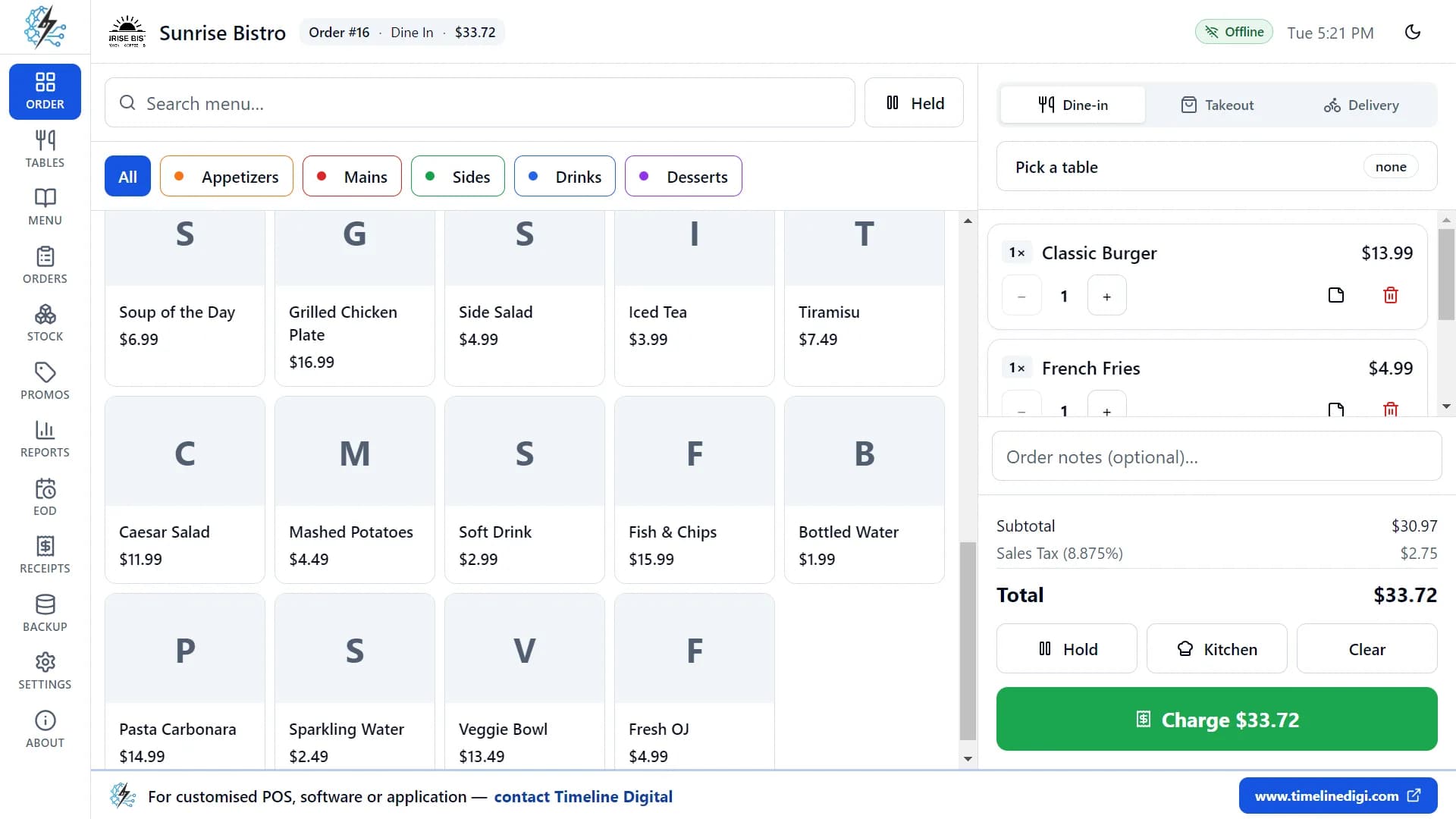
Timeline Restaurants POS is a free counter POS from Timeline Digital. It runs offline on one Windows PC or Mac and sells by the piece, box or scoop.
Version 2.0.1 · Free · Works offline
Who this is for
- A bakery, patisserie, donut or dessert shop with one counter and one till.
- An ice cream, gelato or frozen yogurt shop that sells by the scoop, cup or tub.
- An owner who wants no monthly software fee and a POS that keeps working when the internet is down.
- A shop that takes card payments on its own separate card terminal.
Not a fit if
- You need two or more tills, tablets or phones sharing the same data.
- You take deposits or part payments on cake orders inside the POS.
- You sell loose items by weight on a scale, or scan barcodes on packaged goods.
- You need staff logins, online ordering or a customer list with loyalty points.
Key facts
- App
- Timeline Restaurants POS, version 2.0.1, published by Timeline Digital
- Price
- Free. No subscription, no fees and no account.
- Runs on
- One Windows 10 or 11 PC (64-bit), or one Mac with Apple Silicon or an Intel processor
- Internet
- Not needed to run the app. You only need it to download the installer.
- Business types
- Bakery is one of the business types in the setup wizard, next to Café / Coffee Shop, Fast Food and others.
- Order types
- Dine-in, Takeout and Delivery
- Receipt paper
- 58 mm and 80 mm, with your logo, header and footer
What does it cover in a bakery or an ice cream shop?
There is no separate bakery edition. You build your own menu in the app, and these are the parts a counter shop uses most.
| Feature | In a bakery | In an ice cream shop |
|---|---|---|
| Colour-coded categories | Bread, Cakes, Pastries, Drinks | Scoops, Sundaes, Shakes, Tubs to take home |
| Sizes with their own price | Slice, half cake, whole cake | Single, double or triple scoop |
| Modifier groups | Filling, icing, a message on the cake (typed as a note) | Cone or cup, toppings, sauces |
| Item photos | A photo on each tile, so new staff find the right loaf | A photo for each flavour or sundae |
| Sold-out switch | Hide the croissants when the tray is empty | Hide a flavour when the tub runs out |
| Ingredients and recipes | Flour, butter, eggs and sugar linked to each item | Tubs, cones and toppings linked to each item |
| Promotions by hours and days | A percentage off pastries in the last hour | Buy one, get one free on a quiet weekday |
| Order types | Takeout for the counter, Dine-in if you have tables, Delivery | Takeout for the counter, Dine-in if you have seats |
| Receipts and end of day | Your logo on the receipt, cash count and Z-report at close | The same receipt design, cash count and Z-report |
The full list of screens is on the Timeline Restaurants POS features page.
How do you set up a display-case menu?
Do these five steps on the Menu page, and each item in your case becomes a tile on the order screen.
Make a category for each part of the case
Bread, Cakes, Pastries and Drinks for a bakery. Scoops, Sundaes and Shakes for an ice cream shop. Give each one a colour and put them in the order you like. The order screen follows your choices.
Add items with a photo and a price
Each item has a name, a price, a category and an optional photo (JPG, PNG, WEBP or GIF, up to 5 MB). Items without options go into the order with one tap, which suits loaves, rolls and cookies.
Use sizes for slice, half and whole
Sizes carry their own price difference. Set Slice, Half and Whole on a cake, or Single, Double and Triple on a scoop, and staff pick one when they tap the item.
Use modifier groups for toppings, cones and fillings
A group can be required ("pick 1: cone or cup") or optional ("up to 3 toppings"), and each option can add its own extra price. Attach the same group to as many items as you like.
Sell boxes as their own items
A box of 6 or a box of 12 is simplest as a separate item with its own price. If the customer chooses what goes in the box, type the choices as a note on the line.
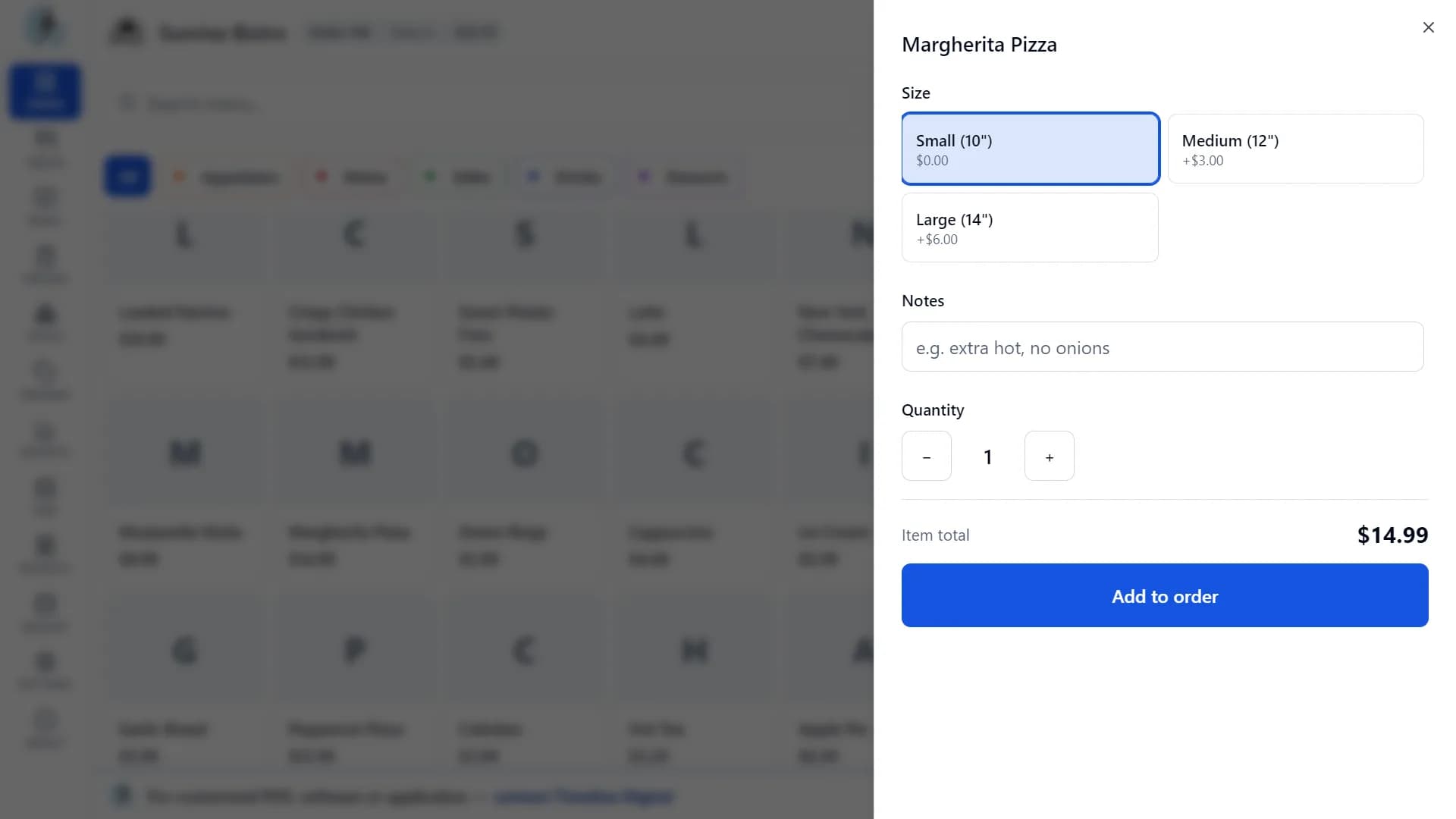
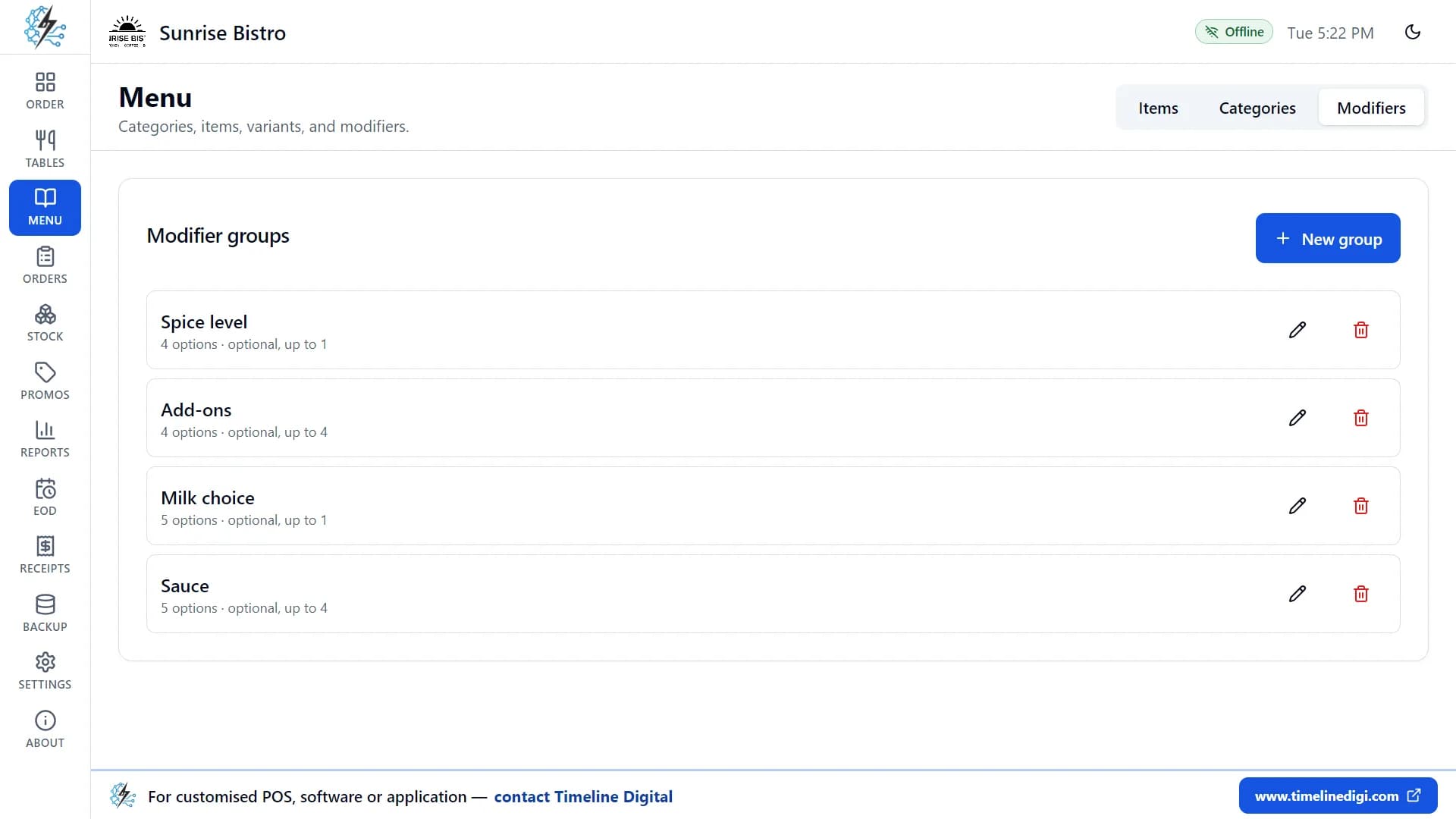
How do you add items, sizes and toppings? Watch it.
Three lessons recorded in the real app: menu items, modifiers and options, then billing and payment.
Lesson 9: Menu: items (4:50)
Prices, photos, sizes and sold out.
Lesson 10: Menu: modifiers and options (4:53)
Extras, toppings and required choices.
Lesson 5: Billing and payment (4:57)
Cash, card, tips, discounts and receipts.
All 18 lessons with written steps · Watch the playlist on YouTube
Can it take custom cake orders and pre-orders?
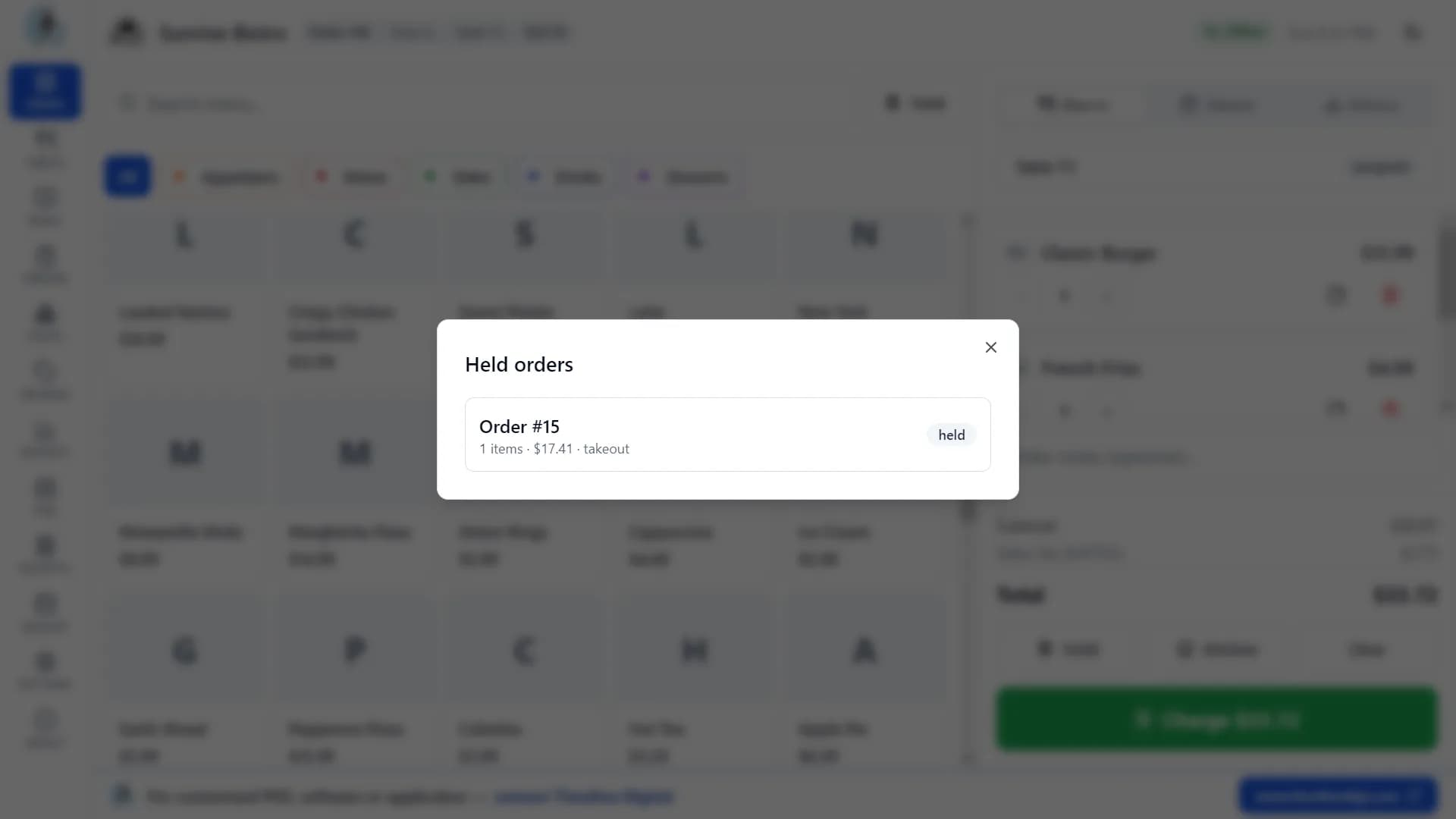
The app has no pre-order module. You can still record a cake order: start a Takeout order, add the cake, and type the customer's name, phone number, pickup time and the message for the cake in the order note. Take payment when the customer collects it.
Hold parks an order and clears the screen for the next customer. The Held list shows every parked order with its item count and total, and one tap brings it back. That works well for an order placed in the morning and collected in the afternoon.
What it does not do: there is no deposit or part payment, no customer list and no pickup calendar or reminder. For a cake booked days ahead, keep your order book as the record and ring the sale up at pickup. If pre-orders with deposits are a large part of your trade, that is a job for a custom POS.
How do you mark an item sold out and track ingredients?
The sold-out switch
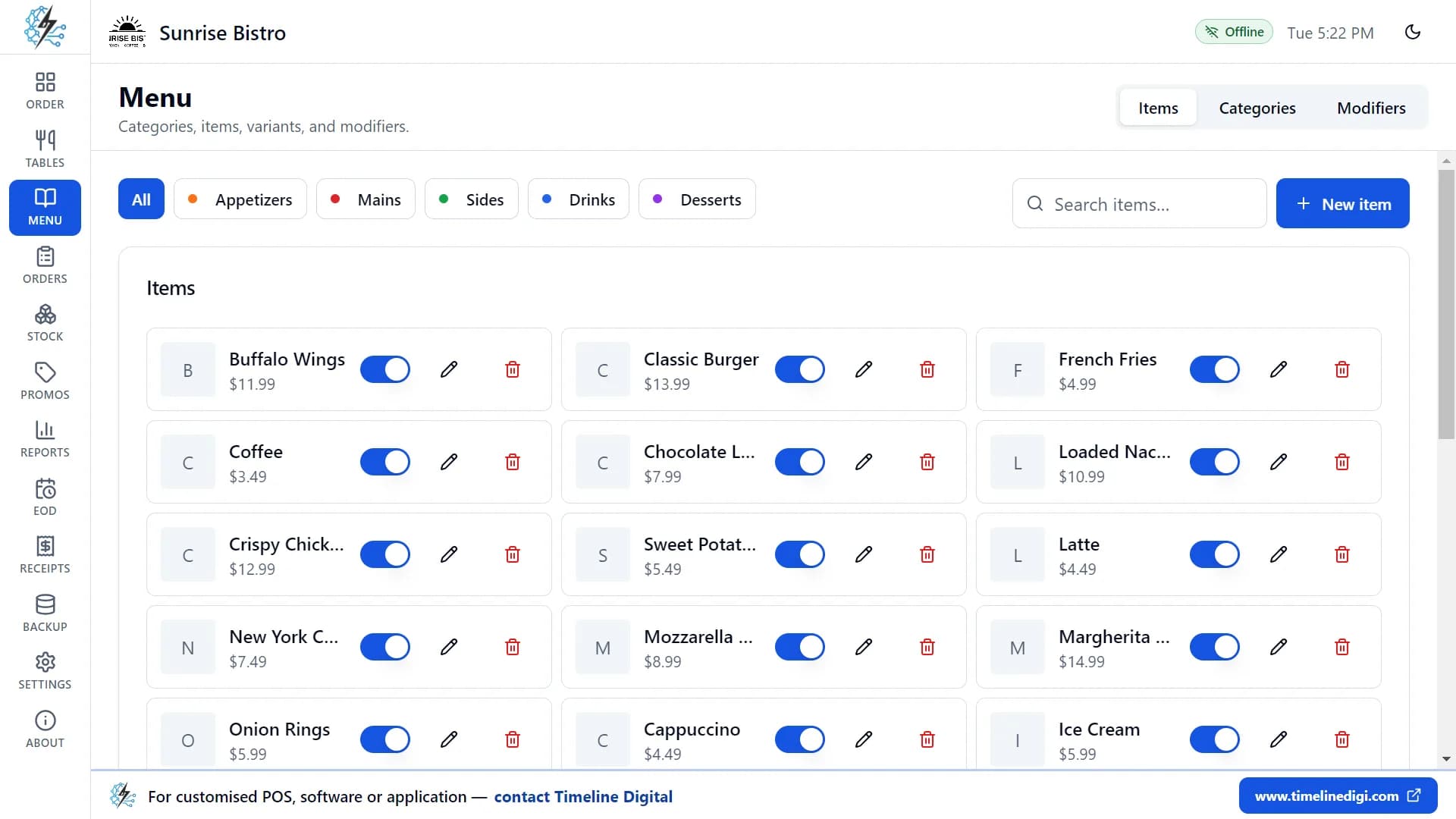
When the last sourdough or the last tub of pistachio is gone, switch the item off in the menu list. It disappears from the order screen at once, so staff cannot sell something that is not there. Switch it back on after the next bake or delivery.
Ingredients and recipes
- Add ingredients with a unit (kg, litre, piece), a cost per unit, the amount in stock and a minimum level.
- Write a recipe for each item: the flour, butter and eggs in a loaf, or the scoop of ice cream and the cone in a single.
- Every paid order takes the ingredients in its recipes out of stock automatically.
- Add stock when a delivery arrives, and remove it with a reason such as "Waste" for unsold items at the end of the day.
- Ingredients below their minimum level are marked "Low" in red, and the stock history lists every delivery, sale and waste entry.
Stock tracking stops at ingredients and recipes. There are no purchase orders, supplier records, or food-cost and profit reports.
How do end-of-day deals, receipts and the Z-report work?
- Deals set by the clock
- Promotions take a percentage off, a fixed amount off, or give buy one, get one free. Point one at a category such as Pastries, set the hours and the days of the week, and it applies itself at checkout while it is valid. A promo code is optional.
- Receipts with your logo
- Receipts carry your logo, shop name, address, and your own header and footer text, on 58 mm and 80 mm paper. Each one lists the items with their sizes, options and notes. A short "Powered by Timeline Restaurants POS" line at the bottom cannot be removed.
- The Z-report at close
- Open a shift with the cash in the drawer, record cash in and out during the day, then count the drawer at close. The app shows the expected cash, your counted cash and any difference, and prints a Z-report with cash, card and other sales, tax, tips and discounts.
Each of these screens has a short lesson in the 18 free video tutorials. See how to use Timeline Restaurants POS.
What does the free app not do?
Read this before you download, so you know the app suits your shop.
| Limit | What it means in your shop |
|---|---|
| One computer, one till | The app runs on a single Windows PC or Mac. Tills, tablets and phones cannot share data, and there is no cloud sync or remote access. |
| No deposits or part payments | Each order is paid once, with one payment method. A cake deposit has to be recorded outside the app. |
| No customer database | Customer names and phone numbers can be typed in the order note, but there is no customer list, loyalty scheme, or email or SMS receipt. |
| No barcode scanning or scales | Items are chosen by tapping a tile or searching by name. The app does not read barcodes or weigh items. |
| Card payments are recorded, not taken | You take the card payment on your own card terminal and mark the order as paid by card. The app does not connect to card terminals. |
| Stock is ingredients and recipes only | There are no purchase orders, supplier records, or food-cost and profit reports. Reports export to CSV, which opens in Excel. |
| English only, no staff logins | The app is in English. Anyone at the computer can use it; there are no user accounts or roles. |
What the app sends, and what stays on your computer
Your orders, payments, menu, stock, reports and backups are stored only on your computer and are never uploaded. When you finish setting up the app, it sends Timeline Digital your registration details once (restaurant name, type, country and city, owner name, phone or WhatsApp number, email, currency, tax settings and app version) so we know who is using it and can offer support. If you are offline, they are sent the next time the computer is connected. We do not sell or share these details.
Running a coffee counter next to the bakes? See the free POS for cafes. Selling mostly packaged goods with barcodes? Timeline POS is our separate free app for shops, with product search by name, SKU or barcode. It runs on Windows only.
When a bakery needs more than the free app
The free app is built by Timeline Digital, a custom software development company founded in 2013 in Islamabad. Several tills, a pre-order book with deposits, stock across branches or a link to your accounts are custom work, delivered as a managed project. Timeline Digital does not publish prices for custom software, because every project is custom. You choose 2 to 3 key modules and test them in a free pilot before the full build. The steps are below, and the service is described on custom POS software development.
How the free pilot works
Before you commit to the full project, we build 2 to 3 of your key modules as working software, free of charge, ready in about 2 days. Your team tests the pilot, and the full build starts only after you approve it.
See how the free pilot worksUnderstand
We learn your requirements and how your organisation works today.
Select pilot modules
Together we choose 2 to 3 key modules that prove the solution.
Build the working pilot
We build those modules as real, working software, free of charge.
You test it
Your team uses the pilot. The full project starts only after you approve it.
Bakery and ice cream shop POS questions
Is there free POS software for an ice cream shop?
Yes. Timeline Restaurants POS is free, with no subscription and no account, and it works for an ice cream shop with one counter. Set up scoops as items with Single, Double and Triple sizes, add a required "cone or cup" choice and an optional toppings group, and switch a flavour to sold out when the tub is empty.
What is the best free POS for a bakery?
It depends on your shop. For a single-counter bakery that wants no monthly fee and an offline till, Timeline Restaurants POS covers the menu, sizes, receipts, ingredient stock and the end-of-day cash count. If you need several tills, online ordering or built-in card payments, a paid cloud POS is the better fit. Our free POS software comparison lists other options.
Does it work without internet?
Yes. Every feature works offline, and an "Offline" badge stays on screen so staff know it is fine. You only need the internet to download the installer. Your orders, sales, menu and stock are stored on your own computer, and you can back them up to a USB drive in one click.
Does it run on Mac as well as Windows?
Yes. There is a Windows installer for Windows 10 and 11 (64-bit) and two Mac downloads, one for Macs with Apple Silicon and one for Macs with an Intel processor. All three are on the Timeline Restaurants POS download page. There is no iPad, Android or Linux version.
Can it weigh items or scan barcodes?
No. Timeline Restaurants POS has no barcode scanning and does not connect to a scale. For goods sold by weight, set fixed sizes such as 250 g, 500 g and 1 kg, each with its own price. If you mainly sell packaged goods with barcodes, Timeline POS, our free retail app, searches products by name, SKU or barcode.
Can I take custom cake orders and pre-orders?
You can record them, with limits. Start a Takeout order, add the cake, and type the customer name, phone number, pickup time and cake message in the order note. Hold parks the order during the day and you take payment at pickup. There is no deposit, part payment, customer list or pickup calendar, so keep your order book for cakes booked days ahead.
How do I mark an item as sold out?
Open the menu item list and switch the item off. It disappears from the order screen at once, so nobody can sell the last tray twice. Switch it back on after the next bake. The item, its price and its photo are kept.
Can it run an end-of-day discount on unsold items?
Yes. Create a promotion with a percentage off, a fixed amount off, or buy one get one free. Choose the whole order, one category such as Pastries, or one item, then set the start and end times and the days of the week. Promotions without a code apply automatically at checkout while they are valid.
Does it track flour, butter and other ingredients?
Yes. Add ingredients with a unit, a cost and a minimum level, then link them to items with recipes. Each paid order reduces the stock, deliveries and waste are entered with a reason, and low ingredients are marked in red. It does not create purchase orders, keep supplier records or report food cost.
Which receipt printers does it work with?
Most receipt printers. On Windows you can use any printer installed in Windows, including USB thermal printers, a network thermal printer by its IP address, or a printer on a serial (COM) port. Paper can be 58 mm or 80 mm. Without a printer, each receipt opens in a preview window where you can save it as a PDF.
What if my bakery needs more than one till or deposits on orders?
That is custom work. Timeline Digital builds POS systems as managed projects, for example several tills, a pre-order book with deposits, or branch stock. You choose 2 to 3 key modules and test them in a free pilot before the full build. See custom POS software development.
Download the free bakery POS
Install the app, load the sample menu to practise, then add your own bakes or flavours. It is free, with no subscription, and works offline on one computer.
Version 2.0.1 · Free · Works offline
The Windows installer is not code-signed, so Windows may ask you to click More info, then Run anyway. The Mac app is not notarized, so right-click it and choose Open the first time. If you need something the free app does not do, tell us about your counters and your pre-order process on the contact page, and we will say what we would pilot.
Updated
About this page
Published by Timeline Digital, the maker of Timeline Restaurants POS. Every feature described here was checked against version 2.0.1 of the app. The screenshots show the app's sample restaurant, and the data in them is made up. The Windows installer is not code-signed and the Mac app is not notarized, so Windows or macOS will ask you to confirm before the first run.
Author
Usama Asif
CEO and CTO, Timeline Digital.
Related free POS pages
Timeline Restaurants POS
The product page: Windows and Mac downloads, screenshots and system requirements.
Read this nextFree POS for Cafes
Size, milk and shot modifiers for a coffee counter.
Read this nextFree POS for Pizza Restaurants
Sizes, toppings and delivery orders for a pizza shop.
Read this nextFree POS for Food Trucks
An offline till for a truck, stall or kiosk.
Read this nextFree Offline Restaurant POS
How the app works without internet and where the data is stored.
Read this nextFree Restaurant POS System
Tables, delivery orders and recipe inventory for full-service restaurants.
Read this nextTimeline POS for Retail
The free shop POS for packaged goods, with product search by name, SKU or barcode.
Read this nextCustom POS Software Development
Several tills, pre-orders with deposits or branch stock, built as a managed project.
Read this next