Free offline POS system for restaurant
Timeline Restaurants POS is a free restaurant POS from Timeline Digital. It runs on one Windows PC or Mac, works offline, and has no monthly fee and no account.
Version 2.0.1 · Free · Works offline
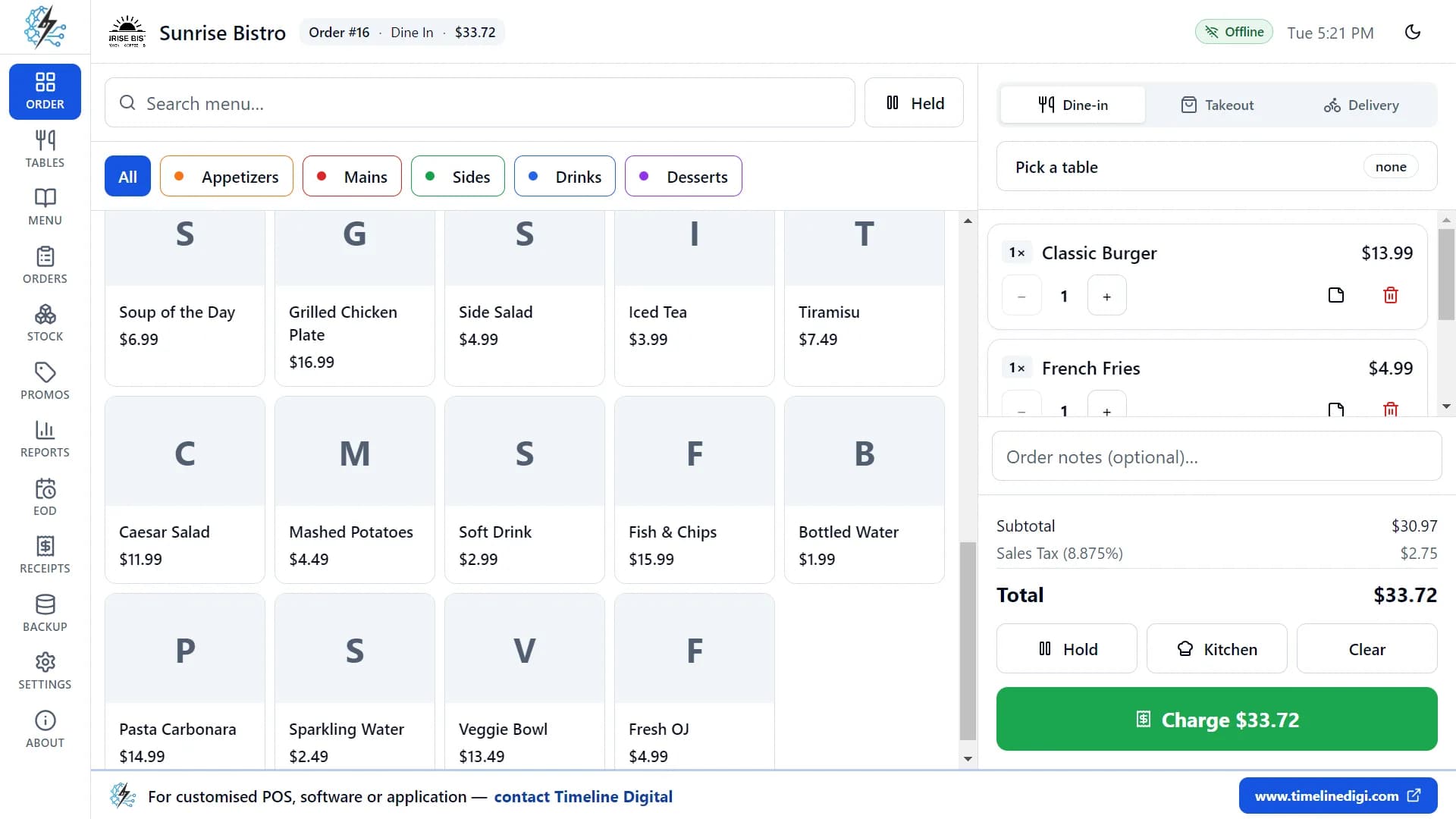
What is the best free POS system for a restaurant?
For a restaurant with one counter, Timeline Restaurants POS is a free POS system made by Timeline Digital. It is a desktop app for Windows 10 and 11 and for Mac, and it works offline. You take dine-in, takeout and delivery orders, manage tables, take payment, print receipts and close the day with a Z-report. It runs on one computer only, and there is no subscription.
The full list is on the features page, and the product has its own page at Timeline Restaurants POS.
Does “free” include card fees?
No. The app is free and takes no cut of your sales, but it does not take card payments. The customer pays on your own card terminal, and you tap Card in the app to record it. Your bank or card processor still charges its fee on each card payment. Check that rate with them.
Want help setting up the free POS in your restaurant?
Leave your name and number and we will reply on WhatsApp within 4 business hours. The help is free.
No spam. We only use your number to reply about your project.
How do you take a dine-in order?
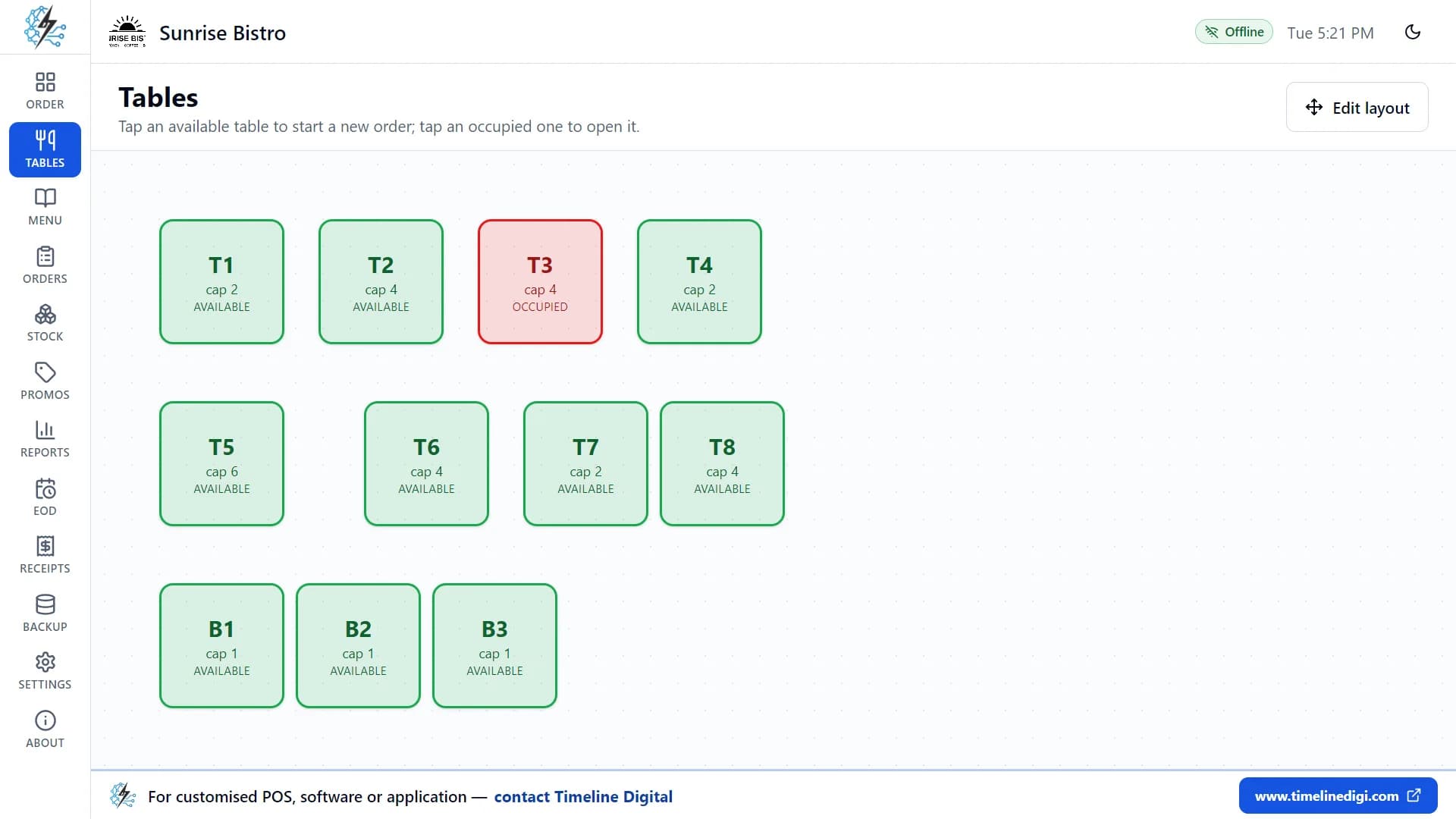
Open the Tables page and tap a free table to start an order for it. The order screen shows your menu on the left and the order on the right. Tap an item to add it. If the item has sizes or extras, a side panel opens so you can choose them and add a note. Tap Kitchen to print a kitchen ticket.
A table turns red while its order is open and is freed when the bill is paid. You can also mark a table reserved or being cleaned. If a customer is still deciding, tap Hold to park the order and serve the next one, then bring it back from the Held list.
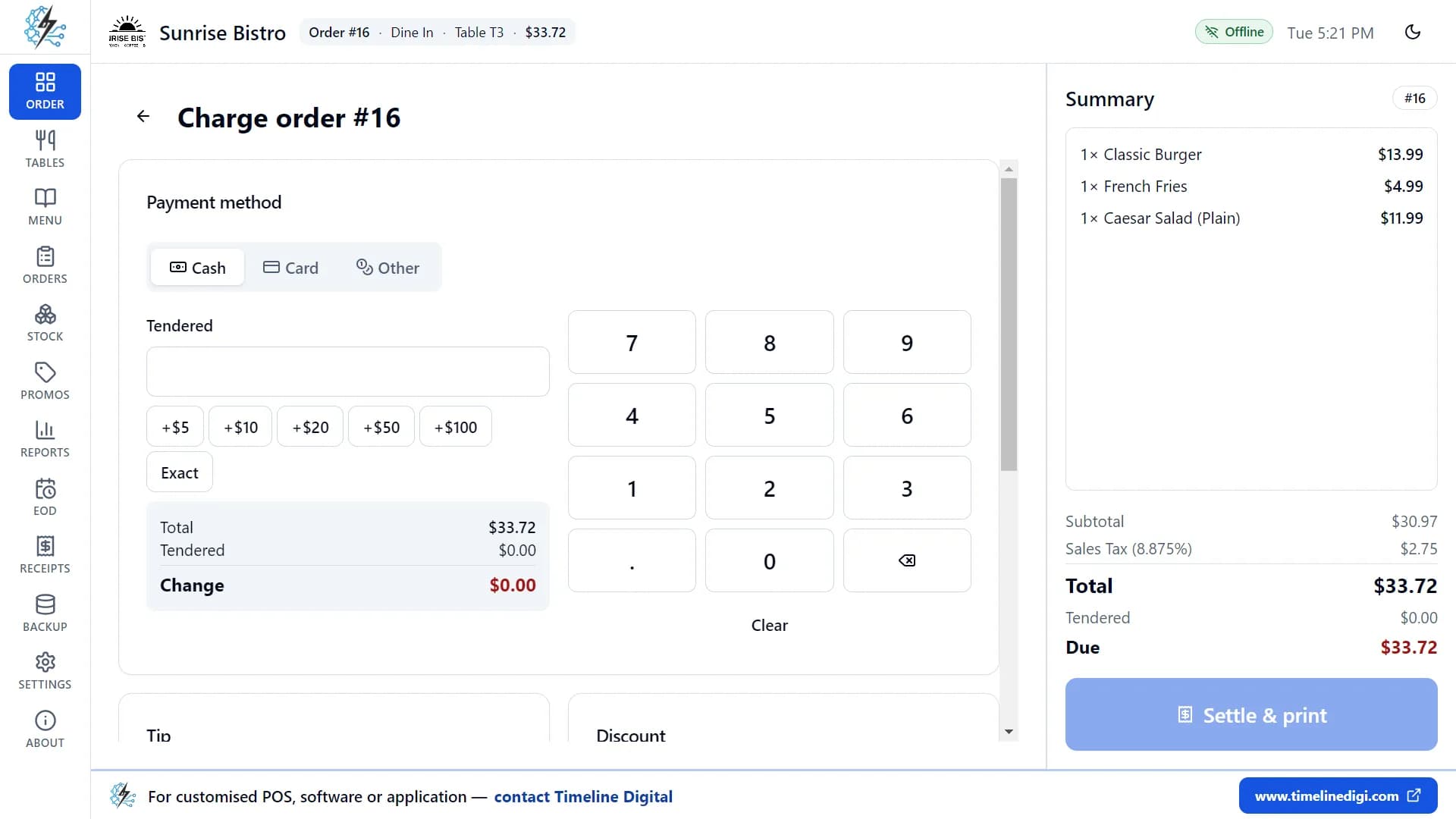
How do you take payment and print the bill?
Tap Charge. The payment screen shows the bill on the right and the payment options on the left. For cash, type the amount you were given and the app works out the change. For card, take the payment on your own terminal first, then mark it paid. Add a tip or a discount on the same screen.
One tap then finishes the sale, frees the table, updates your stock and prints the receipt. If a cash drawer is connected, it opens for cash payments. If the printer fails, the sale is still saved, and you can reprint the receipt from the Orders page. Each order is paid with one payment method; a bill cannot be split.
What does a free restaurant POS include?
Timeline Restaurants POS includes every feature in the free download: orders, tables, payment, receipts and kitchen tickets, menu with modifiers, stock, promotions, sales reports, the end-of-day Z-report and backup. There is no paid plan. It is built for one computer, so it has no cloud sync and no staff logins.
| Area | What the app does |
|---|---|
| Orders | Dine-in, Takeout and Delivery, with sizes, extras and a note on any line. You can hold an order and bring it back later. |
| Tables | A floor plan you arrange yourself. Each table shows as available, occupied, reserved or being cleaned. |
| Payment | Cash with the change worked out, card (recorded after you take it on your own terminal) and other payments such as vouchers. Tips and discounts are on the same screen. |
| Printing | Receipts with your logo, header and footer on 58 mm and 80 mm paper, and kitchen tickets when you tap Kitchen. |
| Menu | Categories with colours, items with photos and sizes, modifier groups, and a switch to mark an item sold out. |
| Stock | Ingredients and recipes. When an order is paid, the ingredients in its recipes are taken out of stock. Items below their minimum are marked Low. |
| Promotions | Percentage off, a fixed amount off or buy one get one free, with dates, hours and promo codes. |
| Reports | Sales for today, the last 7 days, the last 30 days or any range you pick. Best sellers, payments, voids and discounts. Export to CSV. |
| End of day | Open a shift, record cash in and out, count the drawer and print the Z-report. |
| Backup | One zip file with everything in it, saved to a folder or USB drive you choose. It can also back up each time you close the app. |
What it does not do
- Several tills, tablets or phones sharing one set of data
- Cloud sync or remote access
- Staff logins or a time clock
- Splitting a bill or paying with two methods
- Built-in card payments or a link to a card terminal
- Online ordering, QR menus or delivery app links
- A kitchen display screen
If you need any of these, Timeline Digital builds custom POS software.
How does a shift work in the app? Watch it.
Three short lessons recorded in the real app: a dine-in order, billing and payment, and closing the day with a Z-report.
Lesson 3: Taking a dine-in order (5:14)
Tables, options, sizes, notes and kitchen tickets.
Lesson 5: Billing and payment (4:57)
Cash, card, tips, discounts and receipts.
Lesson 14: End of day and Z-report (3:59)
Shifts, cash in and out, cash count, Z-report.
All 18 lessons with written steps · Watch the playlist on YouTube
How do free and cheap restaurant POS systems charge?
A restaurant POS costs money in two places: the software fee and the fee on each card payment. A POS that is free to install often earns its money from card fees. This table says how each option charges. It has no prices, because vendors change them; check each vendor's own pricing page before you decide.
| POS system | Software | Card payments | What to check |
|---|---|---|---|
| Timeline Restaurants POS | Free. No subscription and no paid plan. | Does not take card payments. You take the card on your own terminal and record it in the app. Your processor charges its usual fee. | It runs on one computer only, with no cloud and no staff logins. |
| Square for Restaurants | Has a free plan and paid plans. | Card payments go through Square, which charges a fee on each payment. | The current rate per card payment, and which features need a paid plan. |
| Toast | Sold as plans, usually with Toast hardware. | Card payments go through Toast. | The monthly price, the card rate and the contract length, in writing. |
| Loyverse POS | The basic app is free. Some modules are paid add-ons. | Through a partner card processor, which sets the rate. | Which add-ons you need and what each costs per month. |
| Clover | Sold with Clover hardware, often through a bank or reseller. | Set by Clover or the reseller. | The software fee, the card rate and the contract length, in writing. |
| TouchBistro | A monthly subscription. | Through a separate processor. | The current plan price and the terms. |
How to work out your own monthly cost
- Write down your card sales for a normal month.
- Multiply that by the card rate the vendor quotes, and add any fixed fee per payment.
- Add the monthly software fee and any hardware rental.
- Do the same for each option. With Timeline Restaurants POS the software fee is zero, and the card rate is whatever your own bank or processor charges.
The longer comparison is on the cheapest POS system for restaurant page.
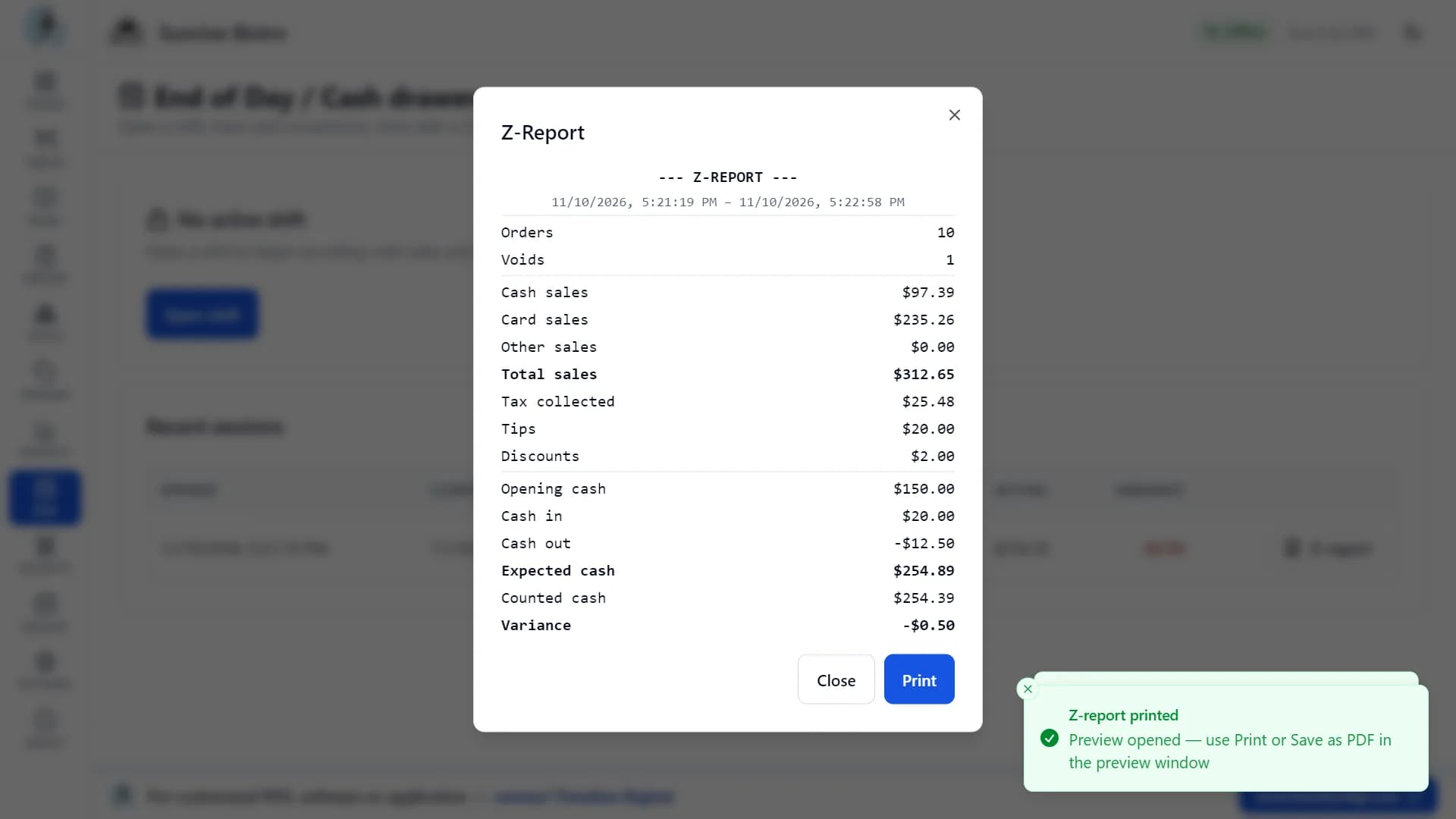
How do you close the day?
Open a shift in the morning with the cash you start with. During the day, record any cash you add to or take from the drawer. At closing, count the drawer and type the amount. The app shows the expected cash, your counted cash and any difference, and prints the Z-report.
The Reports page shows the number of orders, gross and net sales, the average ticket, tax, tips and discounts for today, the last 7 days, the last 30 days or a range you choose. It also lists your best-selling items and the cash and card totals. Any report can be exported as a CSV file, which opens in Excel, for your bookkeeper.
How do you set up a free restaurant POS?
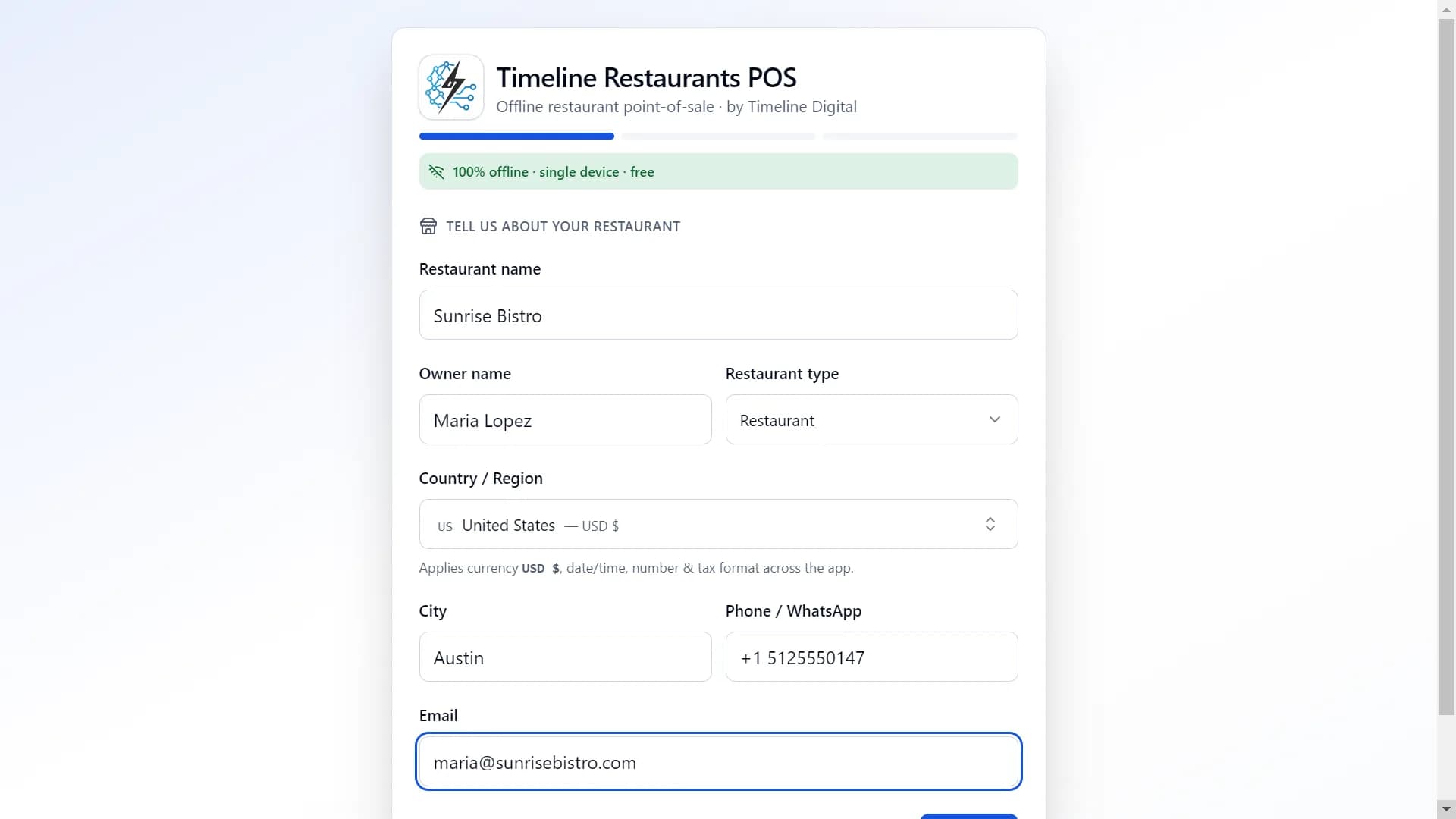
Download the file for your computer and install it. A three-step setup asks for your restaurant details and country, fills in your currency and tax, and offers a sample menu. Then add your own menu, connect a printer if you have one, and take your first order. You do not need an account or the internet.
Download the file for your computer
The Windows installer is about 96 MB. For a Mac, pick the Apple Silicon file (about 116 MB) or the Intel file (about 123 MB).
Install it
On Windows, open the installer. The installer is not code-signed, so Windows may show a blue "Windows protected your PC" message. Click More info, then Run anyway. On a Mac, open the .dmg and drag the app to Applications. The Mac app is not notarized, so the first time you right-click it, choose Open, then click Open again.
Enter your restaurant details
Type your restaurant name, owner name, type of business, city and country. The app has 173 countries and regions and fills in the currency and a starting tax rate for the one you pick.
Check the tax
Change the tax name and rate if you need to, and choose whether tax is added at checkout (like US sales tax) or included in prices (like VAT).
Load the sample menu or add your own
One switch loads 34 sample items in 5 categories and 11 tables, so you can practise. Then add your own categories, items and prices on the Menu page.
Connect a printer if you have one
Open Settings, then Printer. If you have no printer yet, choose the preview window and each receipt opens on screen.
Printer steps are in the printer setup guide, and every screen is shown in the 18 video lessons.
Which kinds of restaurant can use it?
- Pizza restaurant
- Set up sizes on each pizza and toppings as a modifier group. Take takeout orders and print a kitchen ticket for each one.
- Cafe or coffee shop
- Bill at the counter, with milk choice and extras as modifier groups. Set a happy hour on the Promotions page.
- Food truck
- The app needs no internet, so it works on a laptop at a market or on the street.
- Diner or casual restaurant
- Start orders from the floor plan, hold an order while a table decides, and close the day with a Z-report.
- Ghost kitchen
- Use the Takeout and Delivery order types and write the customer name and address in the order note.
- Quick service counter
- Items without options go into the order with one tap. Hold an order to serve the next customer, then resume it.
There are separate pages for a cafe or coffee shop, a food truck, a bar, a bakery or ice cream shop and a fast food or takeaway restaurant.
System requirements
| Windows | Windows 10 or 11, 64-bit. Installer about 96 MB. |
|---|---|
| Mac | Apple Silicon (about 116 MB) or Intel (about 123 MB). |
| Screen | At least 1024 × 700. 1366 × 768 or larger is better. |
| Disk space | About 400 MB free |
| Internet | Not needed to use the app |
| Receipt printer | Optional. ESC/POS thermal printers over USB or network. |
| Card terminal | Optional and separate. The app does not connect to it. |
| Version | 2.0.1 |
Where is your data kept?
Your orders, payments, menu, stock, reports and backups are stored only on your computer and are never uploaded. When you finish setting up the app, it sends Timeline Digital your registration details once (restaurant name, type, country and city, owner name, phone or WhatsApp number, email, currency, tax settings and app version) so we know who is using it and can offer support. If you are offline, they are sent the next time the computer is connected. We do not sell or share these details.
Free restaurant POS questions
What is the best free POS system for a restaurant in the USA?
If you run one counter on one computer, Timeline Restaurants POS is a good fit. It is free, has no subscription, and runs offline on a Windows 10 or 11 PC or a Mac. It covers orders, tables, payment, receipts, menu, stock, reports and US sales tax. It does not take card payments itself: you use your own card terminal and record the payment.
Is Timeline Restaurants POS really free for restaurants?
Yes. It is free to download and free to use, with no subscription, no paid plan and no account. Every feature is in the free download. Timeline Digital earns its income from custom software work, not from this app.
What is the cheapest POS system for a small restaurant?
For software, a free app is the cheapest, and Timeline Restaurants POS is free with no subscription. For the total cost, add card fees. Every card processor charges a fee on each card payment, so compare the rate your bank or processor gives you with the rate a POS vendor charges when it handles the cards itself.
Does Timeline Restaurants POS work offline?
Yes. Every feature works without the internet. Your orders, sales, menu, stock and reports are stored on your own computer, so you can keep taking orders when the connection is down. When setup finishes, the app sends your registration details to Timeline Digital once, the next time the computer is connected.
How do I download it?
Use a download button on this page: one for Windows and two for Mac (Apple Silicon or Intel). Open the file and install it. The Windows installer is not code-signed, so click More info, then Run anyway if Windows asks. The Mac app is not notarized, so right-click it and choose Open the first time.
Does it handle tables?
Yes. Timeline Restaurants POS has a floor plan you arrange yourself, and the sample data loads 11 tables. Each table shows as available, occupied, reserved or being cleaned. Tap a busy table to open its order. A bill cannot be split; each order is paid with one payment method.
Can I use my own card reader?
Yes. Take the card on any terminal you already have, from your bank or another processor, then choose Card in the app to record the payment. You can type a reference such as the last four digits. The app does not connect to the terminal, so you are not tied to one processor.
What free restaurant POS options exist in the USA in 2026?
Timeline Restaurants POS is a free offline desktop app for Windows and Mac that records card payments but does not take them. Square for Restaurants has a free plan and charges a fee on each card payment. Loyverse has a free basic app with paid add-ons. Check each vendor's own pricing page for current plans and rates.
How much can switching save a restaurant?
It depends on your card sales and your rates. Work it out like this: take your monthly card sales, multiply by the rate your current POS charges, and add its monthly software fee. Then do the same with the rate your bank or processor offers and a software fee of zero. The difference is what you would save each month.
Does it support US sales tax?
Yes. Setup fills in a starting tax name and rate for your country, and you change it to your combined state, county and city rate. Choose "added at checkout" for US sales tax. One rate applies to all items, and tax shows as its own line on every receipt. Check the current rate with your state or city tax office.
Is there free restaurant management software?
Yes. Timeline Restaurants POS is free restaurant management software for a single Windows PC or Mac: menu and modifiers, table floor plan, order billing, promotions, stock, sales tax and end-of-day reports in one app. It has no subscription and works offline, so a cafe, diner or food truck can run service without a monthly bill.
More POS guides
- Cheapest POS system for restaurantHow restaurant POS vendors charge and how to add up the real monthly cost.
- Cheapest restaurant POS: complete cost guideThe longer article on software fees and card fees for US restaurants.
- Best POS systems 2026The hub page that links every POS guide on this site.
- Cheapest POS system for small businessFree and low-cost POS for shops and small counters.
- Timeline Restaurants POSThe product page, with screenshots and downloads for Windows and Mac.
- Free POS softwareFree point of sale software for retail, restaurants and services.
Download the free restaurant POS
Timeline Restaurants POS is free, with no subscription and no account. It works offline on one Windows PC or Mac.
Version 2.0.1 · Free · Works offline
New to the app? See how to use Timeline Restaurants POS in 18 short videos. Built by Timeline Digital, a custom software development company founded in 2013 in Islamabad, with 860+ clients across 25+ countries. If you need several tills or a kitchen display, see custom POS software development, or contact our team.